
Record, edit, and share video from all sources.

Vocaroo Voice Recorder: 2026 Review and Top Alternative

Posted by Ethan Brooke to Record Audio Jul 17, 2026
Something is refreshing about a tool that simply turns your device into an instant microphone with just a click. This is what Vocaroo Voice Recorder offers. It's there for sharing quick audio messages without opening any heavy software. But of course, it has trade-offs. For more details and to get to know it more, scroll down here to see the Vocaroo review, analyzing its pros and cons, security, and even a powerful alternative when it falls short.
Guide List
What Is Vocaroo Voice Recorder Is Vocaroo Recorder Safe How to Use Vocaroo Voice Recorder Vocaroo Reviews: Pros & Cons Vocaroo Not Recording? Try This AlternativeWhat Is Vocaroo Voice Recorder
When you need to record audio quickly, complex software can feel like a roadblock, but not with Vocaroo Voice Recorder. This tool is a premier, browser-based tool made to record, share, and download voice messages with zero hassle. It lies in this absolute simplicity, making it the best place for creators and casual users alike.
Core Features of Vacaroo:
Despite its simple layout, Vocaroo Voice Recorder has a suite of options for handling quick audio capture:
- No-Account Required. Record and share audio anonymously without an account.
- Flexible Formatting. Instantly get your audio directly to your device as an MP3 file.
- Quick Sharing. Once the recording ends, Vocaroo creates a unique sharing link, a customizable QR code, or an HTML embed code.
- Audio Uploads. Besides recording, you can upload an audio file up to 250 MB to convert or share.
- Smart Auto-Adjustments. Remove and level volume to clear up your vocal tracks.
What is Vocaroo Used For?
Since Vocaroo works across PCs, Macs, Chromebooks, and mobile devices, it fits into different workflows, such as the following:
- 1.Sending Quick Audio Messages. Instead of typing out messages, users use Vocaoro to record thoughts and share them instantly. This is perfect for teachers to leave voice feedback on assignments and for remote teams to insert commentary inside collaborative documents.
- 2.Creating Everyday Voice Memos. Vocaroo works as your digital notepad, recording those thoughts, a concept, or a simple reminder.
- 3.Quick Recordings for Podcasts or Videos. While serious audio engineering needs dedicated software, Vocaroo is ideal for capturing tracks or quick vocal snippets for multimedia projects. It helps you grab interviews, script ideas, or a simple voiceover.
Is Vocaroo Recorder Safe
Now that you know what Vocaroo is and have explored its functions, it's nice to look at the privacy safety standards of the platform aside from its convenience.
Vocaroo is generally considered safe for casual use, but it has no heavy encryption needed for confidential data. However, since it runs directly in your browser without needing any personal details, your name, email address, and passwords are completely safe from potential data risks.
But, you should at least keep the following points in mind before hitting record:
- Every time your recording ends, Vocaroo offers a unique URL that anyone who has the link can listen to your audio.
- The site uses standard SSL encryption to protect files while moving from your device to the server, but encryption keys don't protect the stored files.
- Audio files are saved on the server temporarily and usually auto-delete after a month of inactivity.
How to Use Vocaroo Voice Recorder
As you've seen, Vocaroo works on a single-page layout, which makes navigating in a matter of seconds much easier. Here's a step-by-step method to record and share your audio.
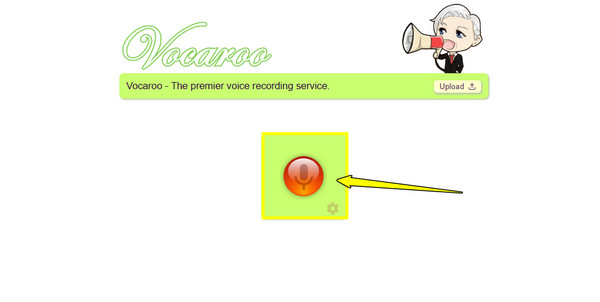
Step 1Once you're on the Vocaroo website, you'll see a clean interface with a large microphone. Click the "Microphone" button. If the browser prompts you with a pop-up, click "Allow".
Step 2Now, speak clearly into your mic; a timer will be shown to check your recording duration. It is suggested to keep track under 10 minutes to avoid crashes.
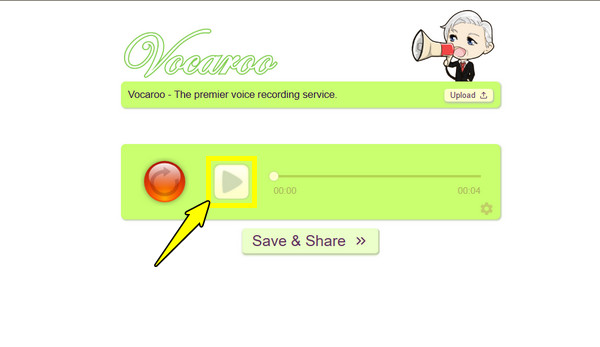
Step 3Later, click the "Stop" button. You can then click the "Play" button to preview your track and ensure your mic captures everything clearly.
Step 4If so, click the "Save & Share" button, and catch the unique shareable link that you can paste directly into an email or chat window.
Vocaroo Reviews: Pros & Cons
Every tool has trade-offs, and Vocaroo online voice recorder is no exception. Despite how straightforward its approach is, it strips away the advanced features that are found in modern dedicated audio recording tools.
So, to help you determine whether this utility is best for you, broken down here are the pros and cons:
Pros of Vocaroo:
- No Signups. You do not have to provide an email address, number, or password.
- Easy HTML Embedding. Plug a fully functioning audio player into a website, blog post, or forum.
- Instant Audio QR Codecs. Aside from links, there's a custom QR code that can be printed out for every recording.
- Convenient Upload. You aren't limited to live microphone capture, as you can upload local audio files too.
Cons of Vocaroo:
- Basic Audio Quality. The online voice recorder is built for speed and small sizes, and not for high-fidelity recording.
- Privacy Limitations. No password protection or access restrictions for your files.
- Strict Expiration Windows. Vocaroo does not have permanent cloud storage.
Vocaroo Not Recording? Try This Alternative
When online solutions like Vocaroo Voice Recorder fail to meet your recording standards, 4Easysoft Screen Recorder serves as a stable desktop recorder alternative for all your audio and video needs. Not only can this software record audio, but it operates entirely offline, eliminating any unstable servers and browser glitches while you record. Additionally, it features advanced, built-in tools to clean your audio tracks in real-time. So, whether you're saving an online lecture, music, or a vocal track, this software ensures your data stays sharp and completely protected on your local drive.
Dual channel capture, recording system audio and mic at once or selectively.
Microphone noise reduction and noise cancellation for clean recording.
Listen to the recording and trim any unwanted parts before saving.
Export tracks in lossy or lossless formats like MP3, AAC, FLA, WAV, etc.
100% Secure
100% Secure
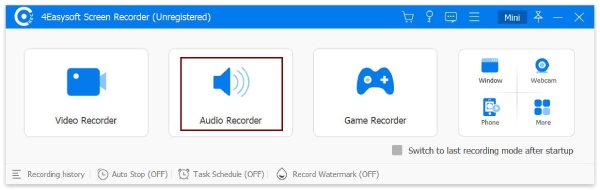
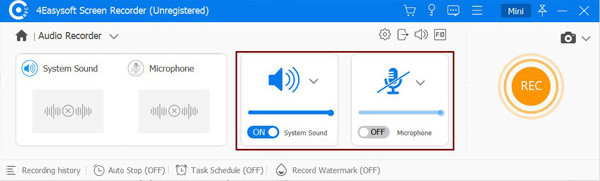
Step 1Open 4Easysoft Screen Recorder and from the recording options menu, click the "Audio Recorder" tool.
Step 2Next, toggle on "System Sound" or "Microphone" or both, depending on what you plan to capture. Don't forget to adjust them to your desired input volume levels.
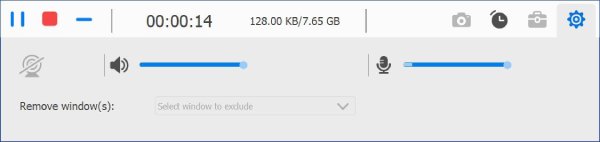
Step 3Click the "REC" button to begin. As it records, you can manipulate the volume levels on the fly using the floating toolbar. Click the "Stop" button once you're finished.
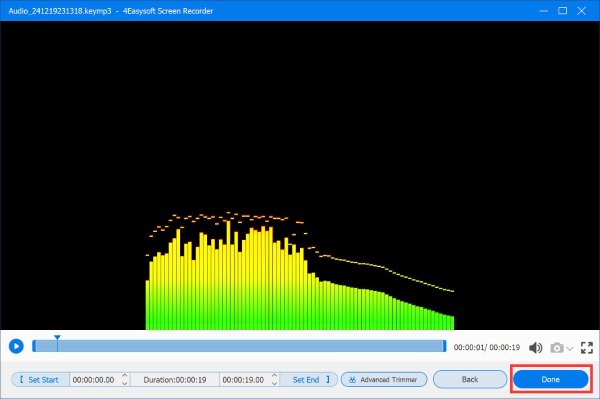
Step 4Now, in the preview player window, you can listen to your captured audio and trim away any dead air or mistakes. Click the "Done" button to export and save the audio file to your local storage folder.
Vocaroo vs. 4Easysoft Screen Recorder
| Feature | Vocaroo Voice Recorder | 4Easysoft Screen Recorder |
| Installation | None | Required |
| Audio Processing | Automatic noise filter | Manual control over noise and echo cancellation |
| Output Formats | MP3 | MP3, WMA, AAC, M4A, FLAC, WAV |
| File Editing | None | Real-time preview with built-in trimmer |
| Data Privacy | Low | High |
| File Longevity | Temporary | Permanent |
Conclusion
Still, Vocaroo is the champion for convenience when you need a quick record, casual voice link, and share it across social media in seconds. Vocaroo is perfect for everyday communication and assignments because of its easy-to-use interface. But you must be ready for its lack of editing functions, temporary cloud storage, and its open-access link. If you want to experience no glitches, studio-level audio, and ensure security, 4Easysoft Screen Recorder is the ideal alternative. Besides audio recording, it reduces noise, trims recordings, and gives you complete authority over your projects.
100% Secure
100% Secure
