
Record, edit, and share video from all sources.

The 6 Best Meeting Recorders for Different Scenarios

Posted by Ethan Brooke to Record Audio Aug 20, 2026
A meeting recorder is a very useful tool for those who frequently need to hold online meetings. During the meeting, there will always be many important points that you might miss. A recording tool can help you capture the meeting for later playback. If you are still struggling to find the right recording tool, then read this post. After testing the most popular online tools, we have recommended 6 top-notch meeting recorders suitable for various devices and scenarios.
Guide List
A Quick View Through Test Conditions and Meeting Recorders The Best Meeting Recorder with High Quality for Any Scenario A Collaborative Meeting Recorder for Windows Computers The Default Meeting Recorder You Can Find on Your Mac A Popular Option Trusted by Many: Zoom Meeting Recorder For Mobile Devices - Otter Meeting Agent with AI Technology Loom Screen Recorder: A Web-Based Meeting RecorderA Quick View Through Test Conditions and Meeting Recorders
To find a meeting recorder that meets your daily or work requirements, we simultaneously used multiple devices to participate in the same online meeting. These devices include Windows computers, MacBooks, mobile devices, and those accessed through a browser.
Meanwhile, due to the varying sizes of the online meeting venues, the duration could range from a few minutes to several hours. Therefore, we held an online meeting that lasted approximately 60 minutes.
During the meeting, we conducted simulations for both the PPT, individual presentations, and group discussions. After testing over 10 tools, we selected the best meeting recorders for different devices and scenarios based on three key criteria: video quality, audio quality, and stability.
| Meeting Recorder | Best for | Automatic Transcription | Scheduled Recording | Collaboration Features |
| 4Easysoft Screen Recorder | Windows, Mac, Mobile | No | Yes | Basic |
| Microsoft Teams Recorder | Windows | Yes | No | Excellent |
| QuickTime Player | Mac | No | No | Limited |
| Zoom Meeting Recorder | Windows & Mac | Yes | No | Excellent |
| Otter.ai Meeting Agent | Mobile | Yes | No | Very Good |
| Loom Screen Recorder | Browsers | Limited | No | Very Good |
The Best Meeting Recorder with High Quality for Any Scenario
For conference recording software, the most important feature is the ability to save the conference video and audio in high quality. Only in this way can you ensure that all important content is recorded and not lost. For this high-quality recording requirement, you need a professional tool. If there is a best meeting recorder, 4Easysoft Screen Recorder is undoubtedly one of the best options.
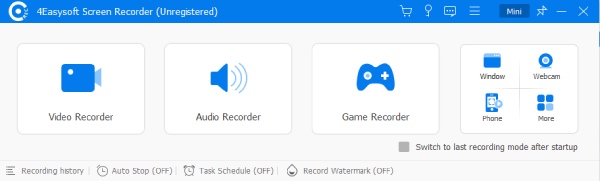
This tool is specifically designed to provide high-quality screen recording, allowing you to easily record the conference in full screen, window, or a custom area. And its greatest advantage is that you can set conferences to be recorded in advance via the schedule recorder, even if you are unable to attend the meeting in person due to being occupied.
Capture meetings with up to 4K resolution in high quality.
Record system audio and mic at the same time without quality loss.
Set specific times when to start and stop recording automatically.
Preview your recording and trim/adjust the video length.
100% Secure
100% Secure
- Pros
- Record both video and audio content without loss of quality.
- Schedule a recording option so the meeting is recorded even if you're absent.
- Real-time drawing and annotation tools for highlighting the content.
- Cons
- Lacks real-time audio transcription.
A Collaborative Meeting Recorder for Windows Computers
If you are using a Windows computer, you will inevitably encounter Microsoft software or processes in your work. Therefore, Microsoft Teams has become an excellent conference recording software that can enhance your work efficiency. During the meeting, it ensures that all audio details and the presentations shared on the screen can be recorded effectively. After you complete the recording, you can also collaborate with other Microsoft 365 software on the recorded content.

- Pros
- Significantly effective for internal team collaboration.
- Support automatic transcription during the meeting.
- Full support for collaboration with Microsoft 365 tools.
- Cons
- Payment is required to unlock its full features.
- A steep learning curve for beginners.
- The collaboration interface is a bit messy.
The Default Meeting Recorder You Can Find on Your Mac
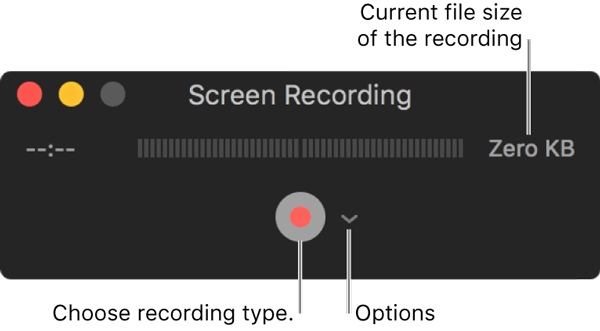
If you are looking for free meeting recording software on Mac that supports both audio and video, then an in-built tool might be able to assist you. You don't need to install any additional software. You can simply open the QuickTime Player at any time when you need to record the meeting content. Although it may not be suitable for particularly professional and formal occasions, it is sufficiently convenient and practical for ordinary meetings.
- Pros
- Built-in tools that do not require downloading.
- The simple interface lets you start by clicking.
- It will only consume a very small amount of system resources.
- Cons
- The recorded meeting content will have a slight loss in quality.
- Lack of additional editing tools to complete post-production.
- QuickTime Player hasn't been updated for a long time.
A Popular Option Trusted by Many: Zoom Meeting Recorder
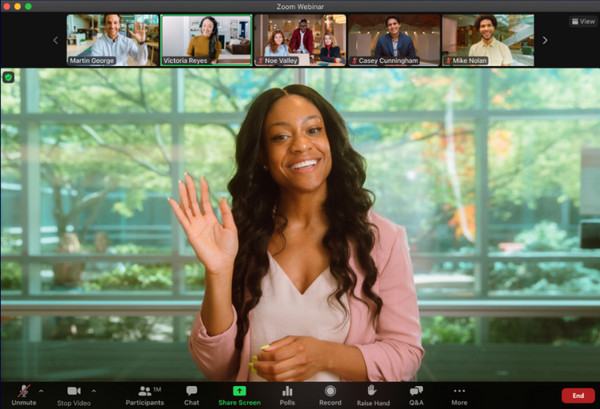
If you frequently participate in online meetings, you must be quite familiar with Zoom. However, you might have overlooked that you can use Zoom's built-in meeting recorder to capture the meeting content while participating. As one of the most reliable conference platforms on the market today, it offers high-quality recordings and lets you make quick edits for sharing with your colleagues.
- Pros
- Excellent for seamlessly recording meetings throughout the process.
- Cloud storage for easy access to all screen recordings within Zoom.
- Record meetings with separate audio tracks for members.
- Cons
- Only supports 40-minute meetings in the free version.
- The recording process can consume a lot of resources.
- The price of the professional version is quite high.
For Mobile Devices - Otter Meeting Agent with AI Technology
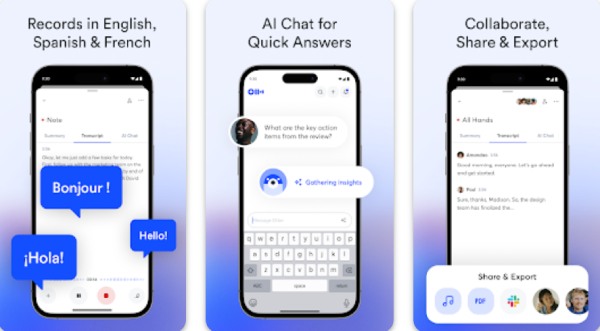
Often, due to the limited availability of equipment around you, you may only be able to participate in some meetings using your mobile phone. Due to the limited performance of mobile phones and the potential quality loss caused by unstable signals, you may find that many meeting recording apps do not preserve the meetings very clearly. In such cases, using artificial intelligence to record and extract the important content becomes an effective solution. Whether you are using an Android phone, an iPhone, or an iPad, Otter.ai, which integrates AI recognition technology, will help you intelligently analyze and extract the important meeting content.
- Pros
- Utilize AI technology to extract key information quickly.
- Allow you to use the real-time text transcription function on your mobile phone.
- Confirm the speaker's content by replaying.
- Cons
- There will be situations where the connection becomes unstable.
- Transcription skills require clear and standard pronunciation.
- AI technology may occasionally make mistakes.
Loom Screen Recorder: A Web-Based Meeting Recorder
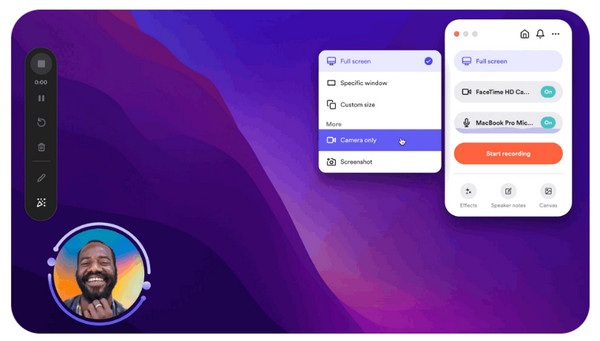
As a cloud-based meeting recorder, Loom Screen Recorder focuses on facilitating quick and convenient meeting recording on your browser. Unlike previous products, the main advantage of Loom lies in its ease of use and convenient sharing function. After you complete the recording of the meeting content, you can immediately generate a shareable URL. This exclusive feature makes it hard to find a Loom alternative when it comes to web-based meeting recorders.
- Pros
- Real-time annotations during the recording session.
- Share recordings instantly via a link.
- Work is simply based on browser extensions.
- Cons
- You are not allowed to record system audio in the free version.
- Storage capacity is limited to 25 videos only for free.
- It won't work once the network is disconnected.
Conclusion
After the test, this post has summarized 5 reliable meeting recording apps for you. In different devices and situations, you will find that there are always suitable tools available to handle various circumstances. Among them, in order to achieve the best video and audio quality, 4Easysoft Screen Recorder is the most reliable option with lossless recorded content.
100% Secure
100% Secure
