
Convert, Edit and Enhance GIF, MP4, MOV, and AVI Videos with AI

3 Ways to Convert GIF to MP4 on Windows, Mac, Online

Posted by Aira Lesly Escoto to Convert Video Mar 06, 2026
Trying to upload a GIF and it won't work? Many social media platforms and apps prefer MP4 instead of GIF. You need to convert GIF to MP4 for better compatibility and a smaller file size. To turn funny animated GIFs into MP4 without losing quality, you can follow the steps below.
Guide List
How to Convert GIF to MP4 on Windows and Mac [for Beginners ] How to Convert Animated GIF to MP4 with FFmpeg [for Experts] How to Convert GIF to MP4 Online [from GIF URL] FAQsHow to Convert GIF to MP4 on Windows and Mac [for Beginners ]
4Easysoft Total Video Converter can handle GIF-to-MP4 conversion and the editing process. For example, you can merge multiple GIFs, trim a long GIF, crop a GIF, and apply visual effects to your GIF animations. Later, you can change the file extension from .gif to .mp4. In most cases, people need to upload MP4 videos to TikTok, Instagram, and other social platforms. To match the aspect ratio, file size limit, and other requirements, you can use 4Easysoft Total Video Converter to solve the problem in one stop.
Convert multiple animated GIFs to MP4 without quality loss.
Crop, merge, trim, rotate, compress, and edit GIF and MP4 files.
Add audio tracks, subtitles, watermarks, effects, and filters to MP4 videos.
Adjust output video settings of resolution, frame rate, etc.
100% Secure
100% Secure
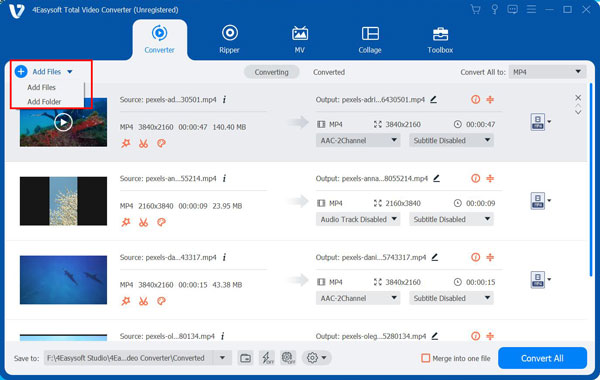
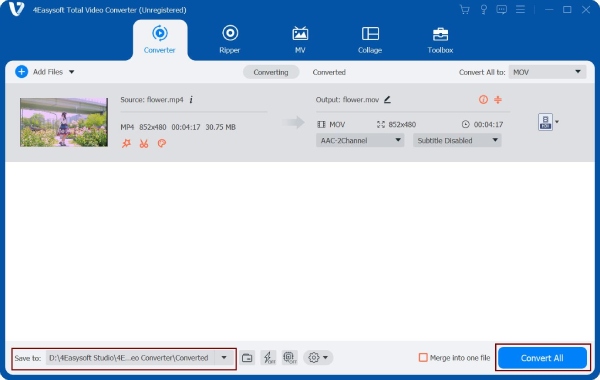
Step 1Open 4Easysoft Total Video Converter. Click the "Add Files" button to import your GIF animation.
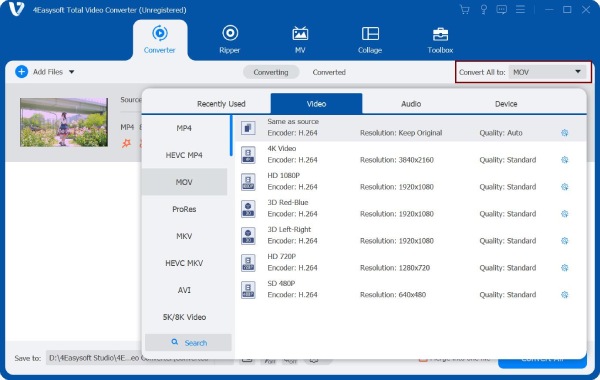
Step 2Click the "Convert All to " button. In the "Video" section, select "MP4" as the output video format.
Step 3Choose the premade profiles. Or you can click the "Settings" button to edit your profile. Here you can adjust video quality, encoder, resolution, frame rate, and bitrate. Click the "Create New" button to save changes.
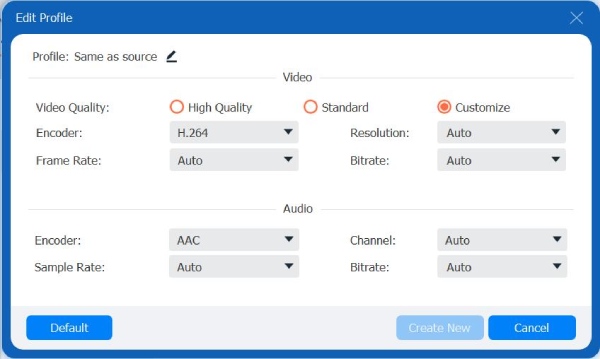
Step 4You can click the "Edit" button to crop a GIF or apply other effects based on your needs. At last, click the "Convert All" button to export GIF to video.
100% Secure
100% Secure
How to Convert Animated GIF to MP4 with FFmpeg [for Experts]
If you want complete control over quality and compression, FFmpeg can be your free GIF to MP4 converter. Compared with some online GIF converters, FFmpeg does not reduce quality or add a watermark in the free version. You can use the following commands to convert GIF to MP4 on Linux, Windows, and Mac for free.
1. Download FFmpeg from its official website, then install it. (Mac users need to install Homebrew to install FFmpeg successfully.)
2. Copy and paste the following command. Replace input.gif with your GIF file name.
3. If your MP4 is still too large, you can use the following command instead. Use 23 to 28 CRF for a smaller MP4 file size.
How to Convert GIF to MP4 Online [from GIF URL]
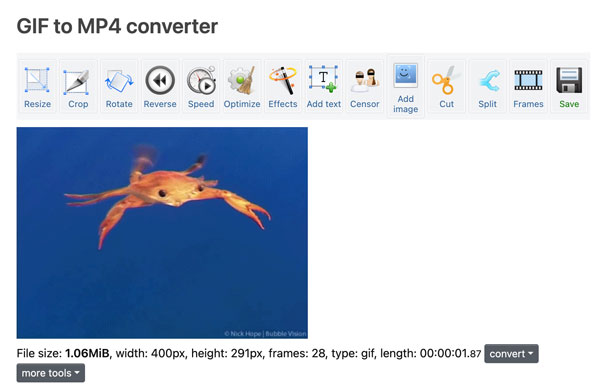
For both desktop and mobile users, online GIF to MP4 converters are popular, especially for Ezgif. You don't need to install extra tools. Just upload your GIF animation from the local or online sources. Later, you can download the converted MP4 video or get a shareable permanent link. The maximum GIF file size limit is 200MB. So you don't need an extra GIF resizer to make this animation smaller.
1. Open Ezgif GIF to MP4 online converter.
2. Click the "Choose File" button or enter the direct GIF image URL.
3. Click the "Upload!" button to import your GIF image.
4. You can resize, cut, split, adjust speed, add text, and edit this GIF file if necessary. (optional)
5. Scroll down and click the "Convert GIF to MP4!" button to complete the process.
FAQs
-
How to keep quality when converting GIF to MP4?
Use high bitrate settings, keep original resolution, maintain the original frame rate, and avoid resizing GIFs. Moreover, you can choose the H.264 codec to get high-quality MP4 video.
-
Is it possible to export a GIF to MP4 with a transparent background?
No. MP4 H.264 does not support alpha channels. If you want to keep transparency, you can convert GIF to WebM (VP9/VP8) or MOV format.
-
Why is my MP4 video not looping like the GIF?
The MP4 format does not have the auto-loop behaviour. And your video player is not set to repeat the video. To solve the problem, you can enable the repeat or loop function in your media player. Or you can duplicate the video clip on the timeline for a longer MP4 loop.
Conclusion
There is no official answer in the battle of GIF vs. MP4. GIF is an image format, while MP4 is a video format. They are not the same thing. But if your GIF is too large to upload, slow to load, or not supported by certain platforms, you can convert .gif to .mp4. Use 4Easysoft Total Video Converter to change file formats and edit videos with easy steps. After that, sharing and posting animations will be easier than before.
100% Secure
100% Secure
