How to rip and edit DVD movies to other video formats
In order to completely experience the super fast conversion speed of AMD APP technology, you have to download and install the AMD graphics driver. Please following the below guide to install the AMD graphics driver.
Step 1: Visit the AMD official website
For to get the AMD graphics card, you should visit the AMD official websites to download: http://www.amd.com.
Step 2: Choose the suitable AMD graphics card for your computer
Once open the website, you can find "Find the drive" on the upper right corner of the page. Please move the mouth on it, you can get a drop list. You can choose the correct options of your computer one by one: Component Category, Product Line, Product Model, and Operating System. Or you can choose "Driver Autodetect". Then click the "View Results" to visit the download page.
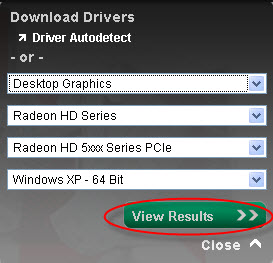
Step 3: Download AMD graphics driver
On the download page, you can see the following driver list. Find the Catalyst Software Suite and click the "Download" button on the right sideto download. If your system settings support AMD APP technology, you can choose to download AMD Media Codec Package of Optional Download.

Step 4: Install AMD graphics driver
When finish the download, you can install the AMD graphics driver as the following instruction.
Note: Please restart our application after the installation to make sure the right identification.



-
Package Deals
- Media Toolkit Ultimate
- DVD Converter Suite
- iPhone Mate
- iPod Mate
- DVD to 3GP Suite
- DVD to Mobile Phone Suite
- DVD to Archos Suite
- DVD to MP4 Suite
- DVD to iPad Suite
- >> Learn More
-
Video Tools
- Total Video Converter
- Mod Converter
- Media Converter
- Free AVI Converter
- Free ASF Converter
- Free 3GP Converter
- Free FLV Converter
- Free Wii Converter
- Free MP4 Converter
- Free TOD Converter
- Free MOV Converter
- Free Flash Converter
- Free Apple TV Converter
- >> Learn More
-
DVD Tools
- DVD Copier
- DVD Converter Platinum
- DVD to Video Converter
- DVD Movie Maker
- DVD to MP4 Converter
- DVD to PSP Converter
- DVD to PS3 Converter
- DVD to DPG Converter
- DVD to Mobile Phone Converter
- >> Learn More
-
HD/Blu-ray Tools
- HD Converter
- MTS Converter
- Free Blu-ray Ripper
- M2TS Converter
- TS Converter
- Blu-ray Mate
- Blu-ray to AVI Ripper
- Blu-ray to MP4 Ripper
- Blu-ray to DPG Ripper
- AVC Converter
- >> Learn More
-
iPod/iPad/iPhone Tools
- iPhone Manager
- Video Converter for iPad
- iPod Video Converter
- iPod Manager
- iPhone Video Converter
- iPhone Ringtone Converter
- iPad Manager
- >> Learn More
-
PDF/ePub Tools
- PDF Converter Platinum
- ePub to iPad Transfer
- PDF to ePub Creator
- ePub to iPhone Transfer
- PDF to Flash Converter
- PDF Cutter
- PDF Joiner
- >> Learn More
-
Audio Tools
- Video to Audio Converter
- Free MP4 to MP3 Converter
- FLAC Converter
- TS to MP3 Converter
- Free MP3 Converter
- Flash Video to WMA Converter
- Sony Ericsson AMR Converter
- >> Learn More
-
System Utilites
- Registry Cleaner