
Reliable video converter, editor, and compressor for daily tasks.

Workable Ways to Extract Subtitles from MKV Video Files

Posted by Paula Pailaga to Edit Video/Audio Jul 25, 2025
Extracting subtitles from MKV files is a beneficial technique for those who enjoy watching videos or need subtitle editing. As a popular video container format, MKV usually contains subtitle tracks embedded within the file. However, obtaining these subtitles individually is not always straightforward. This guide will explore practical methods for extracting subtitles from MKV files efficiently and effectively.
Guide List
Basic Information About MKV and Subtitles Within The Easiest Way to Extract and Edit Subtitles from MKV How to Extract Subtitles from MKV Using PotPlayer An Online Tool to Extract Subtitles from Small MKVBasic Information About MKV and Subtitles Within
MKV, short for Matroska Video, is a powerful and widely used multimedia container format. This means it can accommodate an unlimited number of video, audio, and subtitle tracks in a single file. As a result, MKV became a popular video format for high-quality movies and TV shows, especially when multiple language subtitles or audio tracks are included. Therefore, for video enthusiasts, understanding MKV files is always a necessary skill.

Subtitles in MKV files are often embedded as separate tracks, which means they can be turned on or off during playback without altering the video itself. These subtitle tracks can come in various formats, such as SRT (SubRip), ASS (Advanced SubStation Alpha), or PGS (Presentation Graphic Stream), each offering different levels of formatting and styling.

Knowing what MKV file is and extracting subtitles from MKV files allows you to use them independently—whether for viewing on devices that don’t support MKV subtitles, for translation purposes, or for editing. Knowing how MKV handles subtitles is the first step toward easily extracting and managing these text tracks.
The Easiest Way to Extract and Edit Subtitles from MKV
When it comes to extracting subtitles from MKV files quickly and effortlessly, 4Easysoft Total Video Converte stands out as an all-in-one solution. This versatile software is designed not only to convert videos across numerous formats but also to extract and edit embedded subtitle tracks with precision and ease. With 4Easysoft Total Video Converter, you can simply export subtitle file in popular formats like SRT or ASS.
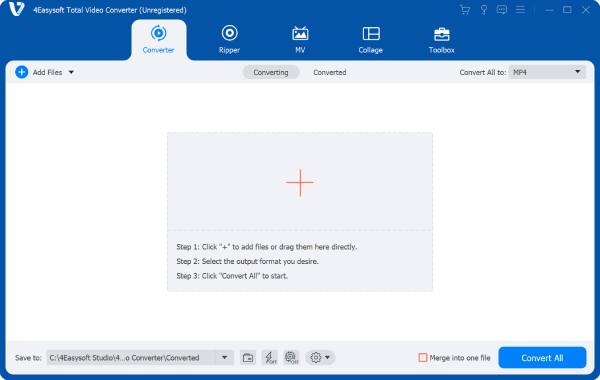
Moreover, this tool preserves the original video quality while handling subtitle extraction, making it ideal for any subtitle-related work. If you want a hassle-free, reliable way to pull subtitles from MKV videos, this MKV converter offers a powerful and user-friendly option that gets the job done quickly.

Directly display all subtitles embedded in MKV files.
Edit subtitle files while extracting them from MKV.
Keep the original quality of video during the process.
Preview to check if your subtitle file is edited correctly.
100% Secure
100% Secure
Step 1Launch 4Easysoft Total Video Converter and click the "Add Files" button to import the MKV video file.

Step 2Click the "Subtitles" button to extract subtitles from MKV file and embed subtitles into the video directly.

Step 3After extracting and editing the MKV video file, click the "Convert All" button to save the video.

How to Extract Subtitles from MKV Using PotPlayer
Known for its widely supported playback power, PotPlayer is considered one of the best media players. If you already use PotPlayer for video playback, you can also use it to extract subtitles while watching your MKV videos. This section will guide you through the simple steps to extract subtitles from MKV files using PotPlayer, making it easy to save subtitle tracks separately for later use or translation.
Step 1Launch PotPlayer on your device, click the "Open File(s)..."/ "Open" button to import the MKV file..

Step 2Right-click the video, click the "Subtitles" button. Under the "Subtitle Saving" tab, click the "Save subtitle as..." button.

Step 3The subtitle will be extracted automatically. Then, select a destination to save the subtitle file extracted from MKV.

An Online Tool to Extract Subtitles from Small MKV
If the video file you are dealing with is not too large, then a network tool is an ideal choice. They offer a fast and convenient method to extract subtitles from small MKV files without the need to install any software. Then you can try SubtitleVideo, a convenient online tool. For users who occasionally use it or need to solve such problems anytime and anywhere quickly, SubtitleVideo makes subtitle extraction simple and easy to operate. You can complete the operation through the browser.
Step 1Navigate to the official website of SubtitleVideo and click the "Browse" button to import the MKV file.

Step 2After a short time of processing, the MKV file you uploaded will be imported and analyzed automatically.

Step 3Click to select the type of how subtitle is embedded in the MKV file. Finally, click the "Extract subtitle" button.

Conclusion
Extracting subtitles from MKV files is a valuable skill for those who love films or deal with subtitles. By following this guide, you can effortlessly extract subtitles from your MKV videos and enhance your viewing or editing experience. Among these tools, 4Easysoft Total Video Converter is the most reliable option that best fits your workflow. Download and start extracting subtitles from MKV today!
100% Secure
100% Secure
