iOS System Recovery
  • 00

    Day

  • 00

    Hours

  • 00

    Mins

  • 00

    Secs

20 OFF

Upgrade to Full License with 50% Discount!

  • Recover iOS and iPadOS to the normal state without data loss.
  • Fix 50+ iOS system problems, including black screen, iPhone disabled, etc.
  • Upgrade to iOS 26 or downgrade to iOS 18 and earlier without iTunes/Finder.
  • Factory reset iPhone without any password.
Monthly: $17.97 $35.95

Quick Start for 4Easysoft iOS System Recovery

iOS System Recovery
1

Start Scanning Your Device

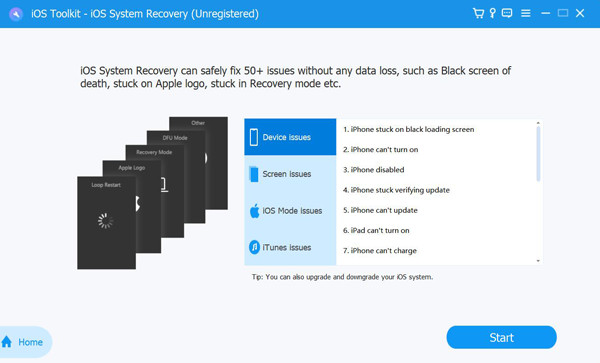
Launch 4Easysoft iOS System Recovery after downloading, and connect your iOS device to the computer via USB cable. After that, click the Start button to fix all iOS system issues.

iOS Information to Fix
2

Choose the Desired Mode

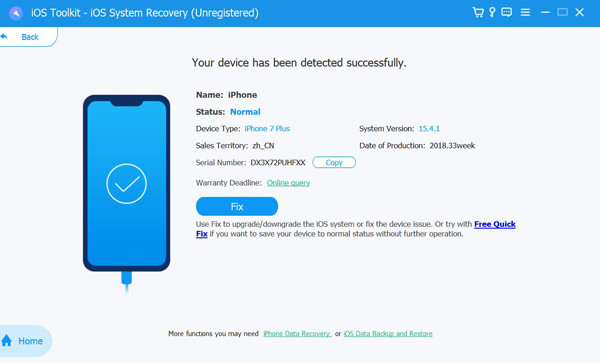
You can quickly fix your iOS by clicking the Free Quick Fix button, which will solve simple problems. If you want to do further fixes, click the Fix button and choose from the Standard Mode and Advanced Mode according to your need.

Download Firmware to Fix
3

Download New iOS Firmware

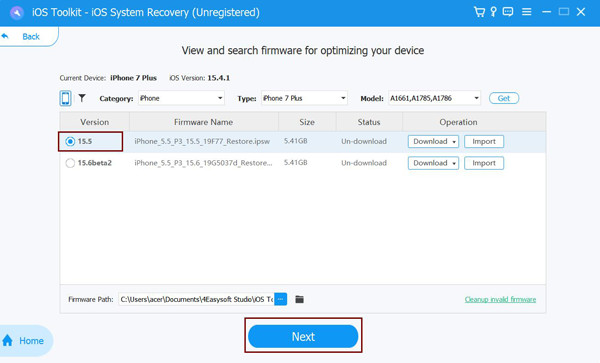
After clicking the Confirm button, you can can choose the latest iOS version to download. You can also upgrade or download your iOS system in this way. In several minutes, you can restart your devices normally.

30% OFF for Our Bundle Products

Why Choose 4Easysoft