
Compress videos from GB to MB and keep its original quality with the AI technology

Rotate GIFs on PC/Mac/iPhone/Android/Online [4 Ways]

Posted by Paula Pailaga to Edit Video/Audio Mar 06, 2026
Animated GIFs are usually used for social media and web content, but sometimes they may appear upside down or sideways. Due to this, you want to rotate GIF animations while maintaining smooth playback and visual clarity. So, which rotation tool is capable of this result? Lucky, the following parts explore four effective GIF rotators, from desktop and online to mobile solutions. By the end, you'll know which one is best for your rotating workflow.
Guide List
Best Way to Rotate GIFs Without Losing Quality How to Quickly Rotate GIFs Using Ezgif Rotate GIFs for Free with iLoveIMG Online Conveniently Rotate GIFs on iPhone/Android with GIF GuruBest Way to Rotate GIFs Without Losing Quality
When it comes to rotating GIFs, preserving animation smoothness and quality is just as important as correcting the orientation. Here 4Easysoft Total Video Converter can rotate animated GIFs while maintaining original resolution and color accuracy. Other than the rotation, the GIF rotator and editor allows you to apply filters, adjust effects, crop, trim, and more. Plus, it lets you preview changes before exporting, so you can confirm all the applied edits look correct.
Rotate GIFs without compressing or sacrificing the GIF quality.
Besides GIF, it works well among popular formats like MP4, MOV, AVI, etc.
Supports multiple rotation angles and flipping options.
Supports fast processing speeds with hardware acceleration.
100% Secure
100% Secure
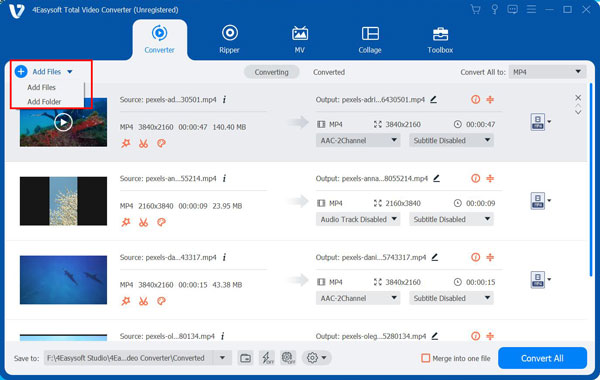
Step 1Open 4Easysoft Total Video Converter on your computer, and click the "Add Files" button to import the GIF you wish to rotate.
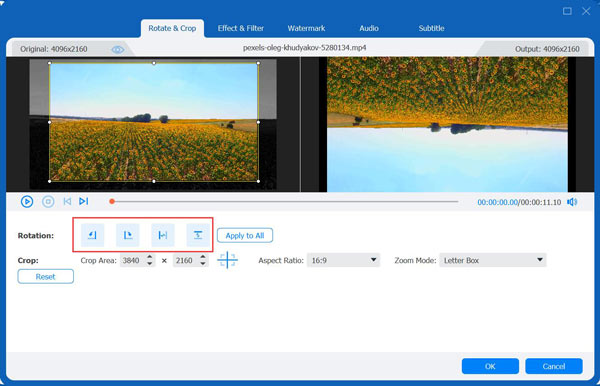
Step 2After that, click the "Edit" button beside the file to access the editing window. Here, go to the "Rotate & Crop" section, and choose the desired rotation or flip option. You can go to the following editing tabs as needed. Preview the GIF's orientation and animation before clicking the "OK" button to apply changes.
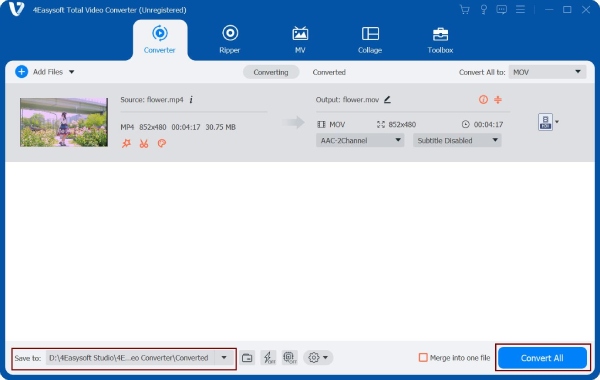
Step 3On the main screen, set a file destination and name for your newly rotated GIF file. Click the "Convert All" button to export the GIF without quality loss.
100% Secure
100% Secure
How to Quickly Rotate GIFs Using Ezgif
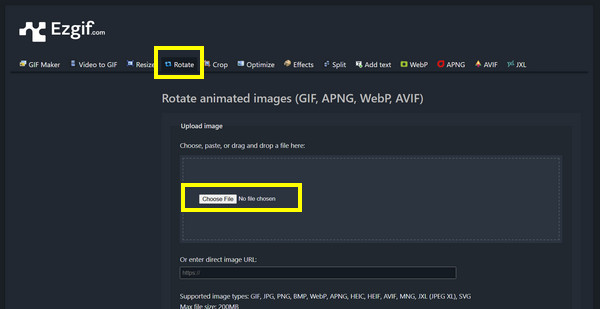
Up next, Ezgif is one of the well-known online solutions for editing GIFs due to its fast, free, and extremely user-friendly. Here, you can rotate GIF images directly in your browser, so there's no need for you to install any software or create an account. In addition, it preserves the original frame sequence, making sure the GIF plays smoothly after the rotation process.
Step 1Visit the Ezgif website. Select the "Rotate" tool from the menu. Click on "Choose File" then browse and upload the GIF you wish to rotate.
Step 2Now, select the desired rotation angle, such as 90 degrees.
Step 3Later, click the "Rotate GIF" button to process the file, and download the GIF once finished.
Rotate GIFs for Free with iLoveIMG Online
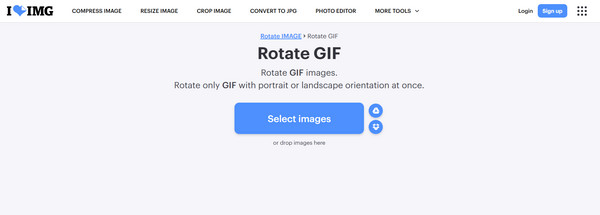
iLoveIMG supports rotating multiple GIF animations. Furthermore, this online GIF rotator works very well across different browsers and operating systems, ensuring accessibility for most users.
Step 1Visit the iLoveIMG page, and there choose the "Rotate GIF" tool. Upload your GIF from your device or cloud storage.
Step 2Click the rotate icons to rotate your GIF left or right.
Step 3Confirm the rotation and wait for the process to complete, then download the rotated GIF.
Conveniently Rotate GIFs on iPhone/Android with GIF Guru
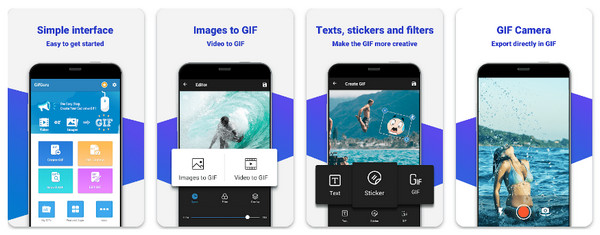
For those who prefer editing GIFs directly on their smartphones, Gif Guru here is a convenient mobile app solution. It lets you rotate GIFs quickly using touch controls while maintaining the original GIF quality. Additionally, this mobile app offers basic editing features. You can speed up GIFs and add other effects. So, for quick edits on the go, this method is ideal to share GIFs on social media.
Step 1Open Gif Guru on your mobile device. Then, import the GIF you wish to rotate from your gallery.
Step 2Next, select the "Rotate" option from the editing tools.
Step 3Adjust the GIF orientation to 90 degrees, 180 degrees, and 270 degrees.
Product Review Table
| Tool | Platform | Watermark | Other Supported Formats | Adjustable Settings |
| 4Easysoft Total Video Converter | Windows, macOS | No | GIF only | Full adjustable settings |
| Ezgif | Web browser | No | GIF, JPG, PNG | Rotation options with limited quality controls. |
| iLoveIMG | Web browser | No | GIF only | Basic rotation |
| GIF Guru | iOS, Android | No | GIF, MP4, MOV, AVI, MKV, FLV, and more. | Rotate and flip options with some additional settings. |
Conclusion
As long as you have the right tool for the job, you can rotate GIF with portrait and landscape orientation easily. Covered here are editors like Ezgif and iLoveIMG, which are perfect for quick fixes, while mobile apps offer convenience for on-the-go edits on your Android and iPhone. However, these free tools may come with limits, so here comes 4Easysoft Total Video Converter. The GIF rotator is highly recommended for rotating GIFs without sacrificing the quality. Whether you wish to rotate GIFs to the perfect angle occasionally, add text to GIFs, or work with animated files regularly, the tool is a stable, high-quality solution to turn GIF images clockwise or counterclockwise efficiently.
100% Secure
100% Secure
