
Reliable video converter, editor, and compressor for daily tasks.

How to Crop a GIF? 6 Best Tools You Need to Try [with Guide]

Posted by Aira Lesly Escoto to Edit Video/Audio Jun 26, 2026
Looking for an easy way to crop a GIF? Even though GIFs add fun to content, messages, and comments, there are times when you need to crop them to remove extra space, focus on the main subject, fit social media sizes, or reduce file size. If one of these reasons applies to your intent of cropping a GIF, then you need to continue reading this post. This post features the six best tools that you can use to cut out part of a GIF on your desktop, browser, and phone. Dive in now!
Add a table at the very beginning comparing the features and supported formats of these tools.
| 6 Best GIF Cropper Tools | Supported Formats | Extra Features | Watermark | Free or Paid |
| 4Easysoft Total Video Converter | GIF, APNG, Animated WebP, AVIF | Crop GIF manually and by picking an aspect ratio. Enhance the GIF quality. | ✖ | Free trial |
| Ezgif | GIF, APNG, WebP, AVIF, SVG | Crop GIF through link importation. | ✖ | Free |
| iLoveIMG | GIF, APNG, WebP, AVIF, SVG | Infused with crop box. Supports other features such as compressor, converter, resizer, and more. | ✖ | Free |
| Online GIF Tools | GIF, APNG, WebP, AVIF, SVG | Crop GIFs in a circle shape. | ✖ | Free plan |
| GIMP | Standard GIF files, including animated GIFs | Aspect ratio options, auto-shrink, current layer only cropping. | ✖ | Free plan |
| GIF Maker | GIF, APNG, WebP, AVIF, SVG | Adding text, border, sticker, background, and more | ✖ | Free plan |
Guide List
Quickly Crop GIF with More Editing Functions for PC/Mac 3 Online Tools to Crop GIF to Ideal Size How to Use GIMP to Crop a GIF Crop a GIF on iPhone and AndroidQuickly Crop GIF with More Editing Functions for PC/Mac
If you are using a PC or Mac, one of the easiest ways to crop a GIF on your device is by using the professional 4Easysoft Total Video Converter. This tool supports a built-in video cropper that enables you to easily and quickly crop any GIF files you have. It provides you with various options to crop your GIF: either by manually adjusting the frames for cropping, entering specific crop values, or choosing an aspect ratio. What makes this tool a great option is that it doesn't affect the quality of your GIF file, and it even offers you options to enhance it.
Lets you preview the cropped GIF for checking before exporting it.
Enhance the quality of the GIF by tweaking its resolution, frame rate, and more.
Supports a GIF maker that you can use to turn videos and images to GIF.
Infused with video-editing-related features that you can use to alter your GIF.
100% Secure
100% Secure
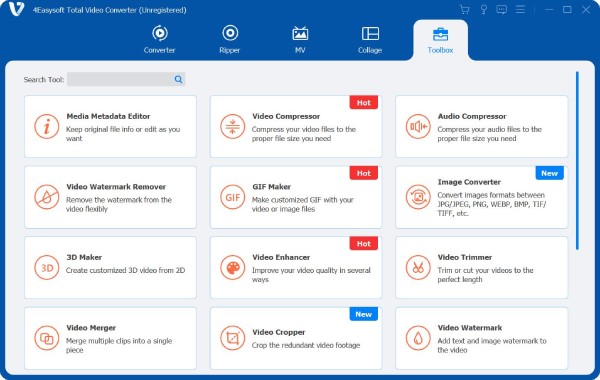
Step 1Install the 4Easysoft Total Video Converter solution on your PC/Mac and launch it afterward. Next, click "Toolbox", look for "Video Cropper", and select it. Then, import the GIF file.
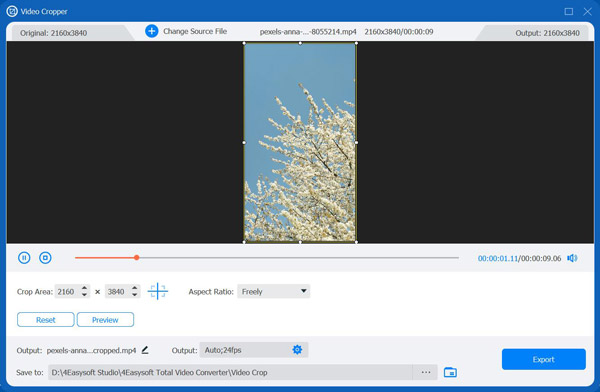
Step 2Once imported, you can proceed to crop the GIF by either adjusting the frames from the preview or entering specific values. You can also select an aspect ratio for quick cropping.
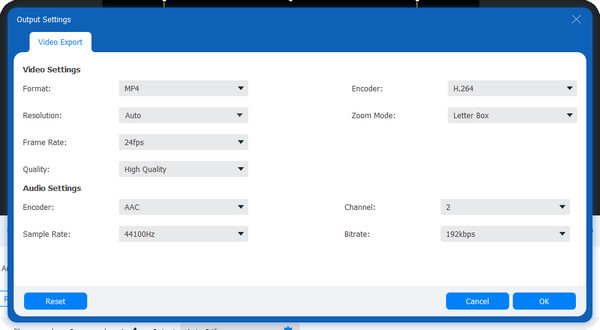
Step 3Once done, you can click the "Output" settings below and adjust the following options to enhance the quality of your GIF file. If you are done with it, click the "OK" button to save it.
Step 4If you are satisfied with your cropped GIF, click "Export" to download it to your PC/Mac.
3 Online Tools to Crop GIF to Ideal Size
Apart from the first featured solution, you can also crop a GIF online through web-based tools. With these solutions, you no longer need to install anything just to crop GIF files. Here are the best tools you must check.
1. Ezgif
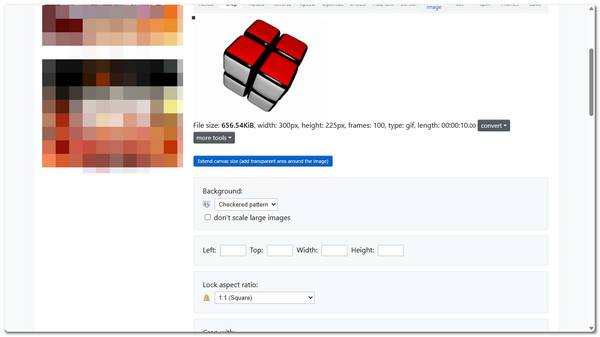
The first solution on this list is Ezgif. This online GIF cropper it easy to remove extra space, borders, or unwanted parts from an animated GIF. It lets you crop GIF images by entering crop values, choosing an aspect ratio, and more. Although this one looks outdated, it offers an effective cropping service.
- Pros
- Easy and uncomplicated tool to use.
- Offers free cropping service with open-source coding like lossygif and gifsicle.
- The interface is well-labeled, allowing you to easily navigate the tool.
- Cons
- Only lets you import a GIF file with a maximum of 200MB.
- Uploaded files can be saved for up to 1 hour only.
2. iLoveIMG
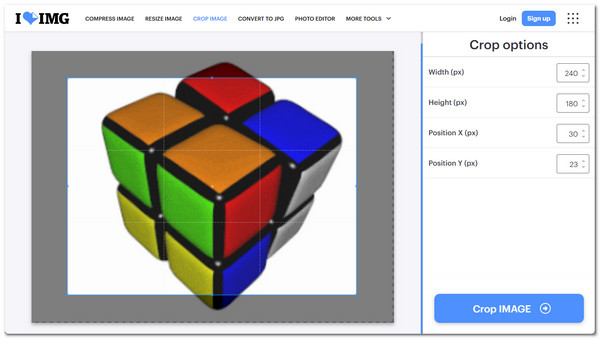
Apart from Ezgif, iLoveIMG is also a great option to crop a GIF image . The same goes with Ezgif, this one is also a simple online tool that lets you crop GIFs by selecting the exact area you want to keep. However, unlike Ezgif, this one lets you crop GIFs manually by adjusting the frames from the preview, which provides you with much control over the cropping process.
- Pros
- A straightforward tool to crop GIF files.
- Let's you crop GIFs by entering width, height, and position values.
- Supports extra editing features to alter your GIF.
- Cons
- Cropping an animated GIF slows down the tool.
- Exploring cropped GIFs takes some time.
3. Online GIF Tools
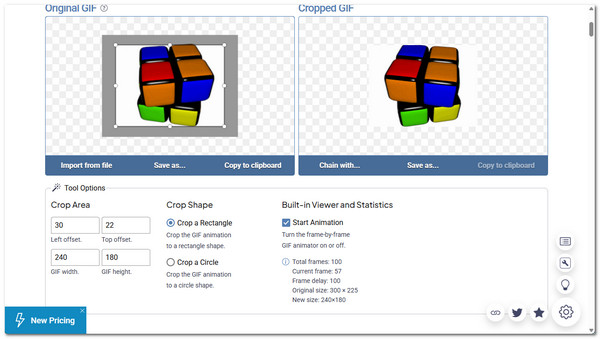
The last online GIF cropper and editor you can use is Clideo. The same goes for the tools earlier, Online GIF Tools also lets you crop an animated GIF by adjusting the crop box to remove unwanted parts like extra space, borders, or empty areas around the animation. It then processes your GIF and gives you a cleaner version that focuses only on the important part of the image.
- Pros
- Very easy to use with a simple crop interface.
- Lets you precisely select the crop area of the GIF.
- Fast processing for small to medium GIF files.
- Cons
- May struggle with very large GIF files.
- Output options and customization are quite basic.
How to Use GIMP to Crop a GIF
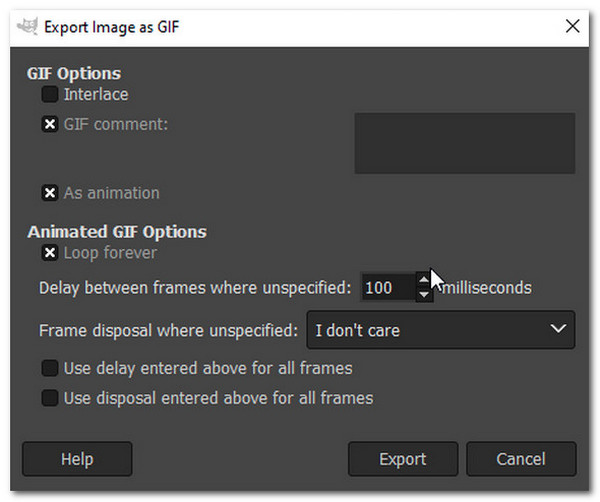
Aside from those solutions, GIMP can also help you crop GIFs, as well as combining GIFs and applying other effects. This one is a free, open-source raster graphics editor tool that is used for image-related editing. It allows you to open an animated GIF as separate frames, adjust the canvas size, and crop the image area while keeping the animation intact. You can manually edit each frame if needed, which makes it useful for more precise or advanced GIF editing. However, this one is a bit complicated for beginners to use. But if you still want to try it, here are the steps to crop an animated GIF through it:
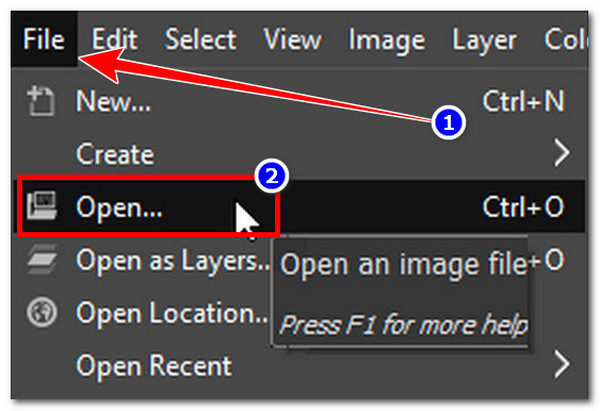
Step 1Install GIMP on your computer and then launch it. Next, click the "File" tab and select "Open" to import the GIF file.
Step 2After that, head to the "Tools", select "Transform Tools", and click "Crop" from the menu. Then, you can start cropping the GIF by adjusting the frame to the size you prefer. Click the "Enter" button to crop the animated GIF.
Step 3Once done, click "File" and select the "Export" option to save your cropped GIF file. And that's it!
Crop a GIF on iPhone and Android
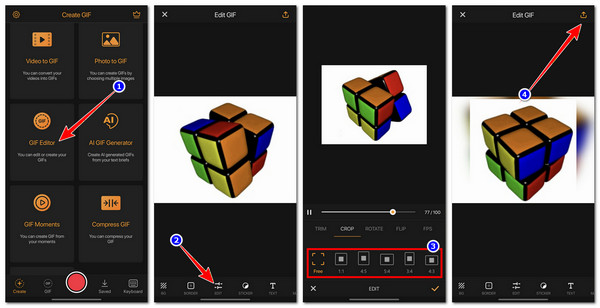
If there are desktop-based tools that can crop animated GIF images, there are also mobile-based solutions that you can use, just like GIF Maker. This app lets you turn videos or photos into GIFs, then edit them with useful tools like cropping, adjusting speed, applying filters, and adding text to GIFs. However, unlike most of the solutions earlier, this one is not completely free. Many of its advanced features require a paid subscription. But if you still want to try this one, here are the steps on how to use it:
Step 1Install GIF Maker on your phone and launch it afterward. After that, select the "GIF Editor" option from the menu and import the GIF file you want to crop.
Step 2Next, select "EDIT" below and tap "CROP". Then, from the list of aspect ratios, choose one that you prefer for quick cropping. Otherwise, you tap "Free" for manual cropping.
Step 3Once done, tap the "Check" icon, tap the "Export" icon at the upper right corner, and tap "Save" to save the cropped GIF. And there you have it!
Conclusion
There you have it! Those are the six best tools you can use to crop a GIF animation. Through them, you can crop any of your GIF files and achieve your intent of this, whether to remove extra space, focus on the main subject, fit social media sizes, or reduce file size. Now, although all of those solutions are indeed effective and do their job very well in cropping a GIF file, only the professional 4Easysoft Total Video Converter can provide you with the best service and high-quality output. So, what are you still waiting for? Try this tool today!
100% Secure
100% Secure
