
Convert, enhance, and edit videos and audio in 600+ formats on Windows and Mac.

How to Convert SWF to MP4? 5 Best Tools on Desktop/Online

Posted by Aira Lesly Escoto to Convert Video Mar 05, 2026
Those interactive greeting cards and viral stick figure fights were all powered by the SWF file. But today, with Adobe Flash Player retired and browsers no longer supporting the format, how can you still play them? Converting SWF to MP4 is the best way to ensure this content plays back on any device. From one-click online converters to desktop tools, check here for everything to find the best tool to convert flash SWF to MP4. Get those files moving again!
Guide List
High Quality Way to Convert SWF to MP4 on Both PC/Mac How to Convert SWF to MP4 with VLC Correctly Convert SWF to MP4 with Popular HandBrake How to Convert SWF to MP4 on Mac Use Clideo to Convert SWF to MP4 on Any DevicesHigh Quality Way to Convert SWF to MP4 on Both PC/Mac
When you seek a professional-grade result without any headache from glitches, slow speed, a dedicated desktop converter is the standard. And one of the tools today that shines is 4Easysoft Total Video Converter. This SWF to MP4 converter can handle complicated layers of Flash files while preserving visual fidelity throughout the transition. Whether you're using a high-end system or a low-end one, this software provides a stable environment for batch processing of various file formats, including MOV, MKV, AVI, and more. It is genuinely the most reliable way to convert SWF files to MP4 without affecting a single frame of your animation.

Can handle 600+ formats, ensuring your old SWF files are never left behind.
Convert dozens of SWF files to MP4 simultaneously with one click.
Utilizes GPU power to speed up the conversion process by 60x faster.
Sophisticated algorithms to ensure the output looks like the original SWF.
100% Secure
100% Secure
Step 1First, start 4Easysoft Total Video Converter on your computer. Simply click the "Add Files" button to browse your folders or just drag and drop them directly into the main window.
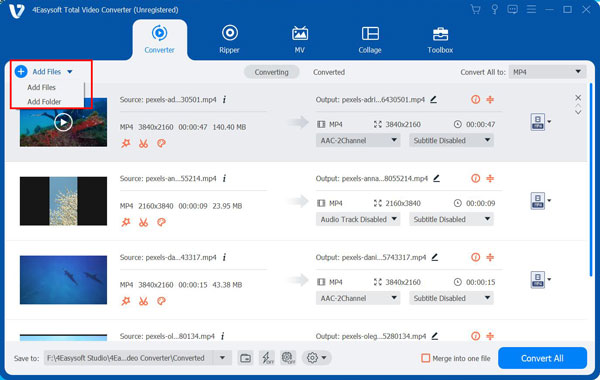
Step 2Click the "Format" dropdown menu to see the full list of formats. Head to the "Video" tab and select "MP4".
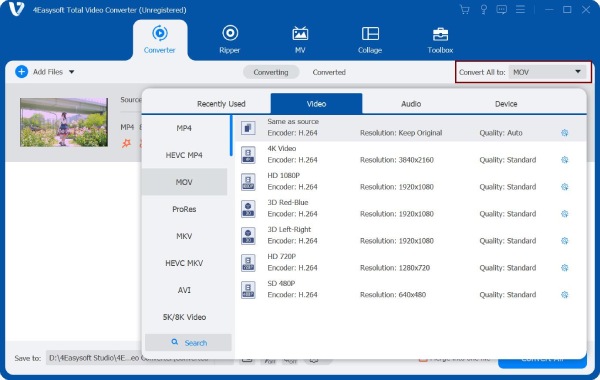
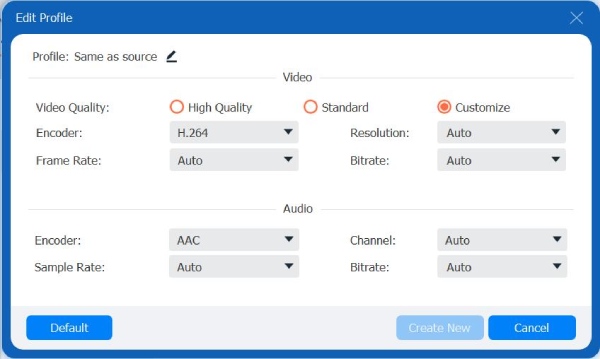
If you love perfect details, click the "Custom Profile" button next to the MP4 format to adjust settings like codec, bitrate, resolution, and more.
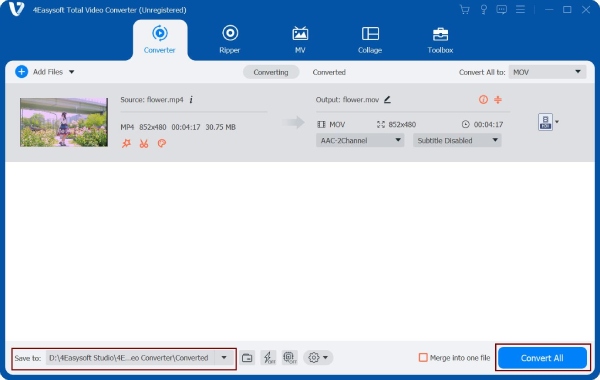
Step 3Once everything looks good, select a destination folder. When you're ready, just click the "Convert All" button, and the software will handle the heavy lifting of those .swf files into .mp4 videos.
100% Secure
100% Secure
How to Convert SWF to MP4 with VLC Correctly
While most of you know VLC as a media player, it also hides a surprisingly powerful conversion engine that'll help you turn SWF to MP4. This solution is excellent if you already have VLC installed and wish for a quick, free method without help from any software. But since VLC treats SWF as a video stream, you must follow the steps use this SWF converter carefully.
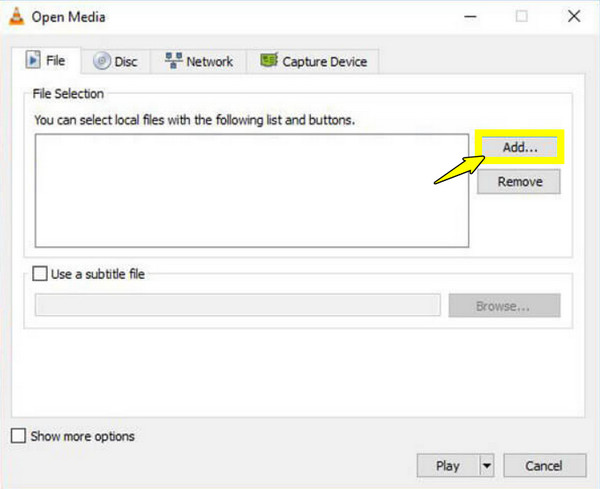
Step 1Fire up VLC and click on "Media" then select "Convert/Save" in the dropdown menu. Click the "Add" button to import your SWF file from the window, then click the "Convert/Save" button to proceed.
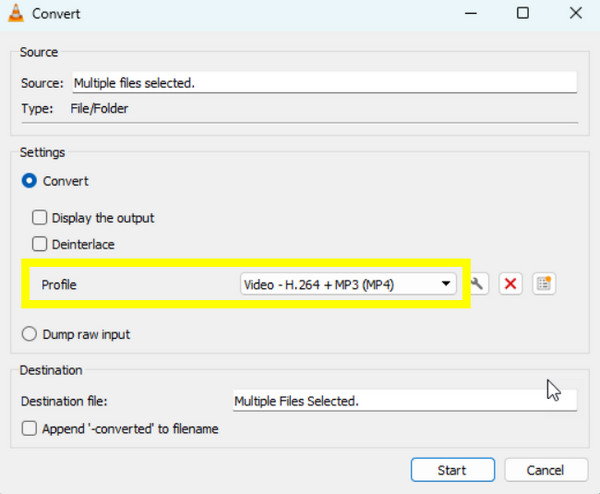
Step 2Afterward, under the "Profile" dropdown, ensure to select "Video - H.264 + MP3 (MP4)". Click the "Browse" to name your file and pick a save location.
Step 3Finally, click on "Start" to change SWF to MP4 files.
Convert SWF to MP4 with Popular HandBrake
Moving on, if you're looking for an open-source solution to change SWF to MP4, here's Handbrake for you! A legendary transcoder that provides advanced settings, Handbrake is built with a high-end encoding engine that results in a superior MP4 file. It is the go-to option for tech-savvy users who want to deep dive into frame rates, bitrates, and more. Moreover, you can use HandBrake to trim videos, compress videos, and do more video editing tasks.
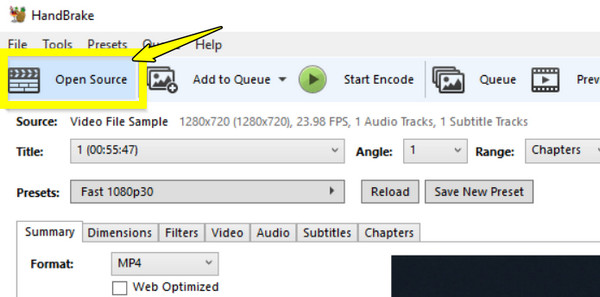
Step 1Start Handbrake on your computer. Click "Open Source" to upload your SWF file. Then, in the "Summary" tab, make sure the "Format" is set to "MP4".
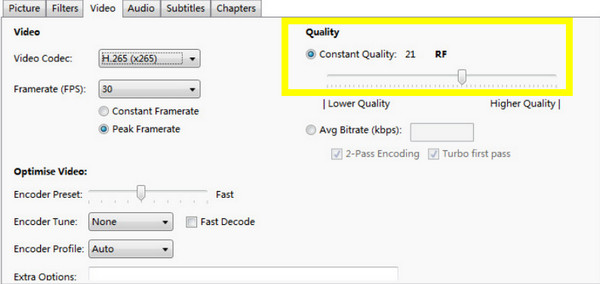
Step 2Slide to the "Video" tab to adjust the "Constant Quality" slider to balance file size and clarity. Next, at the bottom, click "Browse" to choose your path and file name.
Step 3Click the "Start Encode" button to start the SWF to MP4 conversion process.
How to Convert SWF to MP4 on Mac
Mac users often struggle with Flash since macOS was one of the first systems to move away from Adobe's plugin. Thus, WinX Video Converter for Mac is a top-tier choice to help you save SWF to MP4. It has a high-quality engine that guarantees your Flash animations do not pixelate on modern displays.
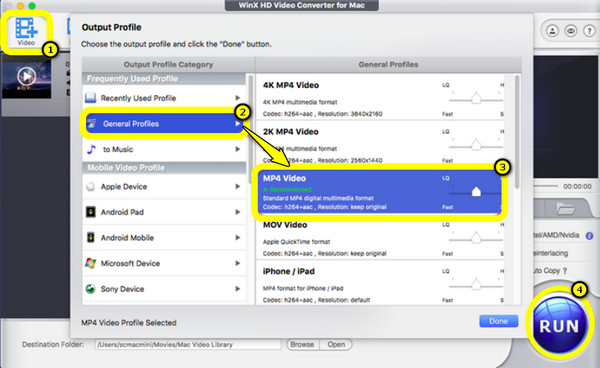
Step 1Launch WinX Video Converter for Mac and click the "Add Video" button to import your SWF file.
Step 2From the "Output Profile" window, go to "General Profiles" and select "MP4 Video".
Step 3Adjust quality as needed by choosing between Fast and High Quality.
Step 4Then, click on "Browse" to select the location for your file, and click the "Run" button.
Use Clideo to Convert SWF to MP4 on Any Devices
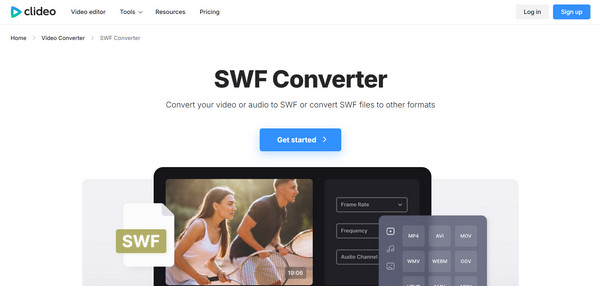
Perhaps you do not want to install anything at all; a browser-based solution offered by Clideo might be the best. This modern web-based SWF to MP4 converter handles video editing and conversion from your browser. While other online tools have file size limits, Clideo lets you convert up to 500MB for free, offering unmatched convenience.
Step 1Once you're on the Clideo Video Converter website, click the "Choose file" button and upload your SWF file from your device or cloud storage.
Step 2Next, select "MP4" from the format list.
Step 3Click the "Convert" button and wait for the server to process the conversion request, then download once it's ready.
Conclusion
Converting SWF to MP4 is not just about changing the file extension, but also about making sure all animations won't be lost along with the Flash player. Each method today offers convenience, flexibility, and reliability, so there's an option for every type of user to convert SWF to MP4 online and offline. But if you have a bunch of unplayable files, 4Easysoft Total Video Converter offers the smoothest experience. This SWF converter ensures a fast and high-quality transition from Flash to MP4, giving your old animation files a brand-new life that can be played without crashes on modern screens.
100% Secure
100% Secure
