
Remove screen passcode, Apple ID, MDM and Screen Time from iPhone safely.

Practical Solutions to Unlock iPhone from Any Carrier

Posted by Alvin Cantero to iOS Unlocker May 28, 2026
Unlocking an iPhone from a carrier for free is not a one-size-fits-all process. This is because different carriers often have different policies and different solutions. When you encounter a similar problem, first determine which carrier the SIM card you are using belongs to, then choose the appropriate method to unlock your iPhone. This guide breaks down practical methods to unlock an iPhone from various carriers, covering both built-in options and more flexible solutions.
Guide List
Things to Know Before Unlocking iPhone with a SIM Card How to Unlock a SIM card on an iPhone with Any Carrier Methods for Unlocking Various iPhone Carriers for Free A Default Way to Unlock the SIM Card on iPhone via Settings How to Unlock iPhone from Carrier with SIM PINThings to Know Before Unlocking iPhone with a SIM Card
Before attempting to unlock an iPhone from a SIM card restriction, it is important to understand how SIM locks function. A SIM card can become locked when the PIN code is entered incorrectly multiple times, triggering a security mechanism designed to protect user data. Once locked, the SIM requires a PUK (Personal Unlocking Key) code provided by the carrier to regain access.
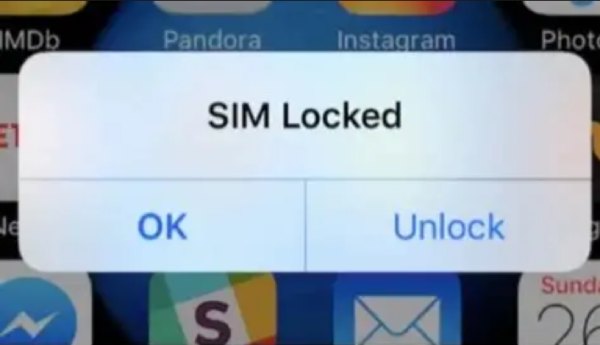
If this problem is not resolved, you will find that your iPhone will be unable to properly access a specific network. At the same time, many essential functions were found to be unavailable, causing significant trouble with daily iPhone use. Even more, inserting a SIM card from another carrier may cause the device to reject the network entirely. Understanding whether the issue is caused by a SIM PIN lock or a carrier restriction is essential before choosing the appropriate unlocking method.
How to Unlock a SIM Card on an iPhone with Any Carrier
Is there a way to unlock an iPhone with any SIM card without having to search for a specific method? Actually, it does. If you don't want to trouble yourself applying different methods for a certain carrier, 4Easysoft iPhone Unlocker can help you solve SIM-related restrictions and carrier limitations with an all-in-one solution.
Quickly resolve the SIM card lock issue of any iPhone model.
The intuitive and simple operation guide is very suitable for beginners.
No matter what the carrier is, it can be accomplished in one step.
The entire unlocking process is very stable and secure on iPhone.
100% Secure
100% Secure
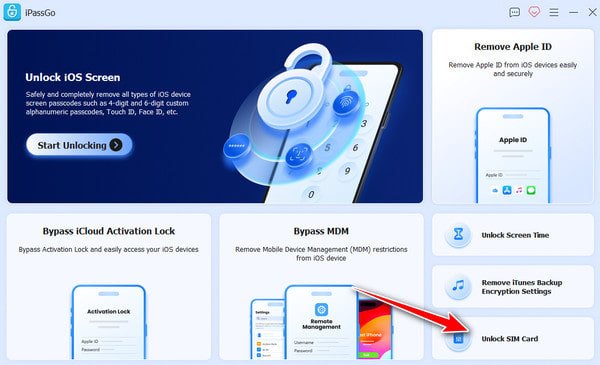
Step 1Launch 4Easysoft iPhone Unlocker and connect your iPhone to the device using a USB cable. Click the "Unlock SIM Card" button in the main interface.
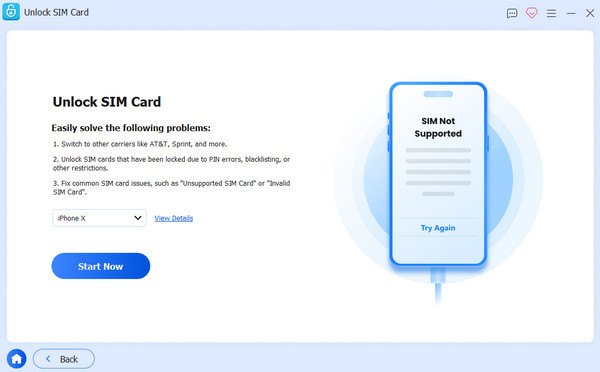
Step 2Click the "View Details" to check your iPhone's info. Once done, click the "Start Now" button to proceed.
Step 3In the new page, check if your iPhone is jailbroken. If it does, click the "Start Bypassing" button to continue.
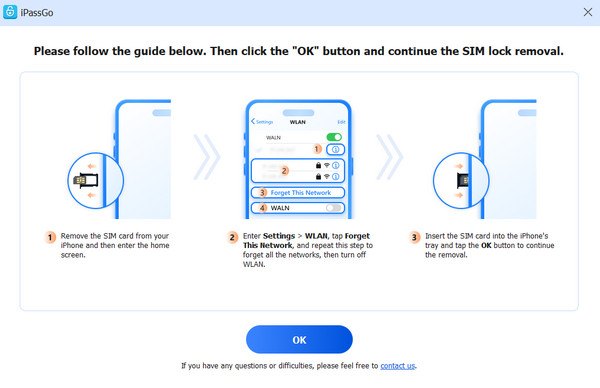
Step 4Follow the detailed instructions to set up your iPhone. All your network will be forgotten. Then, click the "OK" button.
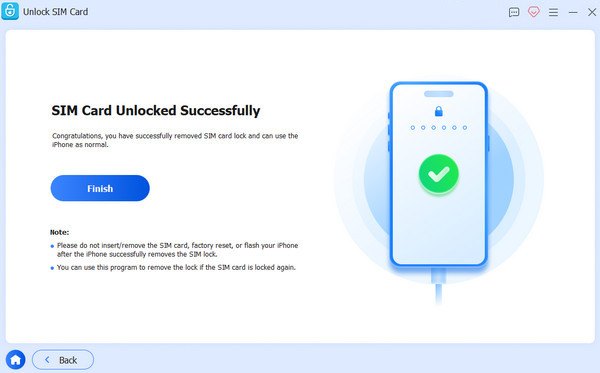
Step 5Wait for the process to finish. Finally, click the "Finish" button, and your iPhone will be unlocked from any carrier.
Methods for Unlocking Various iPhone Carriers for Free
If you want to know how to unlock an iPhone from different carriers, this section provides you with clear instructions. The following section outlines how different carriers handle iPhone unlocking and how to check the iPhone unlock status, helping you identify the correct approach based on the network associated with the device.
1. How to Unlock SIM Card on iPhone with AT&T
Step 1Launch Settings and then tap the "General" button.
Step 2Then tap the "About" button to check your IMEI number under the "Primary" tab.
Step 3Navigate to AT&T's unlock website to enter your IMEI number.

Now, you can follow the detailed instructions to unlock the SIM card on your iPhone. However, if the issue still exists, please dial *#06# to contact AT&T customer service.
2. How to Unlock SIM Card on iPhone with T-Mobile
Step 1Navigate to the official website of T-Mobile and log in with your MyT-Mobile account.
Step 2Tap to select the account and your service plan on your iPhone.
Step 3Tap the "Check device unlock status" button under the "Device" tab.

If you find that you still fail to unlock the SIM card on your iPhone, you can contact T-Mobile customer service by dialing *6 on your iPhone.
3. How to Unlock SIM Card on iPhone with Sprint
For Sprint users, there is no convenient method to unlock the SIM card on your iPhone without manual operations. To solve the issue, dial 1-844-665-6327 to ask for support with the customer's services.

After providing your IMEI number and necessary information, your iPhone will be unlocked in a few days. For further information, you can also ask the staff about how to check if your iPhone is unlocked.
4. How to Unlock SIM Card on iPhone with Verizon
For those who find that their iPhone is locked by Verizon, the lock will actually be removed after a certain period. When you buy an iPhone from a Verizon authorized vendor, it will be locked "for 60 days after purchase," as the regulation states. Therefore, to unlock the SIM card on an iPhone with Verizon, all you have to do is wait for 60 days, and the lock will be removed automatically.

A Default Way to Unlock the SIM Card on iPhone via Settings
For certain SIM-related issues, iOS provides built-in options that allow users to unlock their SIM card on an iPhone directly through system settings. This method is particularly useful when the lock is related to SIM PIN configurations.
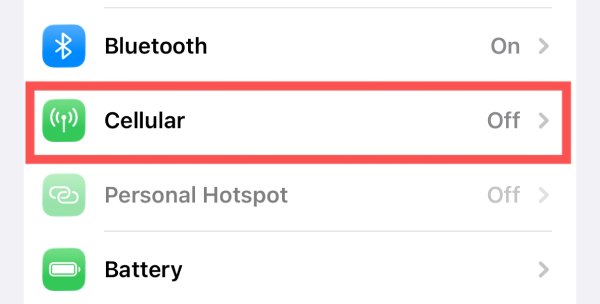
Step 1Launch Settings on your iPhone and tap the "Cellular" button.
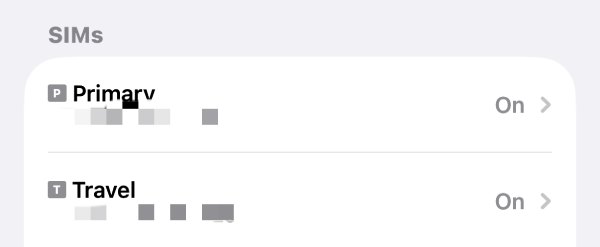
Step 2Under the "SIMs" tab, tap to select the SIM card locked on your iPhone.
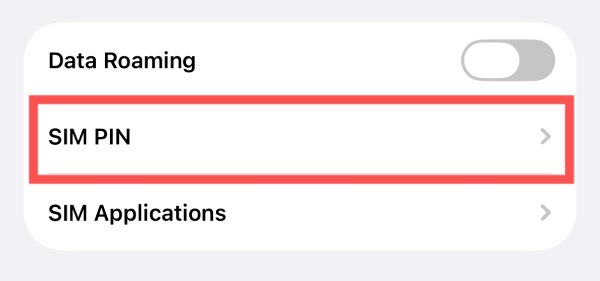
Step 3Scroll down to the bottom of this page, tap the "SIM PIN" button to unlock your iPhone from the carrier if you know your SIM PIN.
How to Unlock iPhone from Carrier with SIM PIN
In some cases, unlocking an iPhone with a SIM card issue can be straightforward as long as you provide the correct SIM PIN or PUK code. If you do remember the related information, you can follow the steps below and navigate to the page where you can provide your SIM PIN and regain access to the carrier network on your iPhone.
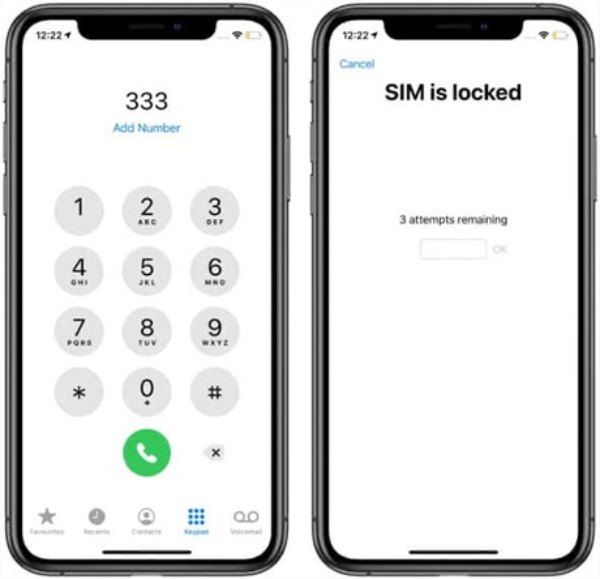
Step 1Launch the Phone app on your iPhone and dial any number, or dial a random number when the carrier locks your iPhone.
Step 2A window will pop up and interrupt your dial, asking you to enter your SIM PIN.
Step 3If you still remember your SIM PIN, type your SIM PIN, and your iPhone will be unlocked from the carrier.
Conclusion
Now you master how to unlock from carrier on an iPhone. With the support of the official customer service, you can wait for a few days and then complete the unlocking process. If you still remember the SIM PIN, you can solve this problem by yourself quite quickly. If you want to quickly reconnect to the carrier network without having the SIM PIN, 4Easysoft iPhone Unlocker can help you get the job done in no time.
100% Secure
100% Secure
