
Remove screen passcode, Apple ID, MDM and Screen Time from iPhone safely.

Effective Ways to Unlock iPhone Free with IMEI Number

Posted by Alvin Cantero to iOS Unlocker Jun 03, 2026
Unlocking an iPhone with an IMEI number is considered one of the most reliable and legitimate ways to unlock it when the carrier locks it and prevents it from connecting to other networks. This guide explains the key steps to unlock an iPhone using its IMEI number, along with an alternative solution for faster access when standard methods are not sufficient.
Guide List
Preparations Before Unlocking an iPhone Free with IMEI Number How to Unlock an iPhone Free with IMEI Number by Yourself Carrier's Support: How to Unlock iPhone with IMEI Number for FreePreparations Before Unlocking iPhone Free with IMEI Number
Before unlocking an iPhone using its IMEI number, it is essential to obtain the IMEI accurately. It can typically be found in the device settings, by dialing a specific code, or printed on the SIM tray or original packaging.
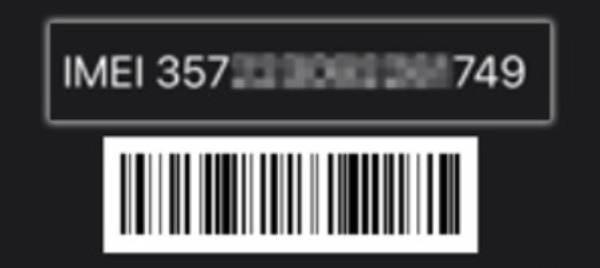
Ensuring the IMEI number is correct is critical, as any mismatch may lead to unlocking failure or delays in carrier processing. If you don't know how to check your IMEI number quickly, here are several practical ways to find it out in no time.
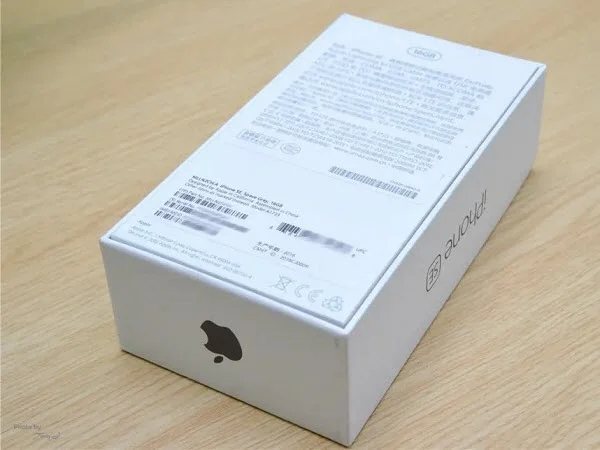
Method 1 - Check the Packing Box
If you still have the packing box you received when you bought the iPhone, this is the most straightforward way to check the IMEI number, as it is printed on the outside of the box. You can easily find your IMEI number on the information label at the bottom of the box, and use it to unlock your iPhone.
Method 2 - Dial the Specific Number
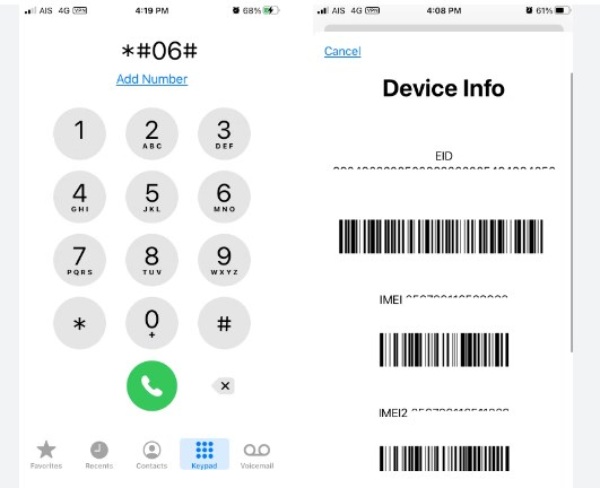
Launch the Phone app on your iPhone that you want to check the IMEI number for. Dial *#06# to display the IMEI number on the screen. Now you can copy or write down the numbers to unlock your iPhone for free using the IMEI number.
Method 3 - Check the General Settings
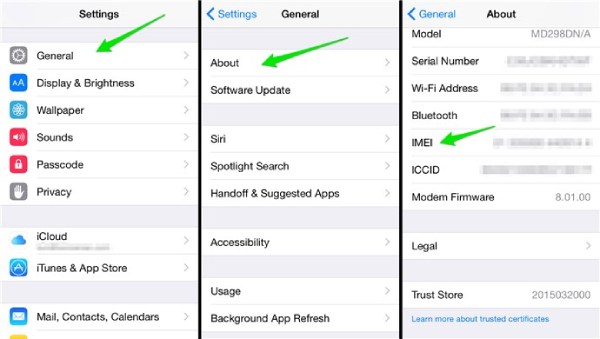
By checking your settings, you can obtain detailed information about your iPhone, including the IMEI number. If you don't know exactly where it is located in the Settings, you can follow the steps below to view your IMEI number for unlocking your iPhone for free or checking the iPhone unlock status in the future:
Step 1Open Settings on your iPhone and tap the "General" button.
Step 2Under the "General" tab, tap the "About" button for detailed information.
Step 3All detailed information, including the IMEI number, will be displayed.
Method 4 - Check the SIM Tray
If you have lost the packing box and can't access your iPhone normally, don't worry. There is still a way for you to find and use the IMEI number to unlock your iPhone for free. All you need to do is remove the SIM tray from your iPhone using a pin first, and you will find a string of IMEI numbers engraved on it.

Method 5 - Check the General Settings
In rare cases, you might need the IMEI number, but unfortunately, the iPhone is not with you. Don't worry. If the IMEI number you are looking for was previously associated with an Apple ID bound to your iPhone, you can query your IMEI number by accessing iCloud. Navigate to the official iCloud website and sign in with the Apple ID associated with your iPhone. And you will be able to check your iPhone's IMEI number.
How to Unlock iPhone Free with IMEI Number by Yourself
When manual unlocking methods become complicated or time-consuming, a dedicated tool can offer a more streamlined solution. 4Easysoft iPhone Unlocker is designed to remove various iPhone restrictions, including carrier-related issues. With a simple interface and guided steps, it allows users to unlock an iPhone with an IMEI number andregain access to their devices efficiently.
Quickly resolve the SIM card lock issue of any iPhone model.
The intuitive and simple operation guide is very suitable for beginners.
No matter what the carrier is, it can be accomplished in one step.
The entire unlocking process is very stable and secure on iPhone.
100% Secure
100% Secure
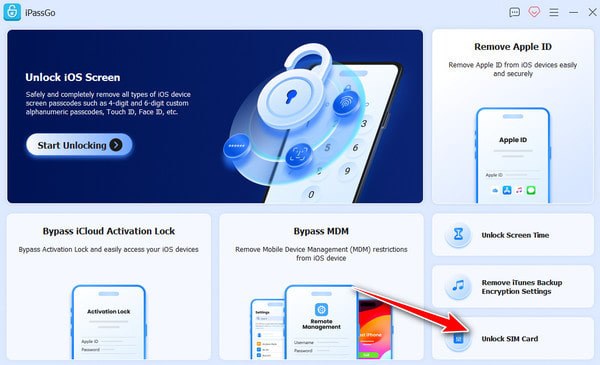
Step 1Launch 4Easysoft iPhone Unlocker and click the "Unlock SIM Card" button in the main interface.
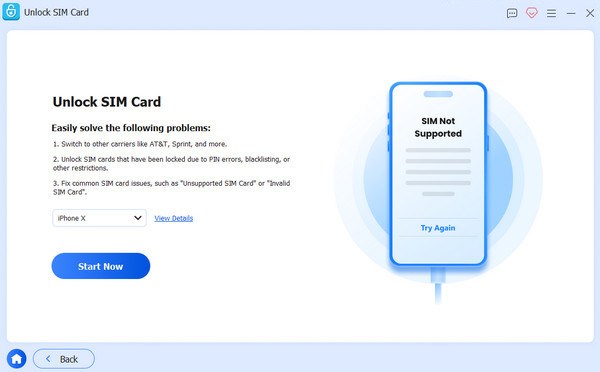
Step 2Connect your iPhone to the device using a USB cable. Once your iPhone is detected, click the "Start Now" button to proceed.
Step 3If your iPhone is jailbroken, click the "Start Bypassing" button to continue. If not, you have to jailbreak in the first place.
Step 4Now, set up your iPhone as a new one to ensure the process works. Then, click the "OK" button.
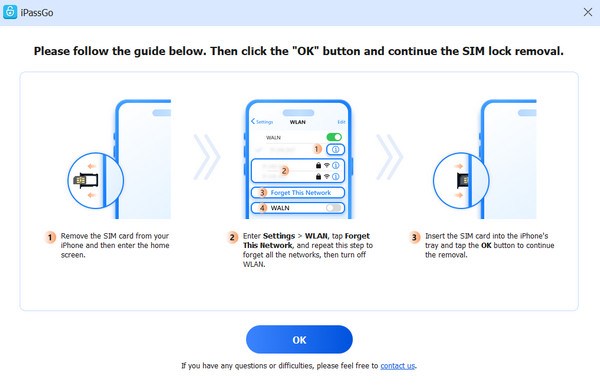
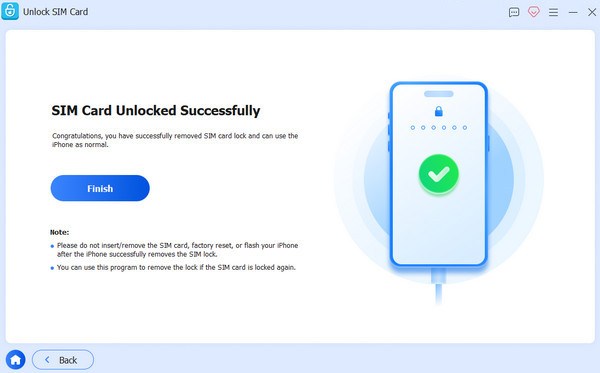
Step 5After a short time of processing, click the "Finish" button, and your iPhone will be unlocked with the IMEI number.
Carrier's Support: How to Unlock iPhone with IMEI Number for Free
For users who prefer an official and cost-free method, contacting the carrier remains a practical option. Most carriers provide unlocking services based on the device's IMEI number. This approach ensures that the iPhone is permanently unlocked and fully compatible with other networks. You can follow the steps below to unlock an iPhone with an IMEI number:
Step 1Contact the carrier by dialing its customer service number, which you can check below. Explain the situation and ask about how to check if your iPhone is unlocked.
AT&T IMEI unlock: 800-331-0500
Sprint IMEI unlock: 888-211-4727
T-Mobile IMEI unlock: 1-800-866-2453
Verizon IMEI unlock: 800-922-0204
Step 2The support will ask you for the detailed information to verify if you are the owner. You can prepare the following information in advance:
The name under which your phone is registered.
Your account number and phone number.
The IMEI number for unlocking iPhone for free.
Step 3If the verification is successful, you will receive a code for unlocking your iPhone. Follow the support's instructions to type the code and unlock your iPhone.
Conclusion
Unlocking an iPhone with an IMEI number for free is a widely accepted method for removing carrier restrictions and restoring full network access. While traditional methods are limited, you can use professional tools like 4Easysoft iPhone Unlocker to unlock the device efficiently and use it without network limitations.
100% Secure
100% Secure
