
Transfer, manage, and merge contacts on iPhone flexibly.

Merge Duplicate Contacts on iPhone - 5 Fast Ways (and More)

Posted by Alvin Cantero to iOS Transfer Sep 23, 2026
One with an old number, one with no photo, and one that's missing a last name, but all these are one person that has many versions in your Contacts app. Duplicate contacts on iPhone are one of the annoying problems that build up over time. Plus, they rarely come from just one place! Therefore, today's post will reveal five ways to merge duplicate contacts on iPhone alongside their different sources and simple habits that will keep your contacts from getting messy again.
Guide List
Identify the Source of Your Duplicate Contacts on iPhone First Remove Duplicate Contacts on iPhone with Built-In iPhone Merge Feature (iOS 16+) Detect and Merge Duplicate Contacts with 4Easysoft iPhone Transfer Get Rid of Duplicate Contacts on iPhone with iCloud.com Clean Up Duplicate Contacts on iPhone with Google Contacts Manually Merge Different Contacts Tips to Prevent Duplicates from Multiple ContactsIdentify the Source of Your Duplicate Contacts on iPhone First
Duplicate contacts on iPhone come from multiple places at once. So, before jumping into cleaning up duplicate iPhone contacts, it helps to know where the duplicates come from, since the fix depends on the cause. See below the most common sources of your duplicate contacts:
- iCloud sync conflicts. If you have ever signed out and back into iCloud, Contacts can end up having two copies of the same contact card.
- SIM card imports. Importing from an old SIM card can also create duplicates of contacts.
- Multiple email accounts. Gmail, Yahoo, Outlook, and other accounts can sync their own contact lists to your device.
- Card imports. Importing shared contacts, such as from one email or AirDrop, more than once will create a duplicate.
- Restoring from backup. Restoring an iPhone from backup can reintroduce contacts that already exist.
- Merging contacts across devices. When you choose to export contacts from your old device, iCloud can duplicate entries.
- Manual duplicate entry. You might have been saving a number a second time because you couldn't see the original entry.
Remove Duplicate Contacts on iPhone with Built-In iPhone Merge Feature (iOS 16+)
If you're running iOS 16 and above, Apple actually has a solution to delete duplicate contacts on iPhone. The Contacts app can now scan your address book for two entries on its own and has a one-tap away to help you get rid of duplicate contacts on iPhone, no extra tool needed.
Best for: Users who are on iOS 16 and newer who want a quick fix without extra installation.
Step 1Launch the Contacts app.
Step 2If duplicates are detected, you'll see a "Merge Duplicates" (or View Duplicates) at the top.
Step 3Tap on the option and review the suggested matches, and tap "Merge Al" to combine them into a single contact card.
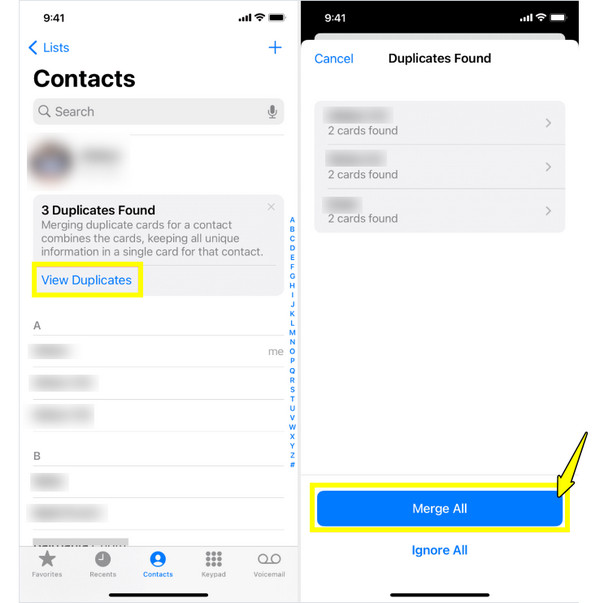
Limitations: It does not exist on iOS 15 or below. Plus, it usually misses contacts with different spellings or formatting.
Detect and Merge Duplicate Contacts with 4Easysoft iPhone Transfer
Maybe the built-in tool feels too limited when it comes to deleting duplicate contacts on iPhone. Or your duplicates are placed across iCloud or an Outlook sync. If your situation sounds like this, using 4Easysoft iPhone Transfer gives you more visibility and control. Once you connect your iPhone to your computer, the program lays out every contact source, letting you see everything before combining contacts on your iPhone. Beyond simply finding duplications, it acts as a complete media and data manager for your photos, videos, messages, and more.
Best for: Users handling huge contact lists, messy cross-platform syncs, or those who want to customize their data.
Can scan and merge duplicate contacts on iPhone across storage, SIM, and cloud.
Complete management for contacts, messages, photos, videos, and music.
Export messages as CSV, HTML, or TXT with full formatting.
All original data on your iPhone stays untouched throughout the process.
100% Secure
100% Secure
Step 1Grab a workable USB cable and plug your iPhone into your computer. Open up 4Easysoft iPhone Transfer, and keep an eye out for the prompt that pops up on your phone screen. Make sure to tap "Trust".
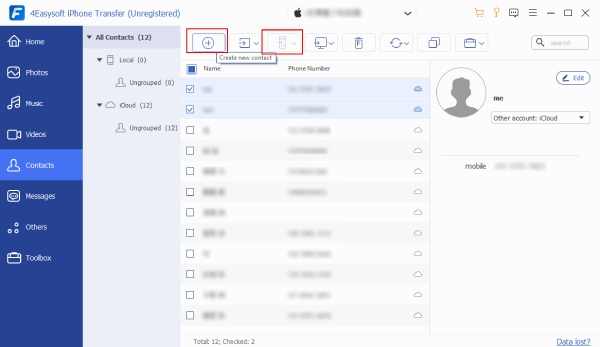
Step 2Head over to the "Contacts" category. The program will then pull up your contacts, organized where they are stored, e.g., iCloud, Outlook, or saved locally.
Click the "Duplicate" button near the top, and the app will show you all the overlapping names and numbers. Check the boxes next to the ones you want to clean up.
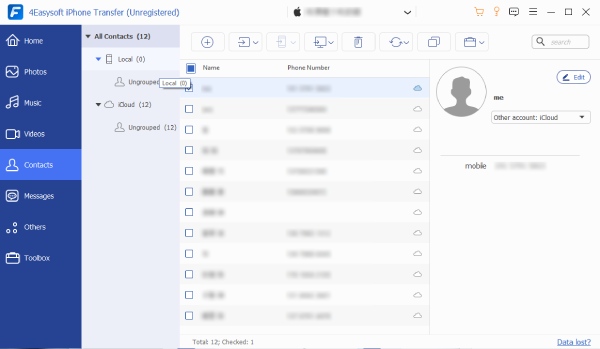
Step 3When you're ready, click the "Merge Selected" button to start merging the details into single contact cards at once. On the main screen, you can do some final deletion with the "Trash Bin" icon to delete old contacts or upload new ones from a "vCard" file.
Limitations: Requires a download and installation, and specific features may be locked behind a paid license.
Get Rid of Duplicate Contacts on iPhone with iCloud.com
Sometimes the cleanest fix is not on your phone at all; it's deleting all duplicate contacts on iPhone where they actually live, which is in your iCloud account. Since it is usually the account syncing the contacts across all your Apple devices, removing all duplicates there means fixing them everywhere automatically.
Best for: Users who have duplicates from iCloud syncing issues, device backups, or account switches.
Step 1Head to iCloud.com on a browser, and sign in with your Apple ID.
Step 2Go to the "Contacts" app to access your full address book.
Step 3There, manually search for names that appear more than once, choose the duplicate, and click the "Settings" button at the bottom left, then click on "Delete".
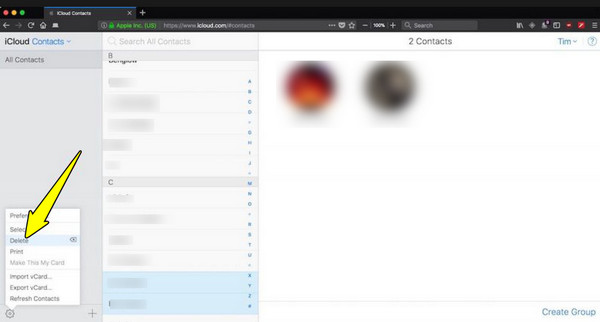
Limitations: The main iCloud website does not give one-click find and merge all duplicates for everyone; you have to identify and delete duplicates manually.
Clean Up Duplicate Contacts on iPhone with Google Contacts
Perhaps you have ever linked a Gmail account to your iPhone for syncing contacts. Then, there's a good chance that your duplicates are from Google. Luckily, Google Contacts has its own Merge & Fix tool that helps you merge and remove duplicate contacts on iPhone, by cleaning it up on the Google side, then clearing the duplicates from your iPhone, too.
Best for: Anyone who has duplicates linked to a Google account or who wants a tool that suggests matches instead of a manual search. You can use Google Contacts to sync contacts from iPhone to Mac and other devices.
Step 1Search for contacts.google.com on your chosen browser, or launch the Google Contacts app. On your desktop, click the menu above and choose "Merge & Fix". On mobile, tap "File & Manage", then "Merge & Fix".
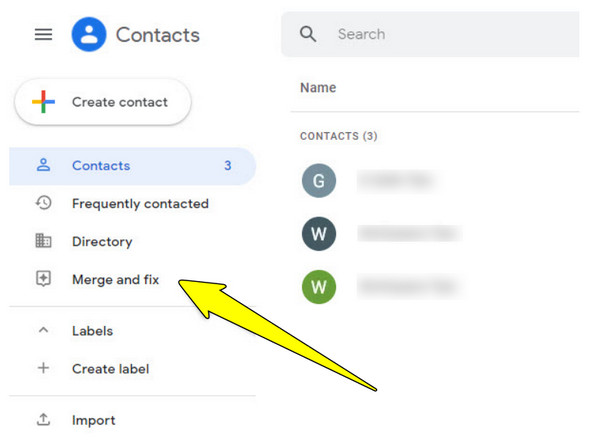
Step 2Select "Merge duplicates" to see everything Google has detected as a likely match. Review it, and tap "Merge" individually or "Merge All" to combine everything.
Step 3Once merged, give your iPhone's Contacts app a time to re-sync, since the cleaned-up list will flow back through your Google account.
Limitations: Google Contacts can only merge entries within the same account. Also, the automatic suggestions aren't perfect, so you need to review each match before merging.
Manually Merge Different Contacts
In scenarios like a contact saved under a nickname, manually linking the cards yourself is the reliable option. Doing so will help you delete duplicate contacts on iPhone that automation fails to catch as duplicates.
Best for: Anyone who has unique entries that automated methods miss, like "Mom" with her name and work number.
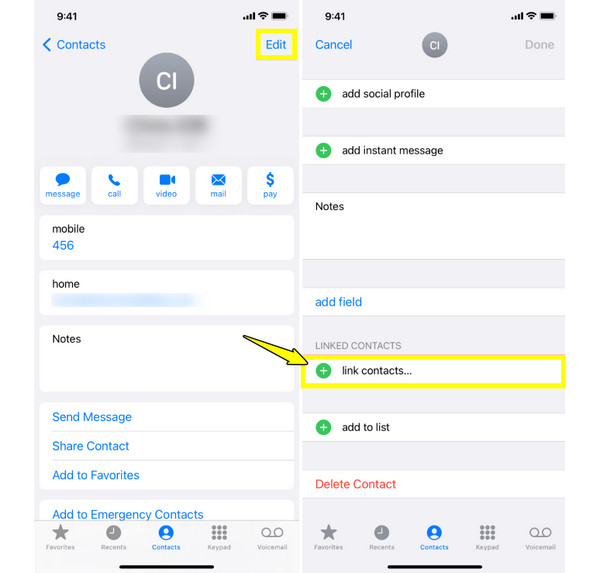
Step 1Inside the "Contacts" app, tap on the primary contact card you want to keep. Tap "Edit" in the top right corner of your phone screen.
Step 2Scroll down to the bottom and tap "Link Contacts". Search for and choose the second duplicate card you want to combine.
Step 3Tap "Link" in the top-right corner, then tap "Done" to link the details into a single card.
Limitations: Most time-consuming method by far, since you have to spot and link duplicates one at a time.
Tips to Prevent Duplicates from Multiple Contacts
Successfully deleted duplicate contacts on iPhone? Doing so feels great, but if you don't address what's causing them, you will likely be back again cleaning them all. So, here are a few practical tips you should look out for to prevent you from cleaning up duplicate contacts on iPhone.
- Stick to one syncing account. If you have iCloud, Gmail, or another account, please pick one as your primary contact source and turn off contact syncing for others.
- Check before importing a vCard/SIM contacts. Before importing, take your time to think about whether those contacts already exist on your iPhone.
- Be careful when restoring from backup. Select either restore from backup or start fresh to avoid layering a backup on top of contacts you've already saved.
- Be selective about which apps you allow to sync contacts. Apps like WhatsApp often ask for permission to sync contacts, so ensure you actually need that feature before allowing it.
- Update existing contacts instead of adding new ones. When someone changes their number, edit their saved card rather than saving it as a brand-new contact.
- Turn on automatic duplicate detection. If you're using iOS 16 and above, check the little Duplicates Found banner in the Contacts app to catch duplicates early.
Conclusion
Whether you go with a built-in merge tool, clean up iPhone contacts through iCloud or Google, you have got a bunch of ways to delete duplicate contacts on iPhone. And once you know what's causing them, keeping your list clean becomes a lot easier than doing the cleanup again. If you wish for the most thorough, one that catches duplicates across iCloud, synced accounts, and local storage, give 4Easysoft iPhone Transfer a try. Download it today and get your iPhone contacts looking exactly the way they should, one name and one number.
100% Secure
100% Secure
