
Rip DVD to MP4 (H.264/HEVC) and other popular formats with Original Quality

[In-Depth] Blu-ray Region: Dive into Codes and Restrictions

Posted by Paula Pailaga to Rip Blu-ray Jun 16, 2026
If you are also encountering the problem of being unable to play Blu-ray discs properly due to the Blu-ray disc region limits then you have come to the right place. This post provides you with basic information related to the blue light area and the restrictions that come with it. After obtaining this information, you can use professional tools to prevent playback failures caused by it. Now, start reading this post to learn about what Blu-ray regions are.
Guide List
Quick Info: What is the Region Code of a Blu-ray Restrictions on Blu-ray Disc Regions You Should Know How to Play Blu-ray Discs of Any Region Code Freely FAQs About Blu-ray RegionQuick Info: What is the Region Code of a Blu-ray
For Blu-ray region, different letters represent different regions. In simple terms, A usually covers parts of North America, South America, Japan, South Korea, and Southeast Asia. Zone B covers regions including Europe, Africa, and Oceania. Zone C represents China, Russia, and other places. If there is no clear indication, it means that this Blu-ray disc can be freely played in any of these regions.
| Blu-ray Region Codes | Region |
| Region A | U.S. Territories, North America, South America, Japan, South Korea, Taiwan, and other regions/areas from Southeast Asia. |
| Region B | New Zealand, Australia, Africa, Europe, and the Middle East. |
| Region C | Asia, except those mentioned regions earlier, including other regions/areas from Southeast Asia. |
| Region Free | Either doesn’t have a set region or supports all region codes (Regions A, B, and C). |
Restrictions on Blu-ray Disc Regions You Should Know
Why does the Blu-ray region code exist? In simple terms, this is done for the sake of copyright protection. Different countries and regions have different measures for copyright management, which requires Blu-ray distributors to design different market management approaches for this purpose. Due to the numerous differences among regions, various factors such as release time and price will all be affected.
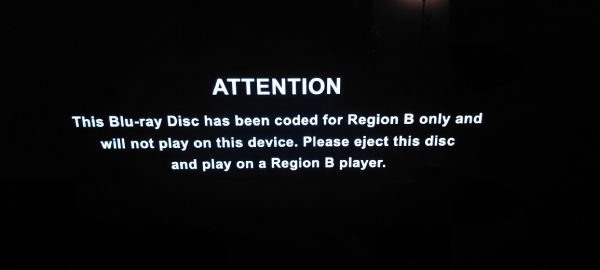
Such measures have imposed regional restrictions on the playback of Blu-ray discs. For instance, a Blu-ray disc of region B cannot be played on a Blu-ray player of region A. This restriction has caused inconvenience for users who like to purchase Blu-ray discs from all over the world. Therefore, a method to bypass the Blu-ray region restrictions is needed for enjoying 4K Blu-ray movies smoothly.
How to Play Blu-ray Discs of Any Region Code Freely
If you are looking for a way to help you avoid playback restrictions caused by Blu-ray region codes, then 4Easysoft DVD Ripper is a practical solution. With the help of this tool, you can convert Blu-ray content into the desired digital format. In this way, you can freely play these contents on any device you want without any restrictions. You can obtain the original high-quality Blu-ray content for free playback by following the steps below.

Play Blu-ray movies without region code restrictions after the process.
Rip Blu-ray discs to any digital formats and devices for playback.
Export ripped Blu-ray movies with their original quality without loss.
Edit and touch up Blu-ray & DVD movies with stunning effects.
100% Secure
100% Secure
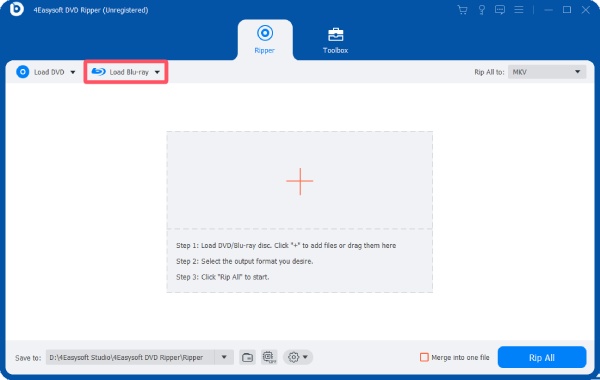
Step 1After inserting the Blu-ray disc into your device, launch 4Easysoft Blu-ray Ripper and click the "Load Blu-ray" button.
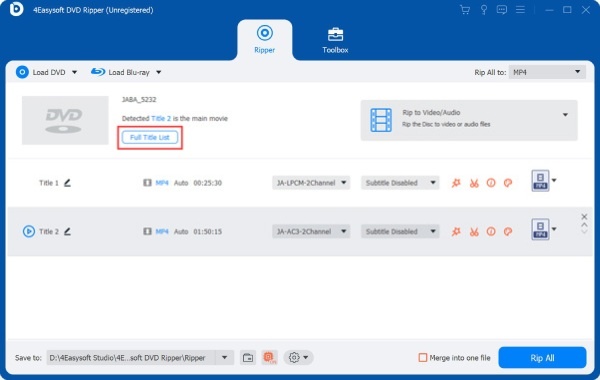
Step 2All the content within the disc will be detected automatically. Click the "Full Title List" button to display them for selection.
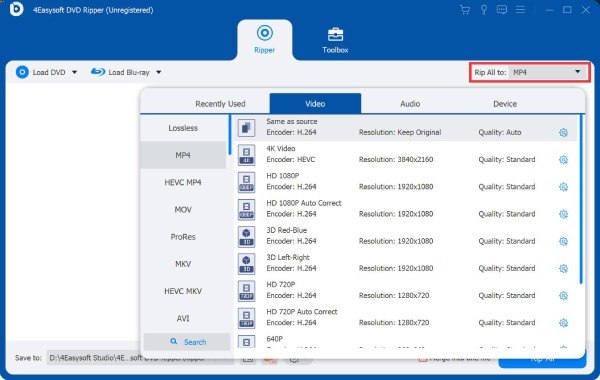
Step 3Click the "Rip All to" button and select the output format under the "Video" tab. Finally, click the "Rip All" button to save the Blu-ray content without a Blu-ray region code.
FAQs About Blu-ray Region
-
Are all 4K Blu-ray discs region-free?
There are some differences between ordinary Blu-ray and 4K content. Generally speaking, most 4K content can be played normally without any restrictions in all regions. At the same time, ordinary Blu-ray discs are still subject to the limitations imposed by the Blu-ray region code.
-
How can I check the region code of my Blu-ray disc?
Most Blu-ray discs will directly display the relevant information related to the Blu-ray region code on the packaging. You can determine the region to which the Blu-ray disc belongs by looking at the capital letters on the front or back of the package.
-
Can a Blu-ray player change regions freely?
When your Blu-ray player fails to play a specific region of a Blu-ray disc, you can change the supported region of the device to enable playback. However, such changes are usually limited in frequency, depending on your device. For instance, the PS5 only allows for a maximum of three area changes.
Conclusion
This post explains to you what a Blu-ray region is. After reading this article, you have gained a basic understanding of the relevant knowledge. After obtaining this information, you can try to avoid the obstacles that may arise when playing Blu-ray videos. However, this limitation can also interfere with your ability to freely play and watch Blu-ray content in many cases. To enjoy Blu-ray content more smoothly, you can use 4Easysoft DVD Ripper to convert Blu-ray discs into a digital format so that you can enjoy them without any restrictions.
100% Secure
100% Secure
