

4K Blu-ray Player Buying Guide: 5 Best Models Reviewed

Posted by Paula Pailaga to DVD/Blu-ray Player Jun 03, 2026
Shopping for a 4K Blu-ray player is nothing like it was a few years ago.
- LG discontinued all Blu-ray players in December 2024
- Samsung exited in 2019
- Oppo - the enthusiast favorite stopped production in 2018
- Pioneer discontinued its optical disc product line in 2025
- Reavon exited the market in 2025
What does that mean for you right now? It means your choices are slim, the competition that used to drive innovation is mostly gone, and the 4K UHD Blu-ray player you buy today may need to last you the next 5 to 10 years. Whether you're a first-time buyer or replacing an old player, understanding what's left on the market saves you from making a purchase you'll regret. This guide covers both.
Guide List
Is a Dedicated 4K Blu-ray Player Worth It vs. PS5 / Xbox Series X How We Test 4K Blu-ray Players Best 4K Blu-ray Player Hardware Recommended by Budget and Use Case 2 Popular 4K Blu-ray Player Software Common Problems and Fixes about 4K Blu-ray PlayersIs a Dedicated 4K Blu-ray Player Worth It vs. PS5 / Xbox Series X
Chances are you already own a PS5 or Xbox Series X. Both play 4K UHD Blu-ray discs. Both look pretty good. So do you actually need a dedicated 4K ultra HD Blu-ray player on top of that?
It depends on how seriously you watch movies.
For casual viewing on a mid-range TV, your console is genuinely fine. Most people won't notice the difference.
But if you have an OLED TV, an AV receiver, and you care about picture quality? The gaps start to show.
Here's what dedicated players do better:
- Dolby Vision for disc playback. Neither the PS5 nor the Xbox supports Dolby Vision for 4K UHD Blu-ray discs. Because doing so requires a physical Dolby chip that both Sony and Microsoft chose not to include. That's a real omission on a $500+ console.
- Better upscaling. Dedicated players bring dedicated upscaling processors built specifically for disc content, which are something consoles can't match. Because they're designed for a wider range of functions.
- Audio handling. Dual HDMI outputs let you send video to your TV and audio separately to your AV receiver, which is cleaner and has no compromise.
- Noise. The PS5 drive is audible when spinning a disc. A dedicated player is completely silent. And that actually matters during a quiet scene.
For audiophiles, it's a no-brainer. A top-rated 4K Blu-ray player also supports SACD, high-res audio, and 7.1-channel analog output. Consoles offer none of that.
Bottom line: Your PS5 won't embarrass you. But if you're building a real home theater setup, a dedicated Sony or Panasonic 4K Blu-ray player (or a Magnetar if budget allows) will noticeably outperform it.
How We Test 4K Blu-ray Players
We don't just watch a movie and move on. Every 4K UHD Blu-ray player goes through the same process. Here's what we actually test.
Test discs
- Recent Dolby Vision releases.
- HDR10-only titles.
- Older catalog films.
- Standard Blu-ray and DVD (upscaling).
- SACD where the player supports it.
No easy discs only. If a title is known to cause issues, it goes in.
Picture quality
Tested on a reference OLED (either an LG or Sony) with an HDR analyzer running at the same time. We're looking at whether Dolby Vision is actually signaling correctly, how the player handles tone mapping, and whether highlights are clipping or shadows are getting crushed. Upscaling gets tested separately. We push standard Blu-ray content through to 4K and look at sharpness, how edges are handled, and whether motion stays clean or starts to fall apart during fast scenes.
Audio
- TrueHD and Dolby Atmos passthrough to an AV receiver.
- DTS-HD Master Audio verified clean.
- SACD tested on supported players.
Reliability
We play Blu-ray discs for testing more than two hours. That's the window where disc freezes and stutters typically show up on weaker Blu-ray players. A top-rated 4K Blu-ray player should handle a three-hour film without hiccups.
The practical stuff
- Disc load times (timed).
- Menu speed and UI usability.
- HDMI handshake reliability across common TVs and AV receivers.
A Sony or Panasonic 4K Blu-ray player can look great on paper. But if it drops the HDMI handshake with your TV, or sits there for 45 seconds before a disc loads. That's a problem you'll deal with every single time you watch a movie. We test for that, and we'll say so when it happens.
Best 4K Blu-ray Player Hardware Recommended by Budget and Use Case
Before jumping into recommendations, know this: the best 4K UHD Blu-ray player for you depends entirely on your setup. A casual viewer on a mid-range TV has very different needs from someone running an OLED with an AV receiver. Use this breakdown to find the right fit.
| Feature | Sony UBP-X700 | Panasonic DP-UB450 | Panasonic DP-UB820 | Panasonic DP-UB9000 | Magnetar UDP800 MKII |
| Price (approx) | $179 to $220 | $200 to $240 | $360 to $400 | $700 to $900 used | $1,799 new |
| Dolby Vision | Yes, manual toggle | Yes, automatic | Yes, automatic | Yes, automatic | Yes, automatic |
| HDR10+ | No | Yes | Yes | Yes | Yes |
| HDR Optimizer | No | No | Yes | Yes | No |
| HCX Processor | No | Yes | Yes | Yes | No |
| Dual HDMI | Yes | Yes | Yes | Yes | Yes |
| SACD support | Yes | No | No | No | Yes |
| 7.1 analog output | No | No | Yes | Yes | Yes |
| Stereo XLR output | No | No | No | Yes | Yes |
| Roon Ready | No | No | No | No | Yes |
| Hi-res audio (DSD, FLAC) | Yes | No | No | Yes | Yes |
| Streaming apps | Yes, limited | No | Yes, limited | Yes, limited | No |
| Built-in Wi-Fi | Yes | No | Yes | Yes | No |
| Region free | No | No | No | No | Yes |
| Reliability | Mostly solid | Strong | Very strong | Very strong | Strong, newer model |
| Best for | Budget, SACD | Budget DV, automatic switching | Most home theater setups | Videophiles, analog audio | Audiophiles, reference setups |
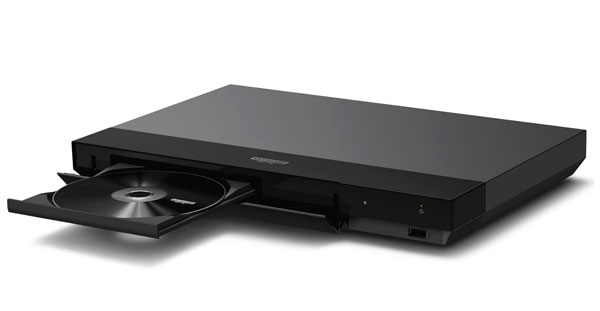
Best Overall / Best Value: Sony UBP-X700
Around $179-$200. For most people, this is the one to buy.
The Sony 4K Blu-ray player market is thin right now, and the UBP-X700 sits right at the sweet spot. It is capable enough for a proper home theater setup, priced well enough that you don't need to think too hard about it.
Picture quality
On a reference OLED with an HDR analyzer running, Dolby Vision performance is solid. Black levels hold up in difficult scenes and shadow detail stays intact. Colors lean slightly vivid, that's just how Sony UBP-X700 tunes it. Panasonic goes the other way, it is more natural and restrained. Neither approach is wrong, it just depends what you prefer. Upscaling on standard Blu-ray is clean. There's some sharpening applied. But it doesn't go too far. Some pricier players actually oversharpen more than the Sony UBP-X700 does, which says something at this price point.
Audio
TrueHD, Dolby Atmos, and DTS-HD Master Audio all pass through cleanly to an AV receiver. SACD playback is supported, something you won't find on most players at this price. Hi-res audio formats, including DSD and FLAC also work via USB.
Reliability
Extended playback over two hours was stable in testing. Some users have reported occasional freezes, particularly with Warner Bros. and Disney 4K titles. Worth running a few discs through when you first get it to confirm yours is behaving. Most units are fine.
The one real annoyance
Dolby Vision doesn't switch automatically. You have to toggle it on and off in the settings depending on the disc. Leave it on for a non-DV title and colors shift noticeably, often toward a pinkish tone. It's a solvable problem, but it shouldn't exist on a dedicated 4K UHD Blu-ray player in 2025.
Quick verdict
| Feature | Verdict |
| Dolby Vision | Yes |
| HDR10+ | No |
| Dual HDMI outputs | Yes |
| SACD support | Yes |
| Audio passthrough | Clean |
| Dolby Vision toggle | Manual only |
| Streaming apps | Limited and slow |
If you want a Sony 4K Blu-ray player that just works, this is it. The quirks are real but manageable.
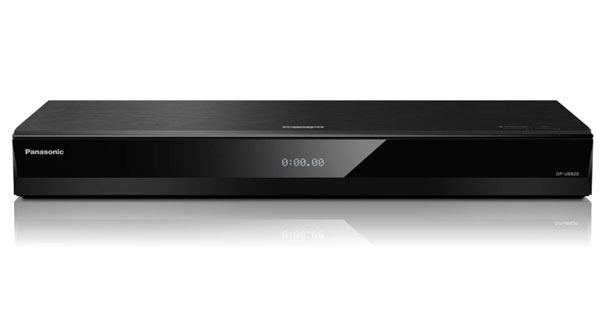
Best All-rounder with Dual HDMI: Panasonic DP-UB820
Around $360 to $400. The step-up choice for serious home theater setups.
If the Sony UBP-X700 is the sensible buy, the Panasonic 4K Blu-ray player is the enthusiast pick. It costs roughly twice as much. For the right setup, it earns that gap.
Picture quality
The UB820 uses Panasonic's HCX processor, and you notice it in how the image looks. Colours are natural and controlled, not pushed. Compare it side by side with the Sony and the difference is clear, the Sony has more pop, the Panasonic looks more grounded. On a well-calibrated OLED, that tends to mean the Panasonic sits closer to what the grade actually looked like in the colour suite.
The HDR Optimizer deserves a mention on its own. On HDR10 content it pulls back highlights that would otherwise blow out completely and recovers detail that most players just drop. It sounds like a marketing feature until you actually watch a bright scene with it on and off back to back. One thing to know: it only works on HDR10 discs. Dolby Vision and HDR10+ do their own dynamic tone mapping, so the Optimizer doesn't come into play on those discs at all.
Upscaling on standard Blu-ray is a step above the Sony. DVDs are handled cleanly too. Though their source limitations still show. You're not going to make a DVD look like a 4K disc, but the Panasonic UB820 gives it a fair shot.
Audio
TrueHD, Dolby Atmos, and DTS-HD Master Audio all pass through cleanly to an AV receiver. The UB820 also supports up to 7.1 channels of analog audio output, which is useful if you're running an older receiver without HDMI or a high-end amp that prefers analog inputs. One thing it doesn't do is SACD. If you have a SACD collection, the Sony X800M2 or a Magnetar will serve you better here.
Reliability
Ran it through a lot of discs, long films are included. No freezing. Everything are loaded and played without issues. It's a touch slower than the Sony Blu-ray Player when loading a disc, but honestly not enough to care about.
Quick verdict
| Feature | Notes |
| Dolby Vision | Yes |
| HDR10+ | Yes |
| Dual HDMI outputs | Yes |
| SACD support | No |
| HDR Optimizer | Yes, HDR10 only |
| Dolby Vision toggle | Automatic |
| Audio passthrough | Clean, 7.1 analog out |
Real users describe it as one of the last great UHD players at a somewhat affordable price, and that's about right. The market has thinned out badly, and the UB820 is one of the few remaining options that can genuinely anchor a proper home theater setup without spending Magnetar money.
Best for Audiophiles: Panasonic DP-UB9000 (used) or Magnetar UDP800MKII (new)
Two 4K Blu-ray players come up when audiophiles start shopping. Which one makes sense depends on your budget and what you actually need from it.
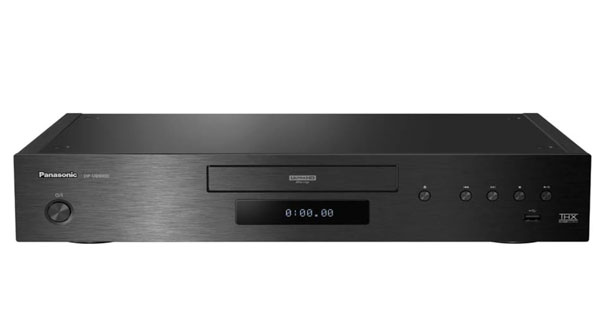
Panasonic DP-UB9000 (used, around $700 to $900)
The UB9000 is Panasonic's reference-class 4K Blu-ray player, and it has been since 2018. Nothing has really replaced it at this price point. It uses a rigid two-layer chassis with a low-vibration design, and the audio circuit gets its own dedicated power supply separate from the digital section. That matters when you're running it into a serious two-channel setup.
Picture quality is exceptional. The HCX processor and HDR Optimizer work as well here as on the UB820, with slightly tighter overall refinement. Audio performance is excellent too, with HDMI low jitter processing, 7.1 channel analog output, and support for high-res formats including DSD, FLAC, ALAC, and AIFF.
There is one catch that still frustrates people. The UB9000 does not support SACD or DVD-Audio. It never did, and it can't be added via firmware. For a player at this price, targeting audiophiles, that remains a genuine omission. If your collection includes SACD discs, look elsewhere.
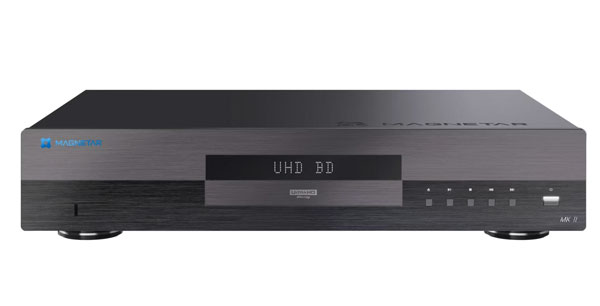
Magnetar UDP800 MKII (new, $1,799)
Magnetar announced the UDP800 MKII at CEDIA Expo 2025. It builds on the original UDP800 with seven OPA1602 op-amps to cut noise and HDMI jitter. It is better EMI shielding, and a redesigned chassis that makes disc reads noticeably quieter.
It does everything the UB9000 does, and then some. SACD playback is included. The audio performance is genuinely audiophile-grade, and the build quality reflects that with an 8kg chassis built around a heavy-duty power transformer and a 3mm steel underplate. It is also region-free out of the box, which matters to collectors.
Nearly $1,800 is a lot of money for a disc player, and most people will stop right there. Fair enough. But if you have a reference setup and you want the best new 4K ultra HD Blu-ray player you can actually buy today, this is the one.
Quick verdict
| Feature | UB9000 (used) | UDP800 MKII (new) |
| Picture quality | Reference grade | Reference grade |
| Dolby Vision | Yes | Yes |
| HDR10+ | Yes | Yes |
| Audio passthrough | Excellent | Excellent |
| SACD support | No | Yes |
| 7.1 analog output | Yes | Yes |
| Stereo XLR output | Yes | Yes |
| Roon Ready | No | Yes |
| Build quality | Very good | Reference grade |
| Reliability | Proven long-term | Strong, newer model |
| Price range | $700 to $900 used | $1,799 new |
If SACD is not in your collection and budget matters, a used UB9000 is still one of the best 4K Blu-ray players you can buy. If you want the best available new player for both film and music, the Magnetar is the answer.
Best Budget: Sony UBP-X700 or PS5 (If Already Owned)
This one comes down to a simple question. Do you already own a PS5?
If yes, use it first. See how you get on. For casual viewing on a mid-range TV, most people genuinely won't notice a meaningful difference. If you're not particularly picky about picture quality and you've never had playback issues with your console, there's a reasonable case that you don't need to buy anything.
But there are real limits.
The PS5 has no Dolby Vision support for disc playback, and immersive audio is not exactly straightforward to set up. If your TV supports Dolby Vision and you're watching films that have it on disc, you're leaving picture quality on the table every time. There are also reported issues with Xbox Series X struggling to play triple-layer 100GB Blu-ray discs, though the PS5 appears more reliable with these.
The Sony UBP-X700 fixes most of those gaps at around $179 to $220.
Picture quality
The Sony UBP-X700 delivers clean, natural-looking 4K images with strong Dolby Vision performance. Picture quality is crisp and natural-looking with excellent detail and colour, which makes it genuinely good value at this price point. The PS5 also looks decent, but without Dolby Vision it can't match the Sony on OLED displays where HDR handling really shows.
Upscaling on standard Blu-ray is solid on the Sony. The PS5 is acceptable but clearly not built with disc upscaling as a priority.
Audio
The Sony passes TrueHD, Dolby Atmos, and DTS-HD Master Audio cleanly to an AV receiver. SACD playback is included, something the PS5 simply cannot do. Enabling Dolby Atmos on the PS5 from a disc is far from intuitive, and there's no analog audio output at all. For anyone running even a modest AV setup, the Sony is the cleaner option.
Reliability
Ran it through more than 50 discs including triple-layer 4K titles and had no lockups or freezes on the updated model. Older units are a different story though, freezing complaints are well documented, so put a few discs through it in the first week just to be sure. The PS5 is reliable enough but the disc drive noise is noticeable during quiet scenes, which gets old fast if you watch a lot of films.
Quick verdict
| Feature | PS5 (already owned) | Sony UBP-X700 |
| Picture quality | Good, no Dolby Vision | Strong, Dolby Vision included |
| Audio | Workable, not intuitive | Clean passthrough |
| SACD support | No | Yes |
| Reliability | Generally stable | Mostly solid, check early discs |
| Noise during playback | Audible fan | Near silent |
| Dolby Vision for discs | No | Yes, manual toggle |
| HDR10+ | No | No |
| Cost | $0 extra | $179 to $220 |
If you already have a PS5 and a basic TV setup, start there. If you have an OLED with Dolby Vision or want proper audio handling, the Sony 4K Blu-ray player is worth the $200. It's a real upgrade for not a lot of money.
Best for Dolby Vision from Disc Specifically: Panasonic DP-UB820, DP-UB450, or Sony UBP-X700
If Dolby Vision from disc is your main priority, the good news is that all three remaining mainstream players support it. The bad news is that they handle it differently, and one of them makes you work for it.
How player-led Dolby Vision actually works
This trips people up more than almost anything else in the 4K UHD Blu-ray player space. It's worth understanding before you buy.
During the HDMI handshake, the TV tells the player what it is and how bright it can get. The player then tone-maps the Dolby Vision image before sending it to the display. This is player-led DV. Both the player and the TV need to support Dolby Vision for this to work. If your TV doesn't support it, you'll fall back to the HDR10 base layer on the disc instead. The picture will still look fine, but you won't get the full Dolby Vision experience.
Check your TV's spec sheet before assuming Dolby Vision is active. Many mid-range TVs support HDR10 but not Dolby Vision.
Picture quality
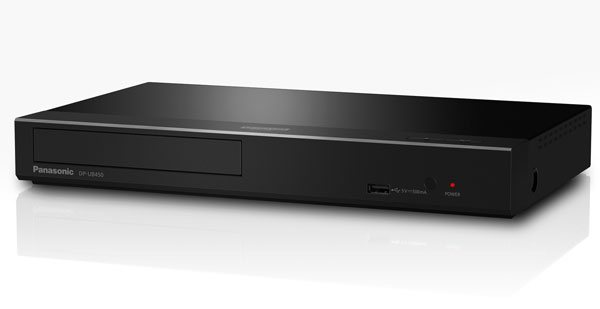
On a Dolby Vision disc, all three 4K Blu-ray players deliver strong results. The Panasonic DP-UB820 and DP-UB450 handle Dolby Vision automatically, switching in and out without any input needed. The UB450 detects HDR10, HDR10+, or Dolby Vision automatically, depending on what the disc supports, which is how it should work on every player. The UB820 adds the HDR Optimizer on top for HDR10 discs that don't have Dolby Vision, giving you better tone mapping across your whole collection.
The UB450's Dolby Vision presentation handles specular highlights and deep shadows well at its price point, making it genuinely good value if Dolby Vision is your main focus and you don't need the UB820's HCX processor or HDR Optimizer.
The Sony UBP-X700 also supports Dolby Vision and produces a strong picture. The problem is the toggle. Dolby Vision has to be switched on and off manually in the settings. Leave it on for a non-DV disc and colours shift noticeably. It's manageable, but compared to the Panasonics, it feels unfinished.
Audio
All three Blu-ray players for TV pass TrueHD, Dolby Atmos, and DTS-HD Master Audio without issues. The UB820 goes further with 7.1 analog output, which matters if you're running a more demanding AV setup. The UB450 and Sony X700 both have dual HDMI. So, you can send video to the TV and audio to the receiver on separate cables without any compromise.
Reliability
Panasonic has the stronger reliability track record here. People who've owned both regularly describe the UB820 as the cheapest Blu-ray player they've used that just doesn't freeze on 4K discs. The Sony X700 is fine most of the time, but there's a well-documented pattern of freezing on certain titles, Warner Bros. and Disney releases coming up most often in complaints.
Quick verdict
| Feature | UB820 | UB450 | Sony X700 |
| Dolby Vision for discs | Yes, automatic | Yes, automatic | Yes, manual toggle |
| HDR10+ | Yes | Yes | No |
| HDR Optimizer | Yes | No | No |
| Dual HDMI | Yes | Yes | Yes |
| 7.1 analog output | Yes | No | No |
| SACD support | No | No | Yes |
| Reliability | Very strong | Strong | Mostly solid |
| Price range | $360 to $400 | $200 to $240 | $179 to $220 |
For pure Dolby Vision from disc performance, the Panasonic DP-UB820 is the top pick. The DP-UB450 gets you automatic Dolby Vision switching at a lower price, but gives up the HCX processor and HDR Optimizer. The Sony is the budget entry point, but the manual toggle is a real annoyance that the Panasonics simply don't have.
2 Popular 4K Blu-ray Player Software
Hardware players aren't the only way to watch 4K Blu-ray content. If your setup is built around a PC or laptop, software playback is a legitimate option worth considering.
1. 4Easysoft Blu-ray Player (Best for Easy 4K Playback)
If you watch Blu-ray content on a computer, 4Easysoft Blu-ray Player is worth a look. It covers what most people need and doesn't take long to figure out.
100% Secure
100% Secure
Disc and file compatibility
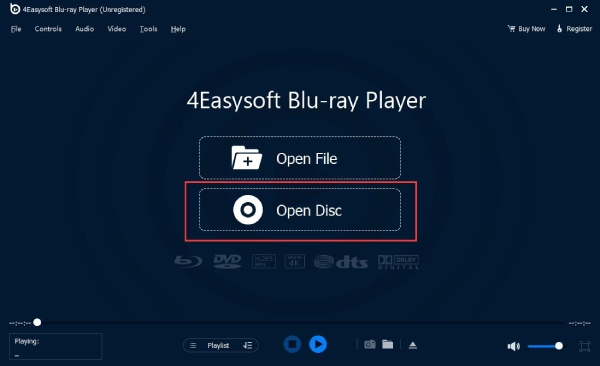
You can put in a Blu-ray or DVD disc, open a folder, or load an ISO file and it just plays. No region code issues. It handles SD, HD, and UHD video files too, so you're not jumping between different apps depending on what you're trying to watch.
Picture quality
4K content plays smoothly and the interface doesn't get in the way. The AI processing does a decent job sharpening older content, useful if you're watching DVDs alongside newer 4K discs and don't want them to look terrible by comparison. GPU acceleration is built in, so playback stays smooth even on a mid-range laptop or desktop.
Audio
Dolby Digital Surround, DTS, and high-res audio up to 5.1 channels are all covered. You can adjust volume, switch audio tracks, change devices and channels without digging through menus. Dolby TrueHD and DTS-HD passthrough work too. It's not going to replace a proper AV setup, but for watching on a computer it does the job well.
Ease of use
4Easysoft Blu-ray Player loads quickly and is straightforward compared to alternatives. Testing with multiple Blu-ray discs showed it loading straight to the disc menu without fuss. Playlist management, resume playback, subtitle customisation, and hotkey controls are all built in.
Quick verdict
| Feature | 4Easysoft Blu-ray Player |
| Platform | Windows and Mac |
| 4K UHD playback | Yes |
| Dolby TrueHD / DTS-HD | Yes |
| AI upscaling | Yes |
| Region free | Yes |
| ISO and folder playback | Yes |
| GPU acceleration | Yes |
| Price | Paid, with free trial |
For Blu-ray and 4K playback on a computer, 4Easysoft Blu-ray Player gets the job done without making you work for it. If you just want to put a disc in and watch a movie without touching any settings, this is the easiest starting point of the three options covered here.
100% Secure
100% Secure
2. VLC Media Player (Best Free Option)
VLC is most people's first instinct when they want to play a disc on their computer. The reality of using VLC for Blu-ray and 4K content is more complicated than that.
The setup problem nobody warns you about
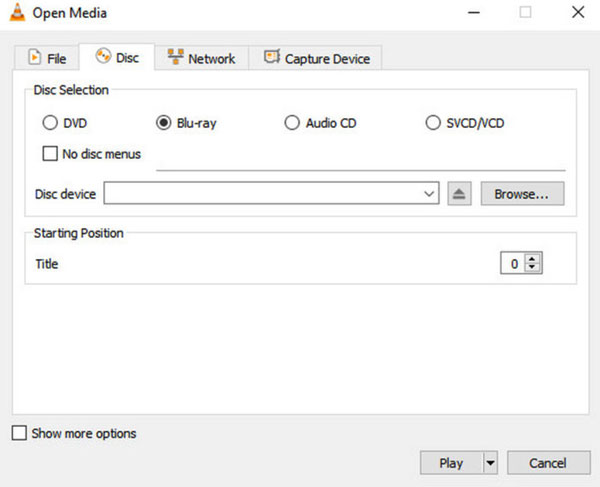
VLC can't play commercial Blu-ray discs straight out of the box. Those commercial discs use copy protection like AACS, BD+, and Cinavia. Therefore, VLC needs a separate decryption key database and AACS dynamic library installed manually. Even after doing all that, there's no guarantee newer discs will work. AACS keys get revoked, and a disc you just bought last month might still refuse to play even though everything worked fine on your older titles.
Picture quality
For standard Blu-ray and 4K file playback, VLC does a reasonable job. But on 4K UHD discs, you're only getting the basic video stream. Dolby Vision, HDR10+, and advanced audio codecs are not supported natively, so you're not getting the full UHD experience regardless of how well your setup is configured. HDR tone mapping is where it really falls short. Even with decryption keys installed and working, the HDR handling is poor. colours come out washed out and grey on most monitors, which makes a 4K disc look worse than it should.
Audio
VLC decodes Dolby Digital, Dolby TrueHD, LPCM, and core DTS. What it doesn't do is HD audio bitstreaming, which is a real limitation if your AV receiver expects a lossless bitstream from the source. For basic computer audio it's fine. But if you're running a proper audio setup, you'll hit that wall pretty quickly.
Disc menus
Some Blu-rays use BD-J menus that need Java to work properly. VLC doesn't fully support them, so the menu either doesn't show up or behaves strangely. Most people just skip the menu altogether and go straight to the movie title, which gets the job done but it's not exactly how you want to watch a film.
Quick verdict
| Feature | VLC Media Player |
| Platform | Windows, Mac, Linux |
| Price | Free |
| 4K UHD playback | Yes, with workarounds |
| Dolby Vision | No |
| HDR10+ | No |
| HDR tone mapping | Poor |
| Lossless audio bitstreaming | No |
| Blu-ray disc menus | Partial |
| Setup complexity | High |
| Region free | Manual setting required |
VLC is a genuinely excellent media player for almost everything. For Blu-ray and 4K disc playback specifically, it's a capable but frustrating option. If you're technically comfortable and willing to set it up properly, it works. If you just want to press play, you'll have a better time with a dedicated 4K Blu-ray player software.
Common Problems and Fixes about 4K Blu-ray Players
Most issues with 4K Blu-ray players come down to the same handful of problems.
1. Disc freezes mid-playback
Clean the disc first. 4K discs are far more fingerprint-sensitive than standard Blu-rays. If that doesn't fix it, power the player off, unplug it for 30 seconds, and restart. A confirmed issue on Sony UBP-X700 and some older Pioneer models, particularly on films over two hours.
2. Dolby Vision not showing on TV
Either the player, TV, or AV receiver in the chain doesn't support DV. Try connecting the player directly to the TV and bypassing the receiver. If DV appears, the receiver is stripping the metadata.
3. eceiver shows standard audio instead of Atmos
Your receiver likely doesn't support TrueHD Atmos passthrough. Use the player's dedicated audio-only HDMI output if it has one, and send audio directly to the receiver.
4. Blu-ray Player won't recognise the disc
Check for dirt or scratches first. Then confirm the disc region matches your player, and verify the format is supported. BDXL discs aren't compatible with all players.
5. No picture after connecting via HDMI
Try a different cable. If that fails, enable HDMI compatibility mode on your TV.
6. Player outputs 1080p instead of 4K
Your TV's HDMI port may not support HDCP 2.2. Switch to a port that does, usually port 1 or 2.
Conclusion
Buying a 4K UHD Blu-ray player is a longer commitment than it was a few years back. The market has shrunk a lot. Whatever you pick needs to last. For a proper home theater setup, the Panasonic and Sony players covered in this guide are reliable and still supported. For watching on a computer, don't bother fighting with VLC's setup process. Try 4Easysoft Blu-ray Player instead. It loads discs, plays 4K content, and works on both Windows and Mac without any of the configuration headaches. Streaming costs keep going up. Disc prices keep dropping. A decent player and a small disc collection goes a long way.
100% Secure
100% Secure
