

10 Best Blu-ray Ripper in 2026: Free & Paid Tested and Ranked

Posted by Paula Pailaga to Rip Blu-ray Mar 27, 2026
Looking for a blu-ray ripper that actually work in 2026? You bought the disc. You own it. You should be able to watch it on Plex without swapping discs or skipping trailers. It should be simple.
Ripping a Blu-ray disc is doable, but the path there is full of DRM errors, 50 GB files nobody warned you about, and paid ripper programs that break after one OS update. Here are the main free and paid Blu-ray rippers, tested on 4K, 1080p, Mac, Windows, and Linux.
Guide List
What We Looked at When Choosing Blu-ray Ripper Software 3 Biggest Problems People Face When Ripping Blu-ray Discs 3 Types of Blu-ray Ripper Users – Which One Are You? 10 Best Blu-ray Ripper Software in 2026: Tested and Ranked [Top List] How to Rip a Blu-ray Disc Step by Step How to Reduce Blu-ray Disc File Sizes Without Losing Quality Fixing Common Blu-ray Ripping Errors Is It Legal to Rip Blu-ray Discs You Own? Blu-ray Ripping for Specific Setups and Use Cases FAQs Bottom Line: Which Blu-ray Ripper Should You Get?What We Looked at When Choosing Blu-ray Ripper Software
We tested and researched each tool based on what actually matters when ripping Blu-ray discs.
- DRM support. A Blu-ray ripper that can't handle modern disc protection is useless. We checked which tools support AACS, BD+, Cinavia, and region codes, including newer 4K titles.
- 4K UHD compatibility. Not every Blu-ray ripper handles 4K discs. We flagged which ones do and what hardware you need alongside them.
- Output formats. Some tools lock you into MKV (Yes, MakeMKV). Others give you hundreds of options. We noted what each one outputs and whether it works for Plex Direct Play out of the box.
- Speed. GPU acceleration makes a real difference on large collections. We looked at which tools use it and how fast they actually run.
- Stability. The BD ripping software should be updated regularly.
- Price vs. value. Free tools are great when they work. Paid tools need to justify the cost. We weighed both honestly.
3 Biggest Problems People Face When Ripping Blu-ray Discs
Before picking software, it helps to know what actually goes wrong. The failure mode often points directly to which tool you need.
- Rip fails at 30%. Usually an outdated key database or unsupported DRM layer. Sometimes just a dirty disc.
- The Blu-ray movies are too large. A lossless 1080p MKV is 30-40 GB. A 4K remux can hit 100 GB.
- Plex keeps transcoding the ripped file. The server CPU works overtime when the codec or subtitle format is not natively supported by your playback device. Fixable with the right output settings.
3 Types of Blu-ray Ripper Users, Which One Are You?
The right tool depends on your goal. Most people fall into one of these three categories.
- The Casual Archivist. You want an MP4 you can watch on your laptop or TV without the Blu-ray disc. Simplicity over quality. Any decent blu-ray disc ripper works to convert Blu-ray to MP4 videos.
- The Plex/Kodi Home Server Builder. You need Direct Play-compatible formats, proper file naming, subtitle track control, and storage efficiency across a NAS. Format choices matter.
- The Lossless Quality Purist. You want a 1:1 MKV remux: full HDR, Dolby Vision, Dolby Atmos, all tracks, zero re-encoding. You will also be the one flashing drive firmware at midnight.
Most people fall between the first two. Every tool below is evaluated for all three.
10 Best Blu-ray Ripper Software in 2026: Tested and Ranked
The table below compares the main Blu-ray rippers at a glance.
| Software | Platform | DRM & Region Codes | 4K UHD | Output Formats | Best For |
| 4Easysoft DVD Ripper | Windows / Mac | CSS, APS, BD+, AACS, Sony DADC, RC 1-6 | Yes | 600+ formats, MP4, MKV, H.265 | Best all-round, Plex, casual. |
| MakeMKV | Windows / Mac / Linux | AACS, BD+, AACS 2.0 (4K) | Yes | MKV only (lossless) | Free lossless archive. |
| DVDFab Blu-ray Ripper | Windows / Mac | AACS, BD+, Cinavia, RC | Yes | MP4, MKV, MKV-Pass, ISO, 200+ | Power users, Cinavia removal. |
| HandBrake + MakeMKV | Windows / Mac / Linux | Needs MakeMKV first | Yes | MP4, MKV only | Free compression step. |
| EaseFab LosslessCopy | Windows / Mac | AACS, BD+, RC | Yes | MKV passthrough + 500+ formats | Fast lossless + format choice. |
| Leawo Blu-ray Ripper | Windows / Mac | AACS, BD+, MKB, RC | Yes | 180+ video/audio formats | Subtitle/audio control. |
| Cisdem VideoPaw | Windows / Mac | AACS, BD+, RC | Yes | MP4, MKV, MOV, 300+ | Occasional Blu-ray ripping + media editing. |
| Acrok Video Converter Ultimate | Windows / Mac | AACS, BD+, RC, 3D | Yes | 200+ formats, 4K, H.265, 3D | 3D Blu-ray. |
| VLC | Windows / Mac / Linux | None built-in (manual AACS setup required) | No | MP4, MKV, AVI, TS | Free ripping of unprotected or personal Blu-ray discs. |
| AnyDVD HD (RedFox) | Windows only | All: AACS, BD+, Cinavia, RC | Yes | System-level (any ripper benefits) | Full disc transparency. |
Top 1: 4Easysoft DVD Ripper, Best Overall Blu-ray Ripper for Most Users
Platform: Windows, Mac (Apple Silicon native)
4K UHD: Yes
Free Trial: Yes
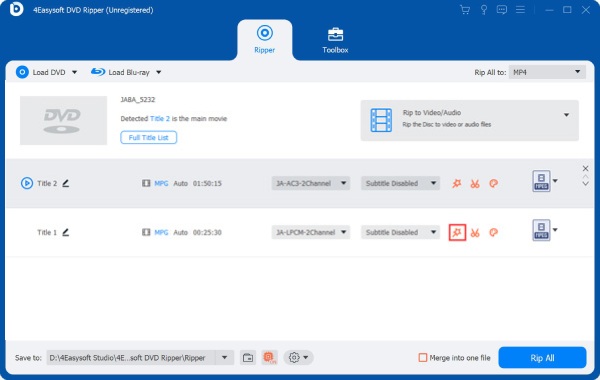
4Easysoft DVD Ripper is a good choice for most people. It can decrypt the disc and export a Plex-ready MP4 in one app. You do not have to juggle extra tools. It decrypts all major Blu-ray copy protection schemes natively, covers 1080p and 4K UHD disc formats, and outputs to the format your device needs. The interface works for first-time users and has enough codec control for experienced ones.
Why choose 4Easysoft DVD Ripper:
- Handles all major Blu-ray DRM and region codes natively, including CSS, APS, BD+, AACS, Sony DADC, and Blu-ray region codes 1-6. No third-party decrypter required.
- 30× faster GPU-accelerated Blu-ray ripping speed (NVIDIA, AMD, Intel).
- Support Over 600 output formats and device presets.
- Have built-in video editors: trim, crop, audio sync, subtitle management, and upscaling videos, no extra app needed.
- Native Apple Silicon build (M1 through M5), no Rosetta emulation, full Mac performance.
- Outputs MP4 / H.264 / AAC directly. For Plex, MP4 with H.264 and AAC Direct Plays on almost every device.
- Supports Blu-ray disc, Blu-ray ISO file, and BDMV folder as input, covers all common backup formats.
Why not choose it:
- Need to upgrade to the full version to rip a Blu-ray disc completely.
100% Secure
100% Secure
Top 2: MakeMKV, Best Free Blu-ray Ripper for Lossless Quality
Platform: Windows, Mac, Linux
4K UHD: Yes (requires UHD-compatible drive)
Free Trial: Yes (beta key renewed every 30-60 days, freely available on MakeMKV forum)
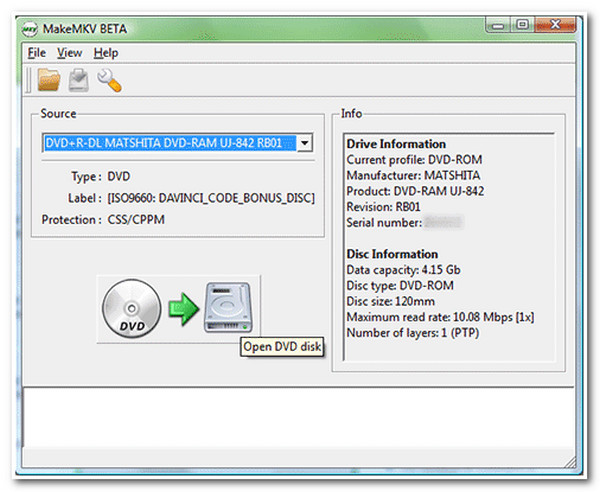
MakeMKV has been in beta since 2012. That sounds like a warning, it is not. The ripper is actively maintained and trusted by home theatre users for over a decade. The only output format is MKV, which keeps every video track, every audio track (including Dolby TrueHD and DTS-HD Master Audio), every subtitle language, and chapter markers, exactly as they are on the disc. Nothing is re-encoded. Nothing is dropped.
Worth noting: MakeMKV had a website outage in August 2025 and a 'version too old' error loop in January 2026. Both were resolved, but it is a reminder that depending on MakeMKV as your only tool carries some reliability risk. But it is still a solid free option to rip Blu-ray with MakeMKV for home use.
Why choose MakeMKV:
- Creates a perfect 1:1 lossless Blu-ray MKV copy, all video, audio, subtitle tracks, and chapter markers preserved.
- Supports AACS, BD+, and AACS 2.0 (4K Blu-ray protection) with a compatible drive.
- Free in beta mode.
- Works on Windows, Mac, and Linux. It is the only free blu-ray ripper with a full Linux version.
- ISO output option lets you preserve the original disc menu structure (Kodi users value this).
Why not choose it:
- Output files are large, usually around 30 to 50 GB for a movie. You may need to compress the video yourself if you want smaller files.
- Cinavia audio protection is not removed, so some players may mute the audio during playback.
- Ripping 4K UHD Blu-ray discs requires a compatible drive and special firmware. Setting this up can be difficult for beginners.
- The software only outputs MKV files. Other formats are not supported.
- From time to time the program can run into issues such as expired keys or version errors, which may interrupt the disc ripping process.
Top 3: DVDFab Blu-ray Ripper, Best for 4K Libraries and Cinavia Removal
Platform: Windows, Mac
4K UHD: Yes
Free Trial: Yes (30-day)
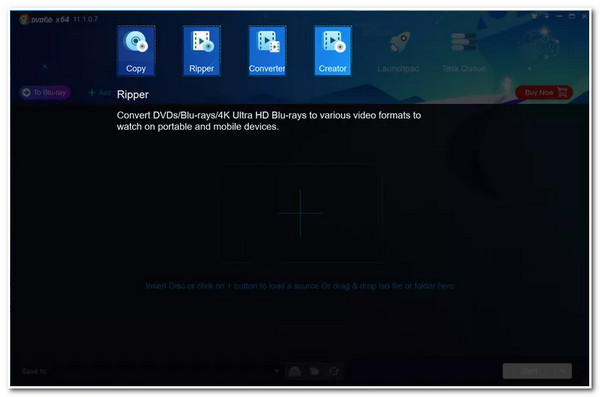
DVDFab Blu-ray Ripper is the most feature-packed tool here, but also the most expensive. It handles every major Blu-ray protection scheme including AACS, BD+, and Cinavia, and it gets updates for new disc protections faster than most. For large 4K libraries where reliability matters most, the price is worth it.
Why choose DVDFab Blu-ray Ripper:
- Cinavia watermark removal, the most widely available commercial solution for this protection layer.
- GPU-accelerated 4K UHD Blu-ray ripping with Dolby Vision and HDR10+ output support.
- AI-based video enhancer that can upscale SDR Blu-ray content to HDR10.
- Handles the widest range of Blu-ray disc protections, including newer titles that fail in other tools.
- New disc protections are usually addressed within days of release.
Why not choose it:
- It is expensive to access the full version for Blu-ray ripping.
- Cinavia removal is a separate purchase, not included in the base blu-ray ripper package.
- DVDFab Blu-ray Ripper can be heavy on system resources. It may run slowly or laggy on older computers.
Top 4: HandBrake, Free Compressor (Not a Standalone Blu-ray Ripper)
Platform: Windows, Mac, Linux
4K UHD: Yes (from already-decrypted source only)
Free Trial: Not applicable, fully free and open source
Important: HandBrake cannot decrypt protected Blu-ray discs on its own.
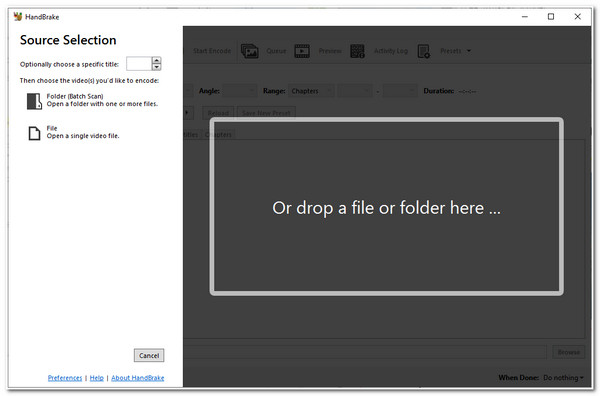
HandBrake is a video transcoder. It converts files that are already decrypted. You need MakeMKV or another Blu-ray ripper first, then you can use HandBrake to rip Blu-ray and compress it. The combination of MakeMKV with HandBrake works well as a free setup to decrypt Blu-ray discs.
Why use HandBrake:
- H.265 (HEVC) Blu-ray compression, reduce the file size effectively after blu-ray ripping.
- Excellent preset system for Plex, Apple TV, Android, and custom quality targets (RF 18-22 for 1080p).
- Batch queue for processing multiple Blu-ray rips.
- Free to use, open source, cross-platform, and actively maintained.
Why not use HandBrake alone:
- It cannot remove Blu-ray copy protection. You need a decrypted source before using it.
- HandBrake only outputs MP4 or MKV files. Other container formats are not available.
- HandBrake runs slow on older hardware without GPU encoding support.
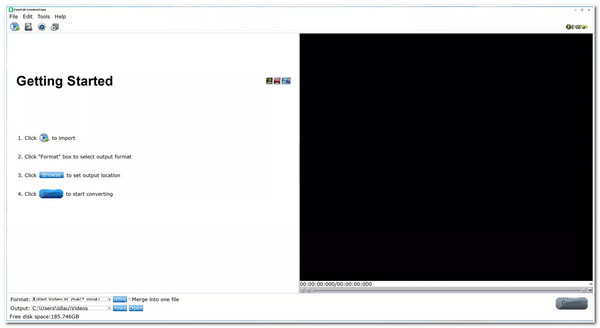
Top 5: EaseFab LosslessCopy, Best for Fast Lossless Ripping with Format Choice
Platform: Windows, Mac
4K UHD: Yes
Free Trial: Yes
EaseFab LosslessCopy falls between MakeMKV and the big paid suites. Like MakeMKV it produces a lossless passthrough copy, but it is not limited to MKV output. You can convert Blu-ray to MKV and other popular formats successfully. With 500+ formats supported, you can get lossless quality in a Plex-friendly container without a second tool.
Why choose EaseFab LosslessCopy:
- Lossless Passthrough mode preserves original Blu-ray video and audio without re-encoding.
- 500+ output formats, far more than MakeMKV's MKV-only output.
- Handles AACS, BD+, and Blu-ray region codes without external decrypter tools.
- GPU acceleration for faster conversion when transcoding is used.
- Supports HEVC and 4K output, including HDR content.
Why not choose it:
- Less community documentation and forum support than MakeMKV Blu-ray ripper freeware.
- Fewer edge-case disc protections handled compared to DVDFab.
Top 6: Leawo Blu-ray Ripper, Best for Subtitle and Audio Track Control
Platform: Windows, Mac
4K UHD: Yes
Free Trial: Yes
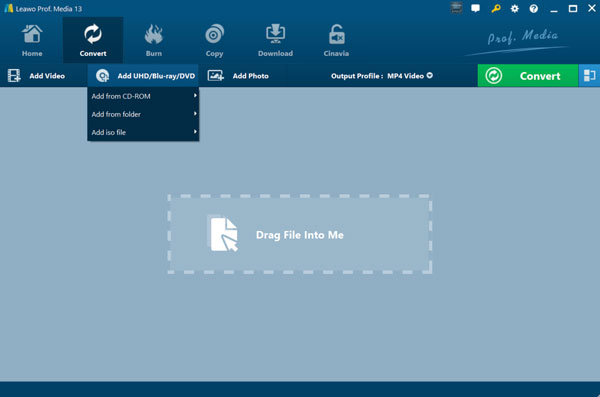
Leawo Blu-ray Ripper is the right Blu-ray converter if you need fine control over which audio and subtitle tracks end up in the final file. It handles multi-language libraries well, with per-track selection across 180+ formats. One forum user reported it ripping 4K Kino Lorber titles that MakeMKV failed on with a volume key error.
Why choose Leawo Blu-ray Ripper:
- 180+ output formats. You can digitize Blu-ray movies to popular formats easily.
- Per-track audio and subtitle selection with precise encoding control. It is ideal for non-English libraries.
- Supports AACS, BD+, MKB protection, and Blu-ray region codes.
- Hardware acceleration via NVIDIA CUDA and Intel Quick Sync.
Why not choose it:
- Slower ripping speed than most competitors.
- The access ends when you stop paying.
- Interface is dated and less intuitive than newer rippers.
Top 7: Cisdem VideoPaw, A Decent Blu-ray Converter for Mac and Windows Users
Platform: Windows, Mac
4K UHD: Yes
Free Trial: Yes (first 5 minutes per file)
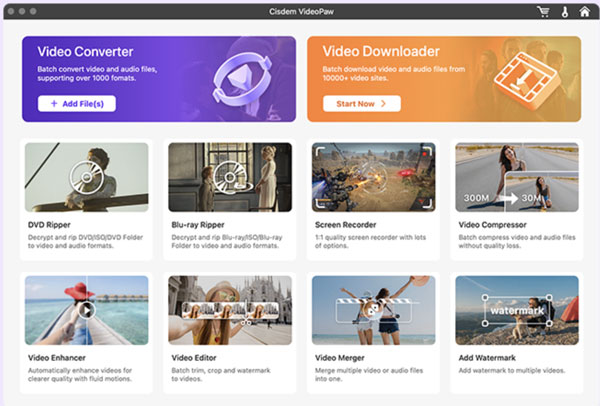
Cisdem VideoPaw provides the Blu-ray ripping function, as well as Cisdem DVD burner, DVD ripper, video compressor, video enhancer, and more. It handles protected discs, keeps the original audio and subtitle tracks, and outputs to common formats like MP4 and MKV. If you already use it for other tasks, the Blu-ray ripper is a useful extra.
Why choose Cisdem VideoPaw:
- Rips copy-protected Blu-ray and DVD discs without extra tools.
- Keeps original audio tracks and subtitles.
- Convert Blu-ray discs to MP4, MKV, and other common formats.
- Edit, compress, convert, and download videos from not only discs, but also streaming sites.
Why not choose it:
- Free trial only processes the first 5 minutes per file.
- Not built primarily as a Blu-ray ripper. The dedicated tools like MakeMKV or DVDFab do it better.
- Not ideal for strict 4K lossless remux.
Top 8: Acrok Video Converter Ultimate, Best for 3D Blu-ray Ripping
Platform: Windows, Mac
4K UHD: Yes
3D Blu-ray: Yes
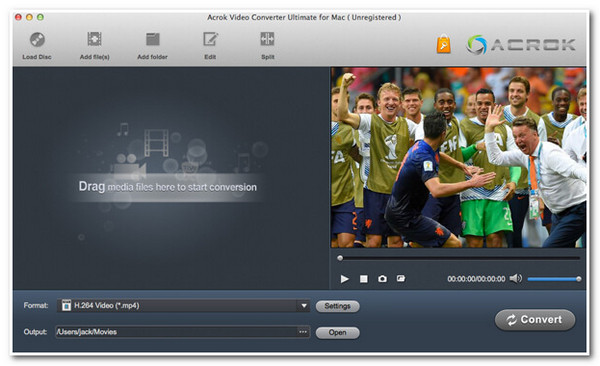
Acrok Video Converter Ultimate is what the 3D Blu-ray community usually recommends. It handles 2D and 3D discs nativel. 3D ISO, BDMV folder, and physical 3D disc all work, with fast GPU-accelerated ripping and 200+ device presets. It works well on standard Blu-ray too. But the 3D support is the main reason to use it.
Why choose Acrok:
- Works with Blu-ray discs, ISO files, and Blu-ray folders. You can load these sources directly in the software.
- Uses GPU acceleration from Intel, NVIDIA, and AMD to speed up conversion. This helps when ripping large movie collections.
- Can convert Blu-ray movies to common formats such as H.264 or H.265 video. These formats work on most devices and media players.
- Supports many output formats and device profiles, so the ripped video can play on phones, TVs, or media players.
Why not choose it:
- The interface has many settings and options. New users may need some time to learn how everything works.
- Community support is weaker than MakeMKV or DVDFab. There are fewer tutorials and troubleshooting posts online.
- Some users report bugs that take a while to get fixed between updates.
- Cannot rip Blu-ray to ISO files.
Top 9: VLC Media Player, Free But Not a Real Blu-ray Ripper
Platform: Windows, Mac, Linux
4K UHD: Yes
Free Trial: Totally free
VLC has a hidden feature that can rip Blu-ray discs into digital formats. But it is not a dedicated Blu-ray ripper, and it shows. VLC doesn't include AACS or BD+ decryption libraries, which most commercial Blu-rays require. To fix this, you need to manually add libaacs and keydb.cfg files. That setup is not beginner-friendly, and it still doesn't work on every disc.
Ripping a Blu-ray with VLC is somewhat similar to ripping a DVD, but because Blu-ray discs use stronger encryption, additional steps and requirements are needed.
Why choose VLC:
- 100% free on Windows, Mac, and Linux.
- Works fine on unprotected or personal Blu-ray discs.
- No extra software needed if the disc is not commercially protected.
- Play Blu-ray and DVD within VLC. There is no need to switch between tools.
Why not choose it:
- Cannot handle AACS or BD+ protected discs out of the box.
- Manual setup required. You need to download extra library files and key databases.
- Even with an AACS key added, VLC may still fail to read some Blu-ray discs because the library lacks data for certain disc types.
- No 4K UHD support.
- Slow. VLC has no GPU acceleration.
- Output quality and format control are limited compared to dedicated tools.
Top 10: AnyDVD HD (RedFox), Best for Full System-Level Disc Decryption
Platform: Windows only
4K UHD: Yes
Free Trial: Yes (21-day)
AnyDVD HD works at the Windows system driver level rather than inside an application. Every Blu-ray disc appears unprotected to any app that reads it. HandBrake, VLC, PowerDVD and other Blu-ray decrytpers can read the disc without needing their own DRM support.
Why choose AnyDVD HD:
- System-level Blu-ray decryption. It is transparent to all software running on the same machine.
- Handles all Blu-ray protection types: AACS, BD+, Cinavia, and region codes.
- Regularly updated for new disc releases.
Why not choose it:
- This Blu-ray to video converter is Windows only.
- Most expensive subscription on this list at €79/year.
- More complex setup than one-click tools.
How to Rip a Blu-ray Disc Step by Step
Now let's rip 4K Blu-ray movies with 4Easysoft DVD Ripper. It handles decryption and conversion in one stop. Moreover, you can trim long videos, compress large files, edit subtitles, add watermark, and apply effects using its built-in editors. If it is the first time you rip Blu-ray movies, you can start from this beginner-friendly Blu-ray converter and editor.
100% Secure
100% Secure
1. Insert your Blu-ray disc into the drive. Wait 30-60 seconds for the drive to read the disc.
2. Open 4Easysoft DVD Ripper. Click the "Load DVD" button. It scans the disc and lists all available titles.
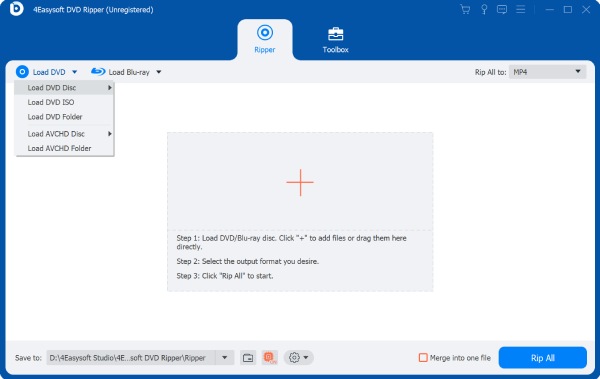
3. Click the "Full Title List" button. Tick the checkmark before your desired chatpers.
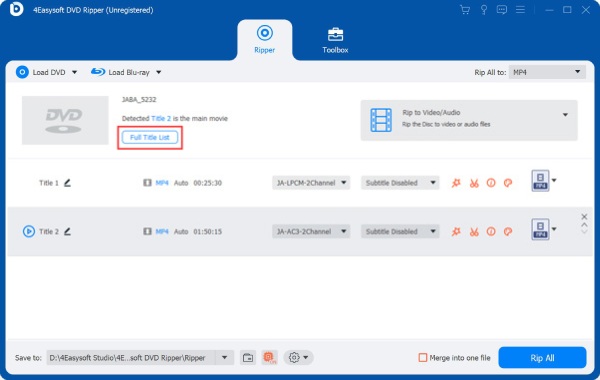
4. Select your audio track, usually English Dolby Atmos or DTS-HD 5.Select subtitle tracks: forced subtitles and your primary language. (optional)
5. Unfold the "Rip All to" list and choose your output format:
- Plex or TV playback: MP4 + H.264 + AAC, Direct Play on virtually every Plex device
- Lossless Blu-ray archive: MKV at original bitrate, perfect quality, largest file size
- Mobile or tablet: H.265 (HEVC) in MP4, smaller file, excellent quality
- Home theatre with full audio: MKV + H.264 or H.265 + original Dolby TrueHD or DTS-HD track
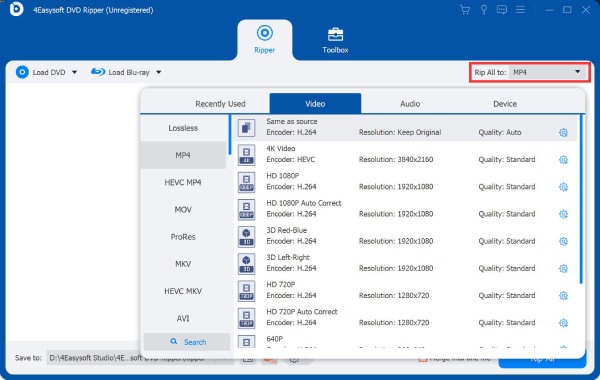
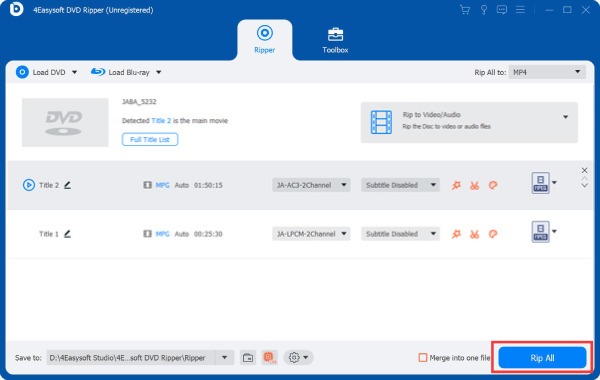
6. Set your output folder. Click the "Rip All" button to convert Blu-ray to MP4, MKV, and other formats. With GPU acceleration: 1080p disc rips in roughly 5-15 minutes; 4K UHD disc in 20-45 minutes.
100% Secure
100% Secure
How to Reduce Blu-ray Disc File Sizes Without Losing Quality
A lossless Blu-ray MKV remux gives you the best quality from a ripped disc, but 30-100 GB per film adds up. Compressing Blu-ray movies without visible quality loss comes down to two choices.
H.264 vs H.265 for Blu-ray Rips: What to Use
Blu-ray to H.264 (AVC): Compatible with every device and Plex client. A ripped 1080p Blu-ray at reasonable quality is typically 8-12 GB. Use it if you are not sure what your devices support.
Blu-ray to H.265 (HEVC): Achieves similar Blu-ray rip quality at roughly half the file size, typically 4-7 GB for 1080p. Requires more encoding time and not every older device supports HEVC playback. Though most hardware from 2018 onward handles it fine. For common 4K Blu-ray rips, H.265 is standard.
For Plex, MP4 with H.264 Direct Plays on almost every device. If all your devices are modern, H.265 cuts storage meaningfully across a large collection.
Blu-ray Remux vs. Re-encode: Which Should You Choose?
Blu-ray to Remux: Videos and audios are copied exactly from the Blu-ray disc with no re-encoding. File size matches the original disc (25-100 GB). Zero quality loss. The standard for archival Blu-ray collections and lossless home theatre setups.
Blu-ray to Re-encode: Video is compressed using H.264 or H.265. Very minor quality changes occur at any bitrate, but on a typical TV at normal viewing distances the difference is invisible. File sizes are 60-80% smaller than a remux.
Remux losslessly with MakeMKV or 4Easysoft DVD Ripper, then compress with HandBrake at H.265 RF 18-22 if storage is tight. For a full library, Tdarr (self-hosted, free) can batch-compress everything to H.265 using GPU acceleration in the background.
Fixing Common Blu-ray Ripping Errors
Blu-ray Disc Won't Load or Rip Fails Halfway
- Clean your disc or change a new one to test first.
- Update your Blu-ray ripper software.
- Try a different drive.
- Check for physical disc damage.
Copy Protection Key Exchange Failure in 4K UHD Blu-ray
- Confirm your drive actually supports UHD reading. Because standard Blu-ray drives cannot rip 4K UHD discs.
- Update BD converter to the latest version.
- Submit an AACS dump if no key exists yet.
Plex Keeps Transcoding Your Ripped Blu-ray
Plex transcodes when it cannot Direct Play a file. Here are common causes from Blu-ray rips:
- Video codec: H.265/HEVC on older clients, AV1, VC-1 from some older Blu-ray discs.
- Audio track: Dolby TrueHD and DTS-HD Master Audio require pass-through to an AV receiver; most TVs cannot decode them directly.
- Subtitle format: PGS subtitles (image-based, native to Blu-ray) force transcoding on many Plex clients, convert to SRT using SubtitleEdit or PGSToSRT.
Rip BD to MP4 + H.264 + AAC + SRT subtitles. That combination plays on virtually every Plex client without transcoding. If you already have MKV files, remux them to MP4 with MKVToolNix, it changes the container in seconds with no re-encoding.
Subtitles Missing or Out of Sync in Ripped Blu-ray
Subtitles missing: In MakeMKV, subtitle tracks are selected via checkboxes in the title list, easy to miss when ripping quickly. Re-rip with the subtitle tracks explicitly ticked.
Subtitles out of sync: Use MKVToolNix's delay offset field to shift subtitle timing without re-encoding or touching the video track.
PGS subtitles causing Plex transcoding: Convert image-based Blu-ray PGS subtitles to SRT text format using SubtitleEdit or the PGSToSRT utility. Text subtitles play on Plex clients without any server transcoding load.
Is It Legal to Rip Blu-ray Discs You Own?
The answer depends on where you live. In most countries the law is either unclear or technically unfavourable. Even though backing up a disc you purchased is entirely reasonable, you had better check local laws first.
United States
Legal status: No, technically prohibited.
The DMCA prohibits circumventing digital rights management (DRM), including the AACS and BD+ protection on Blu-ray discs. No matter whether you own the disc or intend the copy for personal use only. There is no personal backup exemption in US copyright law for encrypted media.
Enforcement has targeted distributors, not individuals ripping their own collection. There is no documented case of a US consumer being prosecuted for personal disc backup.
European Union
Legal status: Grey zone, varies by country.
Several EU countries allow personal format-shifting copies. But most of those exceptions do not extend to DRM-protected content, which covers nearly all commercial Blu-ray discs. The Netherlands and Spain have historically been more permissive, but EU harmonisation has narrowed that over time.
United Kingdom
Legal status: No, not permitted.
For a short time, UK law allowed people to copy media they owned for personal use. This rule was removed after a Supreme Court decision in 2015. Under current UK copyright law, ripping Blu-ray discs you own is not allowed.
Many people still copy their discs for private use. They bought the movie and keep the file for themselves. In practice, enforcement against individuals is extremely rare. The situation is common, but the law around it remains unclear.
Blu-ray Ripping for Specific Setups and Use Cases
Convert Blu-ray for Plex Media Server
For Plex, MP4 with H.264 video and AAC audio works on the widest range of devices. Most smart TVs, Roku, Fire TV Stick, Apple TV, iOS, Android devices, and web browsers can play it directly without transcoding.
Plex also reads file names automatically. For movies, use a format like Movie Title (Year).mp4. For TV shows, use Show Name / Season 01 / Show Name S01E01.mp4.
For storage, a NAS can make things easier. Many people use one from Synology or QNAP. Around 8 TB to 16 TB of space is usually enough for a Blu-ray collection. A two-bay RAID 1 setup is common as well. If one drive stops working, the other drive still has a copy of the data.
Play Blu-ray on Kodi
Kodi on capable hardware, Nvidia Shield Pro, Apple TV 4K, plays MKV, ISO, and M2TS natively, including lossless Dolby TrueHD and Dolby Vision. For Kodi users, MKV remux is a practical everyday choice, not just a purist one, the player handles it without conversion.
Kodi also supports Blu-ray disc menu emulation with ISO files and the right add-ons. MakeMKV can output ISO files that preserve the original Blu-ray disc menu structure for this purpose.
Rip Blu-ray on Mac (M1/M2/M3/M4/M5)
4Easysoft DVD Ripper, MakeMKV, and Cisdem VideoPaw all have native Apple Silicon builds. DVDFab Blu-ray Ripper runs on Mac but feels like a Windows port in practice.
Mac-specific issue: some macOS versions removed native external Blu-ray drive support at the system level. If your drive is not appearing, install the drive manufacturer's macOS driver or open VLC first to force system recognition of the drive before launching your Blu-ray ripper software.
Convert 4K UHD Blu-ray: The Complete Chain
UHD-compatible drive (Pioneer BDR-S13U-X, or a LibreDrive-flashed LG WH16NS60) → MakeMKV, DVDFab Blu-ray Ripper, or 4Easysoft DVD Ripper → MKV or MP4 output → HDR-capable playback device.
Expected rip times: 20-60 minutes for a 4K UHD disc depending on drive read speed and disc size. USB 3.0 is the minimum connection standard for reliable 4K rip speeds.
Rip Blu-ray on Linux
You can use MakeMKV on Linux to rip Blu-ray discs. Install it through a PPA, then connect a compatible Blu-ray drive. After inserting the disc, open MakeMKV and choose the main video track. The program saves the movie as an MKV file.
FAQs
-
Can I rip a Blu-ray disc without a Blu-ray drive?
No. You need a Blu-ray optical drive to read the disc. If you want to rip a 4K UHD Blu-ray, the drive also needs to support UHD discs.
-
How long does ripping a Blu-ray take?
Standard 1080p Blu-ray: 10-30 minutes with most tools, faster with GPU acceleration. 4K UHD Blu-ray disc: 20-60 minutes. HandBrake compression afterwards adds 20 minutes to several hours depending on your hardware and encode settings.
-
Will ripped Blu-ray files play on Apple TV, Roku, or Fire Stick?
Yes, with the right format. MP4 + H.264 + AAC works on all three via Plex, Infuse, or VLC. MKV with HEVC video works on newer devices. Dolby Vision and lossless Blu-ray audio tracks have more limited app support, check your specific device and app combination.
-
What is the best free blu-ray ripper?
MakeMKV. It is free in beta mode with a key renewed every 30 to 60 days (Free MakeMKV codes are available on the forum). Use the combination of MakeMKV + HandBrake as your free Blu-ray converter and decrypters.
-
What is the best blu-ray ripper for Plex?
4Easysoft DVD Ripper provides a one-step workflow directly to MP4/H.264/AAC formats. You can remove copy protections from homemade and commercial Blu-ray with high quality.
-
Can I keep the original Blu-ray disc menus when I rip?
Yes, rip Blu-ray to ISO format. Then use a media player that supports Blu-ray menu emulation. Kodi with the appropriate add-on is the standard approach. MKV and MP4 rips strip the disc menus, which most users prefer for a library setup.
-
How many TB do I need for 500 Blu-ray discs?
At lossless quality: roughly 12-20 TB.
At H.265 compression: roughly 4-8 TB.
Most dedicated Blu-ray collectors run a NAS with 20 TB or more as their library grows. -
Is there a 3D Blu-ray ripper?
Yes. Acrok Video Converter Ultimate is the most consistently recommended tool for 3D Blu-ray disc ripping. DVDFab Blu-ray Ripper also supports 3D disc output.
-
What is the best 4K UHD Blu-ray ripper?
MakeMKV for free lossless 4K remux (requires a UHD-compatible drive, possibly with firmware flash). 4Easysoft DVD Ripper for the most comprehensive paid 4K option including Cinavia removal and Dolby Vision output support.
-
What is the best blu-ray ripper for Mac?
4Easysoft DVD Ripper and Cisdem VideoPaw both run natively on Apple Silicon. MakeMKV is also available for Mac. For Mac-first users who want a native macOS experience, Cisdem is the most polished option; for all-round capability on Mac, 4Easysoft DVD Ripper covers more use cases.
-
What is the best blu-ray ripper software for Windows?
4Easysoft DVD Ripper and DVDFab Blu-ray Ripper are the strongest all-round options on Windows. For free ripping, MakeMKV + HandBrake covers the full workflow at no cost.
Bottom Line: Which Blu-ray Ripper Should You Get?
For most people, digitising a Blu-ray collection, building a Plex or Kodi library, handling a mix of standard and 4K discs, 4Easysoft DVD Ripper is a good first choice. It handles Blu-ray DRM without extra tools, rips fast with GPU acceleration, outputs to the format your device needs, and runs natively on both Windows and Apple Silicon Mac.
If you want lossless quality for free and do not mind more setup, MakeMKV with HandBrake works well, though MakeMKV's occasional reliability incidents are worth keeping in mind.
If you are building a large 4K library, need Cinavia removal, or have discs other tools cannot crack, DVDFab Blu-ray Ripper is worth the higher price.
For 3D Blu-ray ripping, Acrok Video Converter Ultimate is the specialist choice. For the most Mac-native experience, Cisdem VideoPaw. For system-level decryption on Windows, AnyDVD HD (RedFox).
| Your Situation | Recommended Tool |
| Best all-around, first-time or casual ripper | 4Easysoft DVD Ripper |
| Free lossless MKV archive | MakeMKV |
| Large Plex library + Cinavia removal | DVDFab Blu-ray Ripper |
| 4K UHD + full HDR / Atmos preservation | DVDFab or MakeMKV + UHD drive |
| A quick rip to MP4 on desktop | Cisdem VideoPaw or 4Easysoft DVD Ripper |
| Already have MKVs, need compression | HandBrake |
| Rip Blu-ray with subtitle/audio track | Leawo Blu-ray Ripper |
| 3D Blu-ray ripping | Acrok Video Converter Ultimate |
| System-level decryption, Windows | AnyDVD HD (RedFox) |
| Linux blu-ray ripper | MakeMKV (Linux build), VLC |
You paid for the disc. You should be able to watch it on your own terms. The 4K blu-ray rippers are out there, they work, and the community around them is helpful. The first rip is the most confusing. After that it becomes routine.
100% Secure
100% Secure
