
Burn videos to DVD/ Blu-ray with templates and editors.

How to Convert VCR Tapes to DVDs Without Quality Loss

Posted by Paula Pailaga to Burn DVD/Blu-ray Jun 11, 2026
Currently, DVD is a leading choice for the conversion of analog video to digital format. In fact, VCR to DVD refers to two stages, converting analog videos to digital files, and writing digital videos to an optical disc. According to our research, there are three methods to get the job done. This tutorial describes the prerequisites and demonstrates the workflow for each method so that you can digitalize your video tapes easily.
Guide List
The Best Way to Burn VCR to DVD with a Computer How to Copy VCR to DVD Using a DVD Recorder with VCR Top 3 VCR to DVD Services FAQs about How to Convert VHS to DVDThe Best Way to Burn VCR to DVD with a Computer
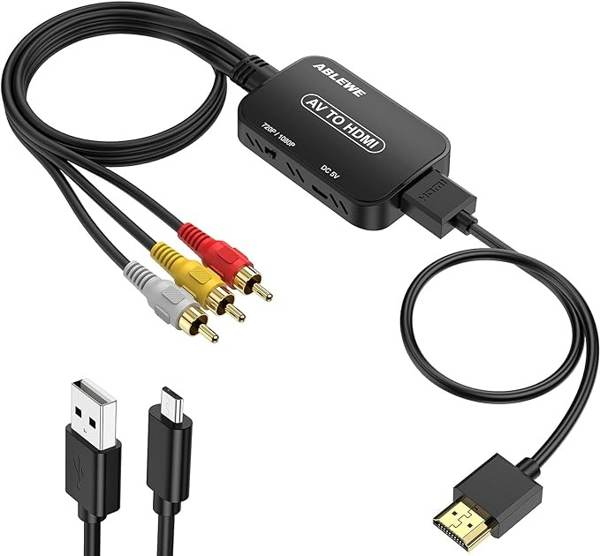
To convert VCR tapes to DVDs at home, you need a computer, a USB-to-composite video converter, and DVD burner software. You can purchase a converter and the price is from several to dozens of dollars, like USB video capture device.
The converter usually comes with software. Install the software on your PC. Plug the USB side of the converter into your computer, and the red, white, and yellow cables into your VCR. Play the video table on your VCR, and hit the record button on the software to begin digitizing the videotape.
What You Actually Need
- 1. A USB video capture device
- 2. DVD burning software (like 4Easysoft DVD Creator)
- 3. A computer with a DVD drive (most modern laptops need an external USB DVD burner, ~$25-$40)
When it is done, you also need a powerful DVD burner to convert VCR to DVD without losing quality. From this point, 4Easysoft DVD Creator is the best option. It utilizes advanced technology to protect video quality.
Burn digital videos into DVDs with one click.
Support almost all video and audio formats.
Equip a menu creator and many templates.
Enhance video quality automatically with AI.
100% Secure
100% Secure
Here are the steps to convert a VCR to a DVD:
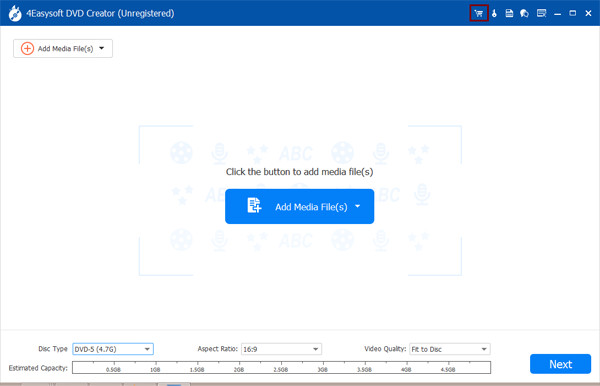
Step 1Open the best DVD burner after installing it on your computer. It is compatible with Windows 11/10/8/7/XP/Vista and Mac OS X 10.9 or above. Insert a blank DVD into your computer. Choose "DVD Disc", and hit the "Add Media File(s)" button. Browse the converted video files and open them.
Step 2Click the "Next" button to open the menu creator window. Choose your favorite template on the right side, and customize the background picture and music. If you do not want to use a DVD menu, check "No Menu" at the bottom right corner.
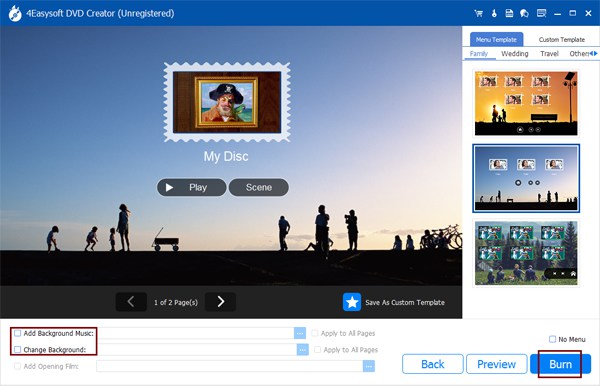
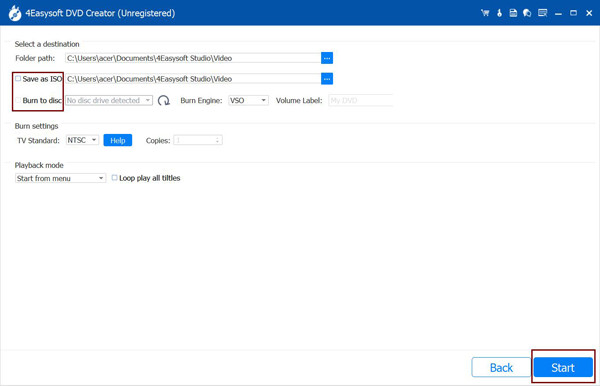
Step 3Next, click the "Burn" button, select "Burn to disc", and choose your DVD drive from the drop-down list. If you do not want to burn the DVD right now, select "Save as ISO" and set a destination folder. Finally, click the "Start" button to begin converting VCR to DVD. Many other popular formats are supported. For example, you can burn MP4 to DVD.
How to Copy VCR to DVD Using a DVD Recorder with VCR
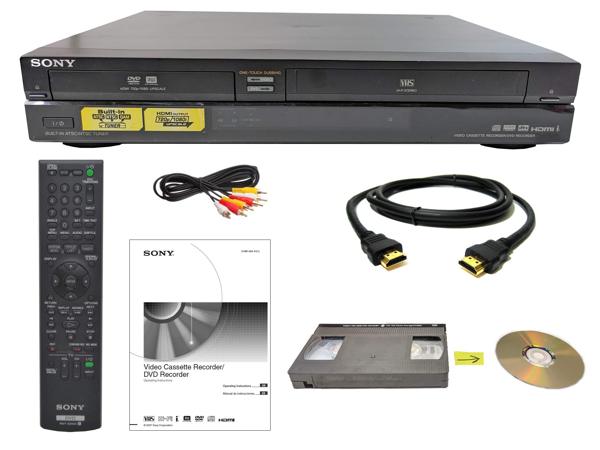
A DVD recorder with VCR combo is a one-stop solution to convert VCR tapes to DVDs. You can purchase a new or second-hand device on marketplace platforms, like Amazon, eBay, and more.
The DVD recorder and VCR combination has two slots, one for video tapes and the other for DVDs. Insert a video tape into the VHS slot, and a blank DVD into the disc slot. Then press the "DVD record" button on the remote or the device to begin converting VCR to DVD. This means no extra connection cables are required.
Top 3 VCR to DVD Services
Legacybox
Pricing: Starts at $65.98 for a 2-item Starter kit (approximately $33 per tape). Add $6.99 for a thumb drive or $7.99 for a disc set. Cloud storage is free for 90 days, then $9.99 per 90 days.Turnaround: 10-12 weeks standard. Expedited available for extra cost.What they accept: VHS, VHS-C, S-VHS, Betamax, MiniDV, Hi8, Digital8, 8mm, VHS-C, audio cassettes, and more.Verdict: Reliable packaging and tracking system. Quality and turnaround are inconsistent. Better for large batch orders where the per-item cost is lower. High-risk for irreplaceable, one-of-a-kind tapes.
iMemories
Pricing: ~$29.99 per VHS tape at regular price. SafeShip Kit is $14.99 (crush-proof box, waterproof bags, prepaid FedEx label). DVD copies: $19.99 per disc. USB thumb drive: $39.99. Cloud streaming app: $7.99/month or $49.99/year.Turnaround: 2-3 weeks, noticeably faster than Legacybox.What they accept: VHS, VHS-C, MiniDV, Hi8, Digital8, Betamax, 8mm/16mm film, photo prints, slides, negatives. Does NOT accept audio cassettes.Verdict: Faster and generally more customer-friendly than Legacybox. Better for smaller batches. Watch for hidden cloud storage costs and confirm your tape format is supported before ordering.
FAQs about How to Convert VHS to DVD
-
How much does it cost to convert VHS to DVD?
The cost depends on the way you choose to convert VHS to DVD. If you do the job at home, you need to purchase a USB-to-composite video converter or a VCR-to-DVD recorder, while the prices of online services are various.
-
Is it legal to copy VHS to DVD?
If the VHS tape is copyright protected, it is illegal to convert VHS to DVD. For homemade VHS, it is okay to copy VHS to DVD.
-
Is it better to convert VHS to DVD or digital?
Converting VHS to digital videos may take lots of space on your computer. If your computer has limited internal storage capacity, you can convert VHS to DVD, which is an external storage.
Conclusion
This guide has demonstrated three methods to convert VCR tapes to DVDs. A DVD recorder with a VCR combo is the easiest way, but you have to purchase a proper device. Or you can create an order with a professional service. Another way is completing the job with a computer using 4Easysoft DVD Creator. If you have other questions about this topic, please feel free to leave a comment below this post.
100% Secure
100% Secure
