
Rip DVD to MP4 (H.264/HEVC) and other popular formats with Original Quality

How to Rip 4K Blu-ray with Original Quality on Windows/Mac

Posted by Paula Pailaga to Rip Blu-ray Jun 09, 2026
If you want to learn how to rip 4K Blu-ray discs to play the content on them more conveniently, then you've come to the right place. This post will show you how to complete this task quickly. By ripping 4K Blu-rays, you can ensure that high-quality Blu-ray videos have greater compatibility. Read this post right now to learn about the knowledge related to Blu-ray ripping and master this skill.
Guide List
Why Rip 4K Blu-ray Playback on PCs How to Rip 4K Blu-ray without Quality Loss [Bonus] A Free 4K Blu-ray Ripper for MKV Formats Only Tips for 4K Blu-ray Ripping with a Better OutputWhy Rip 4K Blu-ray Playback on PCs
Before starting the process of ripping 4K Blu-ray discs, one necessary step might be to understand why this is necessary. In simple terms, doing this has two significant advantages. First of all, repeatedly inserting and removing the discs will cause physical wear and tear to the optical discs themselves, which means that some scratches or even damage may occur. And once these physical damages become severe, your precious Blu-ray discs are very likely to fail to play normally. By burning Blu-ray discs into a digital format, you can effectively protect Blu-ray discs.
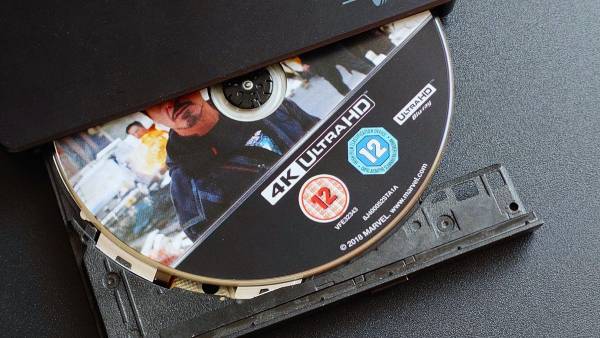
If you want to watch the content stored on a Blu-ray disc, you need to have a device that can read Blu-ray discs and play it under a stable connection. This becomes somewhat troublesome for users whose devices do not have built-in drives. As it is obvious, they would need to purchase an additional external device, which relies on a rather complicated wired connection. By ripping 4K Blu-ray discs and converting them into a digital format, you can access them more freely on any device. Whether at home or when out and about, as long as you have a device capable of playing videos, you can enjoy high-quality 4K Blu-ray content anytime and anywhere.
How to Rip 4K Blu-ray without Quality Loss
If you want to enjoy high-quality original video content, then you will need a professional 4K Blu-ray ripper to assist you in completing this task. 4Easysoft DVD Ripper undoubtedly has the ability to handle it. During the ripping process, it can completely preserve all the contents on the Blu-ray disc without any loss of quality. This means that even menus, subtitles, audio tracks, and even HDR effects can all be completely preserved. In addition, you can customize and select the output format of the video to meet your playback requirements.

Maintain stunning 4K and crystal-clear audio quality during the ripping process.
Support ripping multiple Blu-ray discs simultaneously.
Rip 4K Blu-ray discs to popular video formats, like MP4, MKV, AVI, and more.
Customize output settings with their parameters to meet your needs.
100% Secure
100% Secure
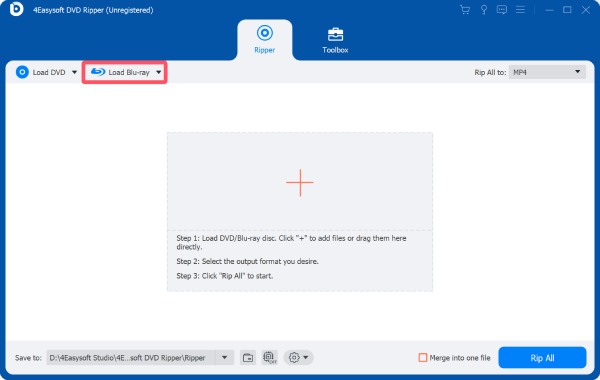
Step 1After inserting your Blu-ray disc, launch 4Easysoft DVD Ripper and click the "Load Blu-ray" button.
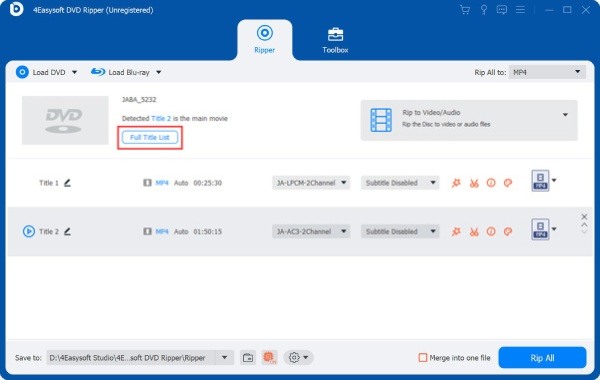
Step 2Click the "Full Title List" button to display all the content within the disc. Click to select the content and then click the "OK" button.
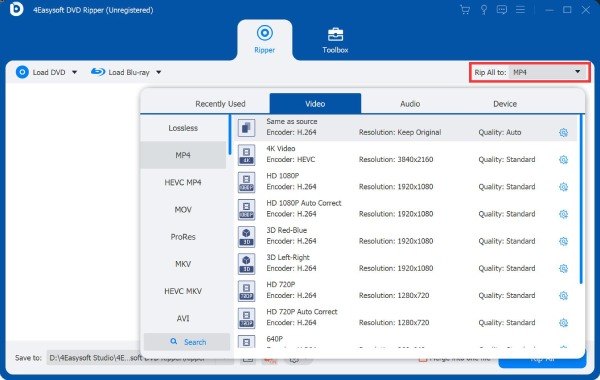
Step 3You can adjust the output formats by clicking the "Rip All to" button. Finally, click the "Rip All" button to rip a 4K Blu-ray disc.
[Bonus] A Free 4K Blu-ray Ripper for MKV Formats Only
For those users who are looking for a free way to rip 4K Blu-ray content, there are still quite a few options available to them. While conducting a search, you may come across numerous results, but not all tools can assist you in completing this task. After testing, MakeMKV stood out as a reliable option. Although it lacks certain custom options and additional editing tools, its two biggest advantages are that it is free and lossless. You can quickly obtain the desired Blu-ray content by following the steps below.
Step 1Insert your 4K Blu-ray disc and launch MakeMKV. The content within your disc will be detected automatically.
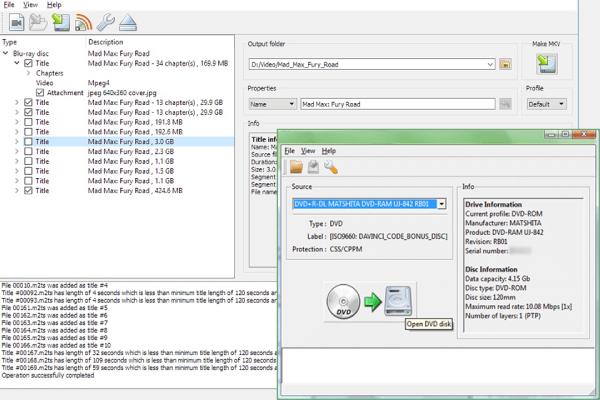
Step 2After a short time of processing, all the content will be listed. To rip 4K Blu-ray videos, click the option with the largest size.
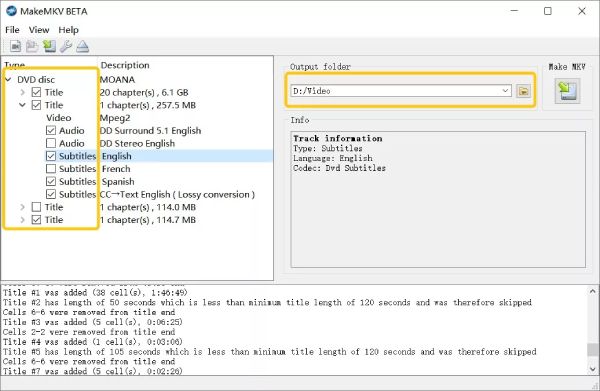
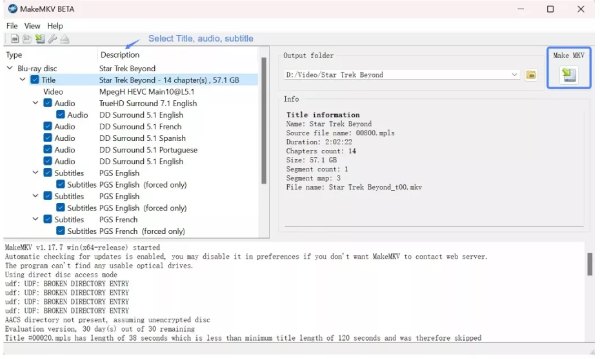
Step 3Finally, click the "Make MKV" button to rip the 4K Blu-ray disc and convert Blu-ray to MKV format.
Tips for 4K Blu-ray Ripping with a Better Output
This section offers you some useful tips, aiming to achieve better output results when you rip 4K Blu-ray. These tips not only cover the tools you use, but also include some related content, such as hardware and parameters. After mastering these tips, you can ensure that the 4K Blu-ray ripping process can be completed smoothly and result in a relatively good quality.
1. Ensure Sufficient Storage Space
Before you start ripping 4K Blu-ray content, an important preparation step is to have sufficient storage space. Generally speaking, Blu-ray videos tend to take up a considerable amount of space due to their high quality. If you fail to reserve sufficient storage space to save the output files, they may be lost directly.
2. Select the Proper Output Format
If the 4K Blu-ray ripper you choose offers the option of output format, then you should pay close attention to it before making your selection. Different devices or media players have varying support for different video formats. This means that videos in incompatible formats will not play properly. Therefore, choosing an appropriate output format is also of great significance.
3. Use Hardware Acceleration
For large files like Blu-ray videos, this usually takes some time to process them. One tip is that enabling hardware acceleration before starting the Blu-ray ripping process can significantly enhance the speed.
4. Preserve HDR and Audio Tracks
When you choose a 4K Blu-ray Ripper, it is best to select a tool with stronger processing capabilities. Specifically, it should have the capability to save HDR effects and audio tracks. These additional parameters are an important guarantee for the high quality of Blu-ray content.
Conclusion
After ripping 4K Blu-rays, you can access them at any time and from any place without any restrictions. However, it should be noted that the choice of the tool you make will have a significant impact on the outcome. To obtain the original high-quality Blu-ray video, you can use 4Easysoft DVD Ripper to rip the 4K Blu-ray content.
100% Secure
100% Secure
