
Convert FLV to MP4 and Edit Videos with Powerful Tools

FLV to MP4: 3 Ways to Change FLV Format to MP4 & Comparison

Posted by Aira Lesly Escoto to Convert Video Dec 19, 2025
The FLV files were once standard on older video platforms, but many modern devices no longer support this format. For this, the need to convert FLV to MP4 has become essential for smooth playback, compatibility, and easier sharing. Therefore, this guide shares three reliable ways to change FLV to MP4 quickly, alongside differences between the two formats. Whether you want an online tool or a desktop converter, you'll find a method here that fits your needs.
Guide List
Differences and Compatibility Issues Between FLV and MP4 The Simplest Way to Convert FLV to MP4 Free FLV to MP4 Conversion Using VLC Player Quick Online FLV to MP4 Conversion with CloudConvertFLV vs. MP4: Differences and Compatibility Issues
Before deciding which conversion method to use for the FLV to MP4 conversion, understand first how the two formats differ, since these differences affect playback, editing, and sharing. See below the key differences and compatibility notes of FLV and MP4 formats.
• Compatibility Across Devices. Since Flash has been discontinued, the FLV format is no longer supported on mobile devices, smart TVS, or modern browsers. MP4 works seamlessly on computers, mobile devices, browsers, video editors, and streaming platforms.
• Compression and Quality. FLV usually uses older compression techniques that produce larger file sizes and lower efficiency. Meanwhile, MP4 supports modern codecs such as H.264 and H.265, giving you smaller files with better quality.
• Editing and Sharing. Many video editing software no longer accept FLV, as well as on social media platforms during uploads. MP4, on the other hand, is widely accepted everywhere and can be edited in almost any video editor.
• Performance and Playback Smoothness. FLV video files may struggle to play smoothly on newer apps. MP4 runs smoothly even on low-power devices due to its enhanced decoding support.
The Simplest Way to Convert FLV to MP4
If you need a fast, dependable way to save FLV as MP4, using a dedicated converter is often the most powerful and efficient solution. Among so many tools today, 4Easysoft Total Video Converter stands out for offering excellent speed, ease of use, and impressive output quality. Thanks to its hardware acceleration support, FLV videos can be transformed into MP4 format within seconds, without affecting your computer's performance or losing quality. In addition to basic format conversion, the program includes a full suite of editing tools, letting you trim, add filters, crop, rotate, or enhance your video before exporting it.
Converts FLV to MP4 while preserving high quality or giving lossless results.
Supports many format conversions such as MOV, MKV, AVI, MP3, FLAC, and more.
GPU acceleration ensures extremely fast conversion speeds.
Fully customizable export options, e.g., resolution, format, bitrate, etc.
100% Secure
100% Secure
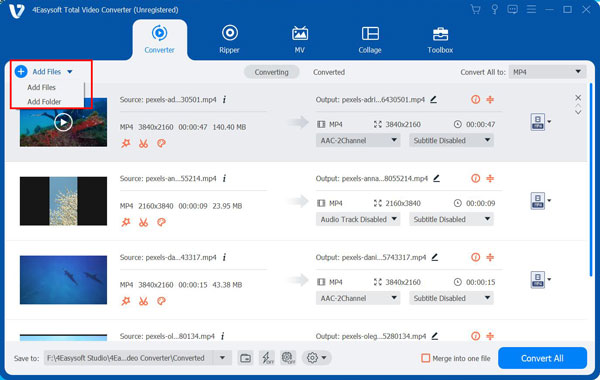
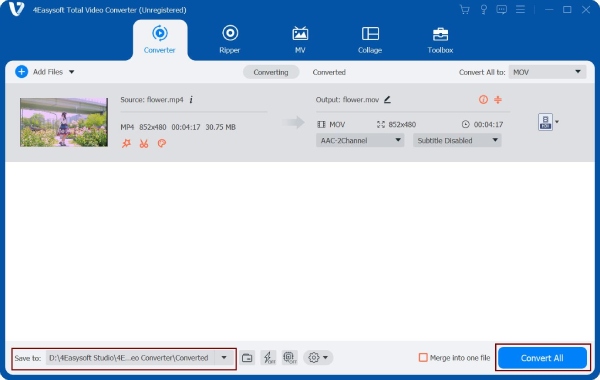
Step 1Open 4Easysoft Total Video Converter on your computer. Click the "Add Files" button or drag your video directly into the workspace to load it into the program.
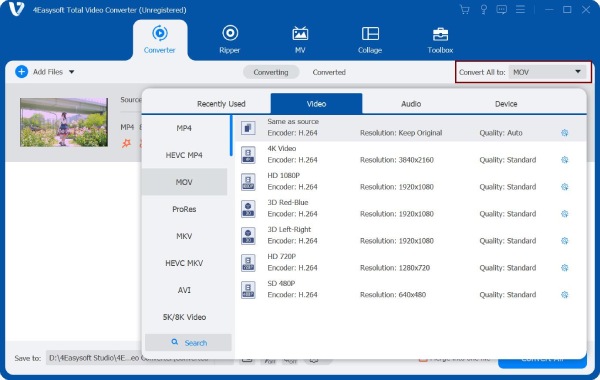
Step 2Once your FLV file appears in the list, expand the "Format" menu beside it. Go to the "Video" category and select "MP4" as your target format. If you wish for specific quality adjustments, click the "Custom Profile" to tweak settings like resolution, encoder, etc.
Step 3Select where you want the converted file saved and rename it if necessary. You can also click the "Edit" or "Trim" button to cut unwanted parts, crop video, or apply filters and enhancements before converting.
Step 4After reviewing all settings, click the "Convert All" to start the FLV to MP4 video conversion. Wait for the process to finish, then check your chosen folder to find the newly created MP4 video.
100% Secure
100% Secure
Free FLV to MP4 Conversion Using VLC Player
VLC Media Player is one of the most trustworthy free FLV to MP4 converter software. Besides being a powerful media player, it has a built-in converter that supports a wide range of formats, making it a great option if you wish for an offline solution that won't need to install anything.
Step 1Once the VLC Media Player on your computer is launched, click "Media" in the upper-left corner and choose "Convert/Save".
Step 2Here, click the "Add" button and upload the FLV file you wish to convert, and click the "Convert/Save" button. Then, under "Profile", choose "video - H.264 + MP3 (MP4)".
Step 3Select a destination and rename your output file, click the "Start" button, and please wait for VLC to finish the conversion.
Quick Online FLV to MP4 Conversion with CloudConvert
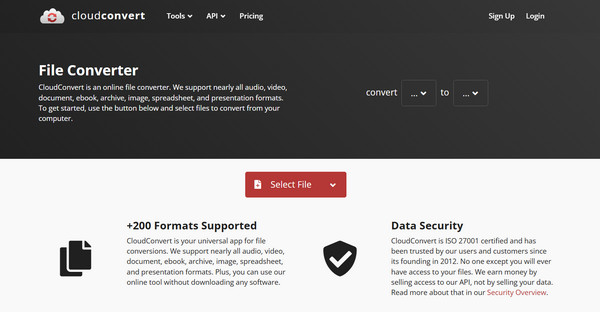
If you don't want to install anything, CloudConvert is a fast and convenient online solution to convert .flv to .mp4 (also for FLV to MP3 conversion). While everything is done online, this tool supports high-quality output and offers basic customization options for resolution, codec selection, and file size.
Step 1Inside the CloudConvert official conversion page, click the "Select File" button and upload your FLV video. Ensure the format is set to "MP4".
Step 2Optionally, you can click the "Settings" button to adjust the resolution, quality, or codec.
Step 3Click the "Convert" button to start and download it to your device.
Conclusion
From desktop and online platforms, converting FLV to MP4 format has become much easier thanks to the wide variety of tools available. And understand the key differences between FLV and MP4, such as their compatibility and compression, which helps you choose the correct format depending on your needs. If you want the smoothest workflow with fast processing and high output quality, 4Easysoft Total Video Converter is a highly recommended solution. It ensures reliable FLV to MP4 conversion while giving you complete control over your video settings, ideal for every user.
100% Secure
100% Secure
