
Burn videos to DVD/ Blu-ray with templates and editors.

How to Burn MTS/M2TS to a DVD without Quality Loss

Posted by Paula Pailaga to Burn DVD/Blu-ray Jun 09, 2026
Although burning MTS/M2TS files to a DVD doesn't seem like an easy task, there are actually many methods available that can assist you. This post offers you a very comprehensive guide, covering basic knowledge related to MTS and M2TS formats as well as three different conversion methods. Whether you are a beginner or a professional, after reading this post, you will surely have a deeper understanding of this content. Now, start reading to learn how to burn MTS/M2TS files to DVDs easily.
Guide List
Things You Should Know Before Burning MTS/M2TS to DVD How to Burn MTS/M2TS to DVDs without Quality Loss A Free MTS/M2TS to DVD Converter for Simple Tasks An Online Solution to Burning MTS/M2TS to DVDsThings You Should Know Before Burning MTS/M2TS to DVD
Before starting to learn how to burn MTS and M2TS files onto DVDs, it is helpful to first understand the relevant information about these two file formats, as it can assist you in better grasping the key points to be noted throughout the process. In simple terms, MTS and M2TS are high-quality video formats that are commonly used by camcorders and Blu-ray content. These two file formats employ extremely advanced compression techniques, enabling the storage of images and sounds in files with extremely high quality. The majority of professional videos you usually come across, such as those of large-scale events like weddings and festivals, are very likely to be in the MTS and M2TS formats.
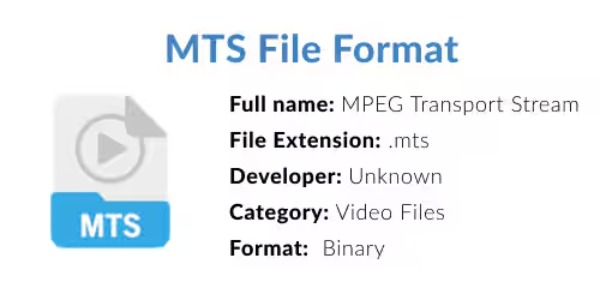
However, these two high-quality video formats have relatively limited compatibility, causing many devices or players to be unable to read and play them properly. Therefore, converting MTS and M2TS to DVD format is a solution that many people will adopt. On one hand, since these formats' videos usually involve large-scale events or professional content, using DVDs to store them is a very solid measure. On the other hand, DVDs have very wide compatibility and can be read normally on many devices. This is the main purpose of using an open-source DVD burner for burning MTS/M2TS to DVDs.
How to Burn MTS/M2TS to DVDs without Quality Loss
When you want to achieve a process that is both high-quality and efficient in burning MTS and M2TS files to DVDs, a powerful processing tool is necessary. For such a requirement, 4Easysoft DVD Creator is a highly reliable option. With hardware acceleration, it is capable of processing large video files very quickly. And during this process, it is capable of converting MTS and M2TS files to the original quality without losing any content. Its operation is very simple, and yet it is not rich in customizable editing. You can burn MTS and M2TS files to DVDs by following these steps.

Powerful capability to burn MTS/M2TS to DVD without quality loss.
Divide long videos into clear chapters or generate chapters by time.
Create an exact 1:1 copy of your MTS/M2TS files and make them DVDs.
Preview to check if MTS/M2TS files are burned to DVDs the way you want.
100% Secure
100% Secure
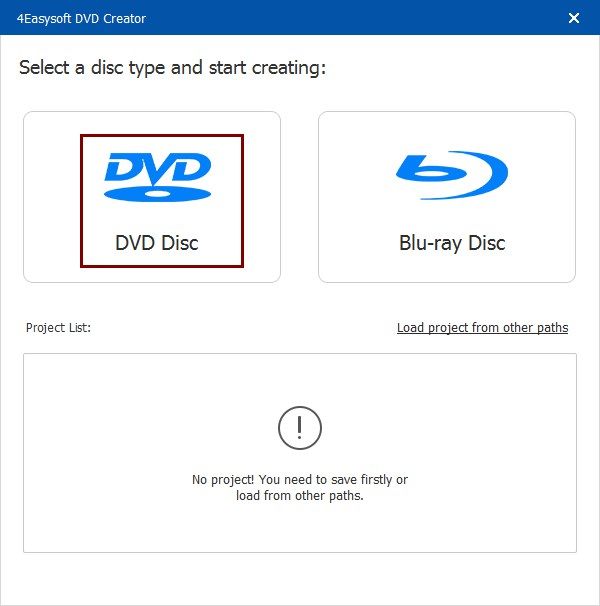
Step 1Insert a blank disc into your device. Then, launch 4Easysoft DVD Creator and click the "DVD Disc" button when the disc is detected.
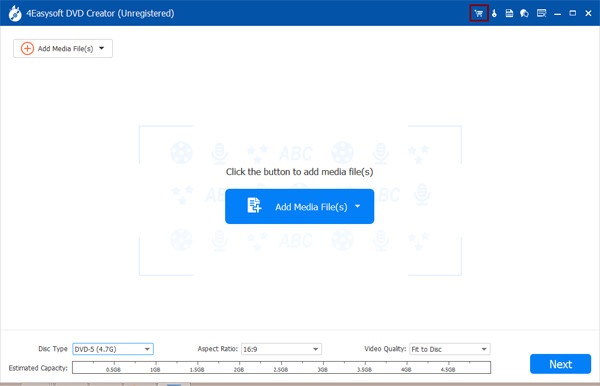
Step 2Click the "Add Media File(s)" button to import your MTS/M2TS video files for burning to a DVD.
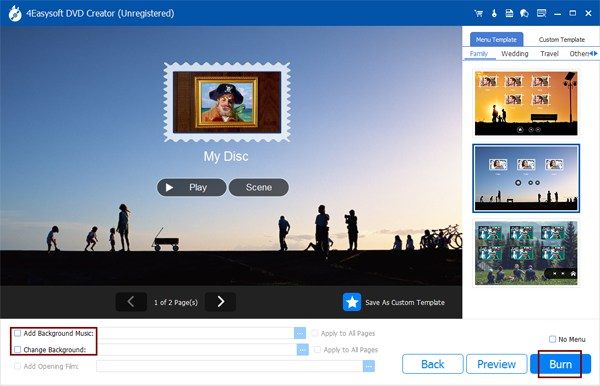
Step 3To create a DVD, you need to set up your menu. After the process of customizing the menu, click the "Burn" button.
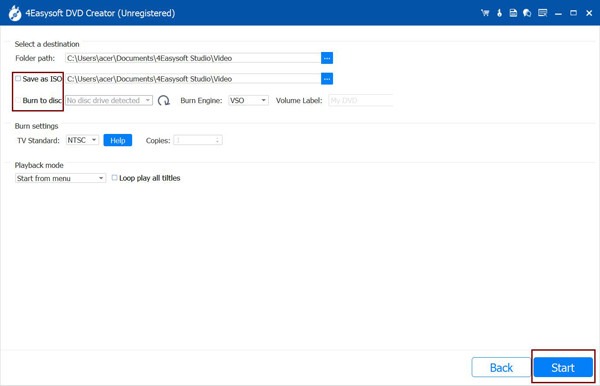
Step 4Click to select the storage path when you see a new window pop up. Finally, click the "Start" button.
A Free MTS/M2TS to DVD Converter for Simple Tasks
As a free MTS/M2TS to DVD converter, WinX DVD Author is also a very good option. This tool has extremely professional processing capabilities in DVD creation, allowing you to completely preserve all the contents of MTS and M2TS files, including menus and subtitles. This Blu-ray ripper is very lightweight. Not only does it not require a lengthy download process, but it also only occupies a limited amount of memory during operation, thus not imposing a heavy burden on your computer. However, the editing function of this tool is relatively limited. You can only save the original video content without being able to make any additional edits.
Step 1After inserting a blank disc into your computer, launch WinX DVD Author and click the "Video DVD Author" button.

Step 2To import your converted MTS/M2TS files, click the "Add Video" button. Then, click the "Next Window" button to proceed.
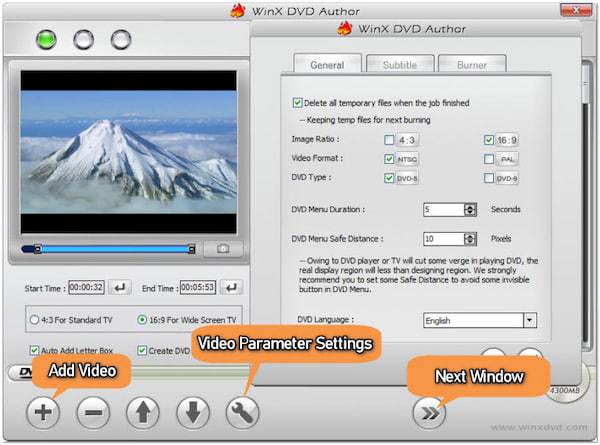
Step 3Now, you can select a folder to save the ISO file as a backup. Finally, click the "Start" button to burn MTS/M2TS files to a DVD.
An Online Solution to Burning MTS/M2TS to DVDs
While some users are in search of convenient online tools to burn MTS or M2TS files onto DVDs, such tools are not very easy to find. One important reason is that the original files of MTS/M2TS are extremely large, and you cannot directly upload them to the website for processing, as the processing capacity of the web page is limited. However, if you have MTS/M2TS files with relatively short durations or small sizes in your hands, you can also try using Convertio to assist you in completing this task.
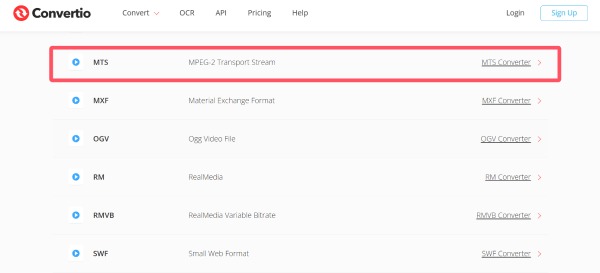
Step 1Navigate to the official website of Convertio and scroll down to find the converter based on your video formats from MTS to M2TS.
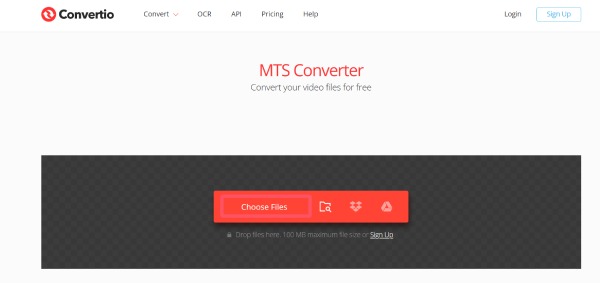
Step 2Click the "Choose Files" button to upload your MTS/M2TS files for burning to a DVD.
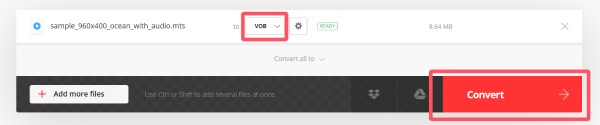
Step 3Click the "Format" button and click the "VOB" button. Finally, click the "Convert" button.
Conclusion
This post teaches you how to burn MTS and M2TS files onto DVDs. After learning the detailed steps, this relatively complex task will no longer be troublesome for you. For burning MTS/M2TS files to DVDs, the most important thing is to ensure both efficiency and quality. For such a requirement, 4Easysoft DVD Creator is undoubtedly the best tool. If you need it, you can download and use it for free right now.
100% Secure
100% Secure
