
Reliable video converter, editor, and compressor for daily tasks.

Best 4 Video Speed Controllers for Faster/Slower Playback

Posted by Paula Pailaga to Edit Video/Audio Dec 19, 2025
Understanding how to control video speed is helpful for both productivity and convenience. Doing so can skip slow sections, analyze content in each frame, and grasp details faster. And with today's video speed controller options, from desktop to browser-based solutions, you can easily adjust playback speed. This guide explores four of the best video speed controllers, each offering unique features to speed up or slow down your video completely.
Guide List
The Best Choice for Desktop Video Speed Controllers Video Speed Controller Extensions for Chrome/Firefox/Safari VEED.IO - Browser-Based Video Speed Controller MiniWebTool - Simple Web Speed Controller Clideo - Quick Video Speed Controller OnlineThe Best Choice for Desktop Video Speed Controllers
Many video speed controllers can adjust the playback rate, but only a few delivers stable speed controls while also offering editing functions and high-quality output. If you wish for a tool that can do more than just speed up or slow down your videos, 4Easysoft Total Video Converter is one of the best desktop solutions you can get. It allows you to change playback speed from slow motion to super-fast motion while preserving the video smooth and clear. Not only does it support more than a hundred formats, but it also improves your videos using trimming, cropping, audio adjustments, effects, and more. Beyond playback adjustments, the software is optimized for fast processing, so even large videos can be processed quickly without waiting for a long time.
Control video playback speed from slow motion to high speed smoothly.
Offers editing tools such as trimming, cropping, rotating, and effect adjustments.
Optimized for fast processing to handle large files with great ease.
Customized format, quality, frame rate, and more to get the quality you want.
100% Secure
100% Secure
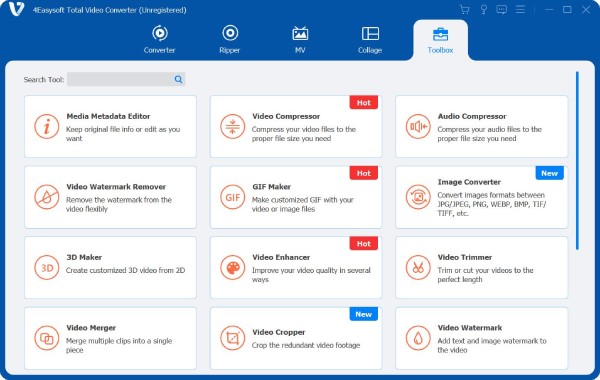
Step 1Launch 4Easysoft Total Video Converter on your computer. Then, from the main interface, navigate to the "Toolbox" tab, find "Video Speed Controller", and click on it.
Step 2Import your video file by clicking the "Add" button. Once the video is loaded, you will see different speed options for playback. You can slow down the footage with rates like 0.25x or speed it up with 1.25x, even up to 8x.
For additional customization, click the "Settings" button to adjust the output parameters such as format, resolution, frame rate, and bitrate.
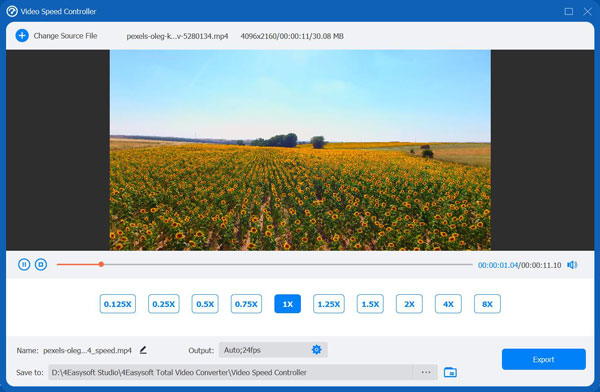
Step 3Once you're satisfied with your speed adjustments, click the "Export" button to save the file with the new playback rate. The process is fast, even for larger files, allowing you to enjoy your sped-up or slowed-down video without long waits.
100% Secure
100% Secure
Video Speed Controller Extensions for Chrome/Firefox/Safari;
Perhaps you prefer to adjust video speed without downloading anything, then an online video speed control can help you improve your viewing experience across different browsers. These tools let you slow down, speed up, or fine-tune playback speed on almost any video online.
See below some of the most reliable video speed controller extensions on Chrome, Firefox, and Safari.
1. Video Speed Controller - Precise Playback Speed Adjustment

This extension, Video Speed Controller, is one of the most popular choices as it gives you precise control over playback speed with simple keyboard shortcuts. Using this video speed controller, you can slow down videos frame by frame or speed them up, offering freedom in how you watch your content. Also, it works across a number of sites, making it great for students, binge-watchers, and anyone who wants full customizable playback.
2. Accelerate for Safari - Lightweight Speed Controller for Mac

Safari users can put their trust to increase or decrease video speed online in popular formats. This Safari video speed controller is lightweight, easy to activate, and works smoothly in the Safari extension toolbar. Since it is built specifically for the Safari browser, it maintains smooth performance and avoids the compatibility issues that sometimes show up with cross-browser extensions.
3. Enhancer for YouTube - Advanced Speed Control with Shortcuts

Working more than just a video speed controller, Enhancer for YouTube offers a complete suite of tools designed mainly for YouTube users. It contains customizable speed presets that let you jump between your desired playback speeds quickly. Also, besides editing video speed, this extension has extra features like looping options, improving player controls, and ad management, making it perfect for those YouTube users.
VEED.IO - Browser-Based Video Speed Controller

Up next for the video speed controller are online options, VEED.IO, to allow you to change video speed directly in your browser, no extensions needed. Beyond speed control, you can enjoy trimming, captioning, or splitting the clip. It is your handy all-in-one web editor, ideal for quick projects without extra software.
MiniWebTool - Simple Web Speed Controller

Another option for a video speed controller online, MiniWebtool offers a simple, no-hassle way to slow down or speed up videos. You can select preset speeds between 0.25x and 4.0x or enter your custom value. Then, view the result and download the footage quickly on your device.
Clideo - Quick Video Speed Controller Online

A browser-based video speed controller, Clideo, supports many standard formats and offers a wide speed range from 0.25x to 4x, with custom values allowed. Since the processing happens locally, there will be no delay in uploading, allowing you to get instant results and complete control over your file.
Conclusion
The seven speed controllers discuss, from desktop to online options, give you a wide range of features that suit different needs. With each video speed controller online and offline, you can enjoy frame-by-frame adjustments to quick presets for faster or slower playback. For those who are seeking a powerful all-in-one desktop solution, try 4Easysoft Total Video Converter. It not only lets you have precise speed adjustments, but also provides advanced editing tools and high-quality. Using this fantastic program, you can manage our projects efficiently, whether slowing down or speeding up, all while keeping excellent visual quality.
100% Secure
100% Secure
