
Reliable video converter, editor, and compressor for daily tasks.

Full Guide: TikTok Resolution, Format & More Video Specs

Posted by Aira Lesly Escoto to Edit Video/Audio May 19, 2026
TikTok has become one of the most popular platforms for sharing creative and engaging video content. In a sea of videos, standing out can be challenging. The first step you should take is to ensure your content meets TikTok resolution and other key specs. In this complete guide, we will show you how to optimize your videos for the best performance.
Guide List
Recommended TikTok Video Specs at a Glance TikTok Video Dimensions: Best Resolution & Aspect Ratio Can You Upload 4K Videos to TikTok How to Resize TikTok Videos for Best Resolution TikTok File Size, Format & Frame Rate Requirements Pro Tips to Optimize TikTok Video QualityRecommended TikTok Video Specs at a Glance
Below is a quick summary of the most recommended specs to keep in mind when uploading your TikTok videos. Follow the specs to make your video sharp.
- Aspect Ratio: 9:16 (Vertical)
- Resolution: 1080 x 1920 pixels (Full HD Vertical)
- File Size: Up to 287.6 MB (iOS), up to 72 MB (Android)
- File Type: MP4/MOV
- Frame Rate: 30 fps
- Audio: AAC
- Video Length: 15 to 60 seconds
TikTok Video Dimensions: Best Resolution & Aspect Ratio
Best Aspect Ratio: 9:16 Vertical
The best aspect ratio for TikTok videos is 9:16 vertical. This is TikTok's native orientation, designed to fit the screen perfectly without any black bar. Most TikTok users view content on mobile, so the 9:16 aspect ratio also ensures an immersive experience.
TikTok's algorithm tends to favor videos that are optimized for vertical videos, so sticking with the 9:16 aspect ratio can boost engagement more than those in 1:1 (square) or 16:9 (landscape).
Recommended TikTok Resolution: 1080 x 1920 Pixels (Full HD)
A crisp resolution of TikTok video can capture the audience's attention. If your video is blurry, viewers are more likely to swipe past it without a second glance. The best resolution for TikTok is 1080 x 1920 pixels, which aligns with the 9:16 aspect ratio. This ensures your video fits the full screen in vertical format, making it ideal for mobile viewing.
This TikTok resolution is not a random standard – it strikes the perfect balance between clarity and performance. Uploading your video in 1080 x 1920 pixels ensures your video looks crisp and loads faster for viewers, leading to higher engagement and a greater chance of appearing on the For You Page.
Can You Upload 4K Videos to TikTok
Does a higher TikTok resolution mean better quality and engagement? Not exactly. While TikTok's maximum resolution is up to 4K (3840 x 2160 pixels), it automatically downscales content to 1080p (Full HD) for optical streaming. This means that, even though your video might start as 4K, it will be converted to 1080p once it's live on the platform.
So, if you're shooting a 4K video, it's always best to resize your video to 1080 x 1920 pixels before uploading. This ensures your video meets TikTok's recommended specs and also avoids large file size and long upload time.
How to Resize Videos for Best TikTok Resolution
If your video resolution is higher than 1080 x 1920pixels, TikTok will compress your content automatically. It's recommended to resize it to match the platform's ideal specs before uploading. 4Easysoft Total Video Converter is an ultimate tool to help you reduce video resolution while maintaining clarity.
Reduce TikTok video resolution while maintaining clarity.
Provide basic tools to trim, crop, rotate, add subtitles, and more.
Convert TikTok videos to 600+ formats
Enhance video quality to ensure stunning visuals.
100% Secure
100% Secure
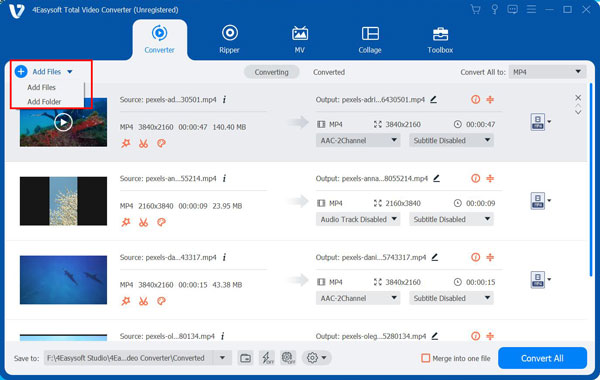
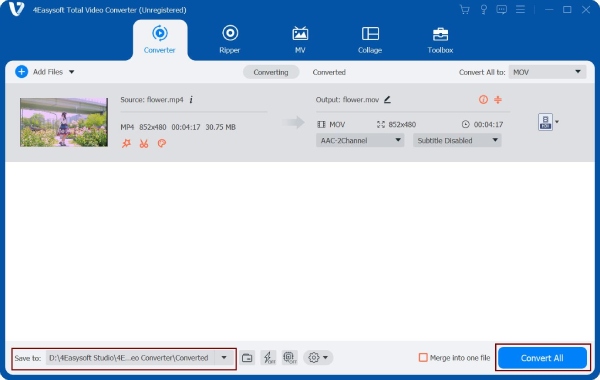
Step 1Click the "Add Files" button to select the files you want to resize, or simply drag and drop your video file into the software.
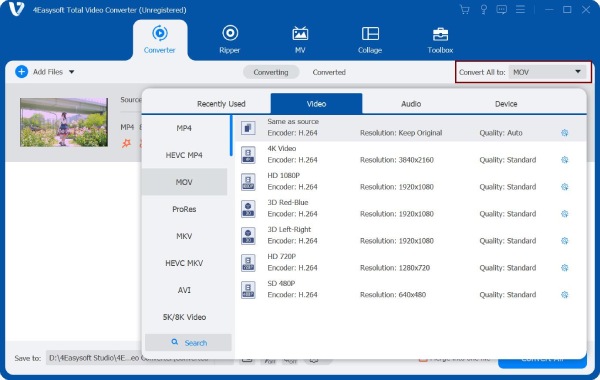
Step 2Click the "Format" button in the top-right corner and select your desired format.
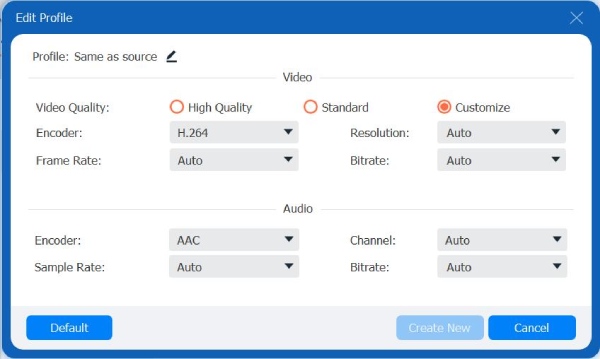
Step 3Click the "Gear" button to open the edit profile. You can set the video resolution to 1080 x 1920 pixels. You can also adjust codec, frame rate, or bitrate to optimize your video.
Step 4Hit the "Convert All'' button to start resizing your TikTok video.
TikTok File Size, Format & Frame Rate Requirements
To ensure smooth uploads and optimal video quality on TikTok, it's important to follow the platform's specs for file size, format, and frame rate.
TikTok File Size Requirements
TikTok allows users to record videos up to 10 minutes in length directly through the app. However, pre-recorded videos that are uploaded can be as long as one hour. For videos under 3 minutes, the maximum file size is 500MB. If your video is between 3 to 10 minutes, it can be up to 2GB in size.
TikTok has different file size limits depending on how you're uploading your content:
- Android devices: 72 MB maximum
- iOS devices: 287.6 MB maximum
- Web uploads: 500 MB maximum
If you're working with high-quality or longer videos and the file size exceeds the limits, you'll need to compress your video before uploading.
Best TikTok Video Formats
Although TikTok also supports other formats like MPEG, AVI, and 3GP, the best file formats for TikTok are MP4 and MOV. This is because they strike a balance between high quality and manageable file size, making them ideal for fast uploads and smooth playback. What's more, MP4 and MOV are widely compatible with iOS, Android, and web devices.
Frame Rate Requirements
TikTok can handle videos up to 60 fps. Going higher than that can make things look smoother, but it also results in a larger file size. For most users, 30 fps offers the ideal balance between smooth playback and a manageable file size.
Pro Tips to Optimize TikTok Video Quality
How can you make your audience watch your complete TikTok video? After adjusting your TikTok video dimensions, what else can you do to optimize your video quality? Here are some pro tips:
- Shoot in Good Lighting: Proper lighting is key to high-quality videos. Natural light works great, or use a ring light to make your video look more professional.
- Hook your audience in the first 10 seconds: Start with something exciting or intriguing to keep viewers watching beyond the intro.
- Use Text Overlays and Subtitles: Add subtitles or text overlays to highlight key points and improve accessibility, especially for viewers watching without sound.
- Leverage Transitions and Effects: Use smooth transitions and creative effects to keep the video dynamic. Don't overdo it.
Conclusion
To wrap it up, if you want your TikTok videos to grab attention and perform at their best, getting the best resolution for TikTok is a must. Make sure that your videos fit the platform's specs, like resolution, aspect ratio, and file size, then you'll get smoother uploads, better quality, and more engagement. Now, take a moment to optimize your videos, and let them shine in the TikTok feed!
100% Secure
100% Secure
