
Burn Xbox game disc to digital files to save the video/audio files.
6 DVD Audio Extractors for Ripping Audio Files from DVDs

Posted by Paula Pailaga to Rip DVD Sep 18, 2026
DVD audio extractors are tools that many people are looking for. These tools are especially useful when you come across interesting sounds in a DVD video, allowing you to save just the audio portion without keeping the video clips. Afterward, you can keep it as your own collection or use it for other content creation. However, many people wonder which specific tools can actually help. After testing, this post recommends six tools to effectively help you extract audio from DVDs.
Guide List
Factors to Consider When Selecting a Good DVD Audio Extractor The Most Powerful DVD Audio Extractor with Original Quality 5 Reliable Options for DVD Audio Extractors for Basic RippingFactors to Consider When Selecting a Good DVD Audio Extractor
Before start extracting audio from a DVD, it's significant to understand some important aspects related to a crucial feature of the tool. These factors greatly affect the capabilities of DVD audio extractors. You can use the points provided in this section as a reference, and then choose the best-suited tool for your needs.
1. Audio Quality
If you want to rip the soundtrack from a DVD, then the audio quality is of great importance. Many ripping tools have let people down. Although they can extract audio, the quality is often very poor. When you check the audio files, you might find you can't hear them clearly at all. Good tools usually have a wider range of audio decoding formats.
2. Format Supports
Many DVD audio ripper programs lack extensive format support. For instance, many tools can only extract the audio from MP4 files. However, when it comes to formats like MKV, they are of no help. If you want the tool to be more versatile, then pay attention to the formats it supports.
3. Batch Extraction
You will often need the batch extraction function. When you have multiple videos to extract, this function is extremely beneficial for improving efficiency. Batch extraction can help you significantly increase your efficiency when ripping audio from DVDs.
The Most Powerful DVD Audio Extractor with Original Quality
We conducted tests on 17 popular tools. During the test, we extracted audio from DVDs by playing them one after another. Ultimately, we selected 6 options that were worthy of consideration. Each of them has its own advantages and disadvantages. So you can choose based on your own needs.
Test Condition: We conducted tests separately on Windows 11 and Mac. To ensure a stable testing environment, we have stopped most background software. We selected several different types of video files. They are, respectively, a 10-minute MP4 file, a 40-minute MP4 file, and a 40-minute MKV file. Our judgment criteria are largely based on the three standards mentioned above. Ultimately, we selected several reliable DVD audio extractors based on the results.
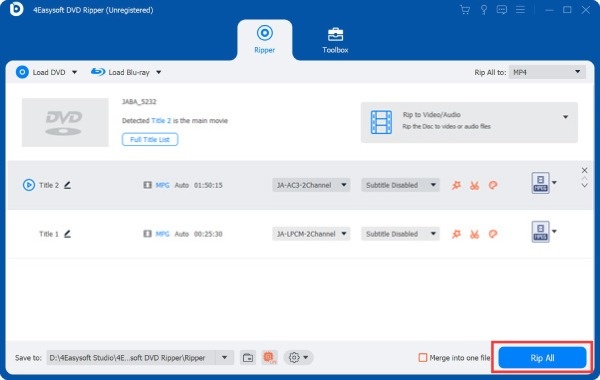
When it comes to the best way to obtain audio from DVDs, 4Easysoft DVD Ripper emerged as the winner in the test. This tool can handle almost any video format. After listening to the extracted audio files, we also conducted parameter checks on them. The result is satisfactory. At the same time, it also supports batch extraction. These features make 4Easysoft DVD Ripper the best DVD audio extractor.
Rip audio from DVD video to MP3, FLAC, and other formats.
Adjust the encoder, sample rate, and other parameters.
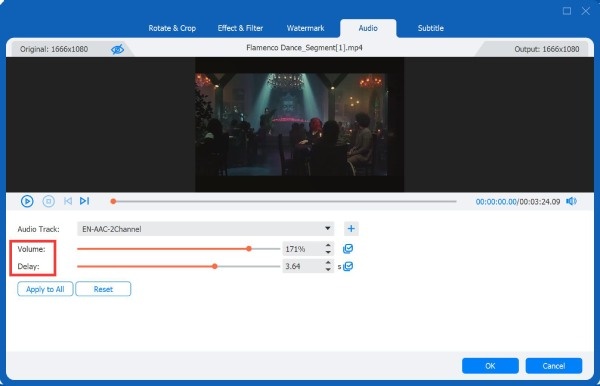
Customize the volume, delay, etc. of the audio track.
Rip audio from DVD video with hardware acceleration.
100% Secure
100% Secure
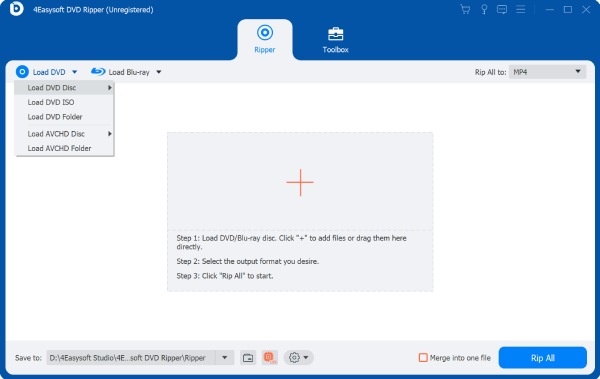
Step 1Launch 4Easysoft DVD Ripper. Click the "Load DVD Disc" button. Your DVD will be read automatically.
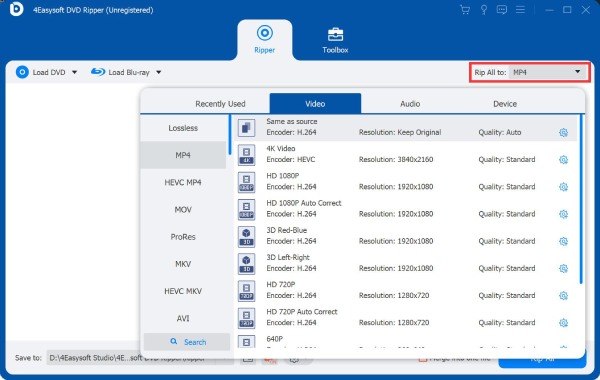
Step 2Click the "Rip All to" button. Under the "Audio" tab, click to select the desired output format.
Step 3To adjust the parameters, click the "Edit" button. You can set the output parameters before stripping audio from the DVD.
Step 4In the main interface, click the "Rip All" button. All the audio files will be saved automatically.
5 Reliable Options for DVD Audio Extractors for Basic Ripping
During testing, we also discovered several reliable tools. These tools each have their own specific strengths. You can choose the one that suits your needs. They can help you rip audio from DVDs based on certain requirements.
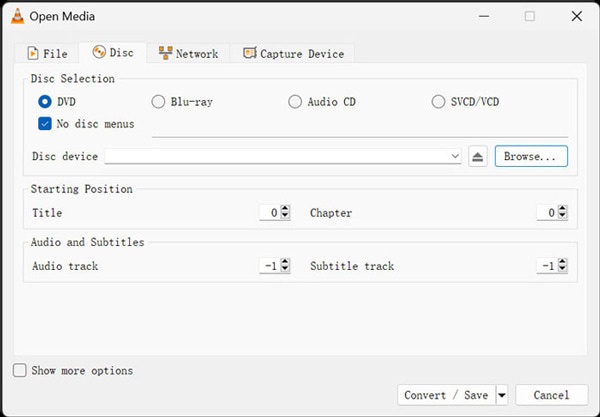
1. VLC Media Player - During Playback
Many people are familiar with VLC media player. As a media player that has been popular for many years, it has always been highly trusted. Many people may not be aware of this: VLC media player lets you extract audio from DVDs. If the player you use to watch DVDs is VLC, then this is really convenient. You can complete it directly during the viewing process.
- Pros
- Extract audio files from DVDs for free.
- Start the process during the playback.
- Several preset options are provided.
- Cons
- The process of ripping audio is not very intuitive.
- Limited features are provided for the extraction.s
- You can't set all the parameters for your requirements.
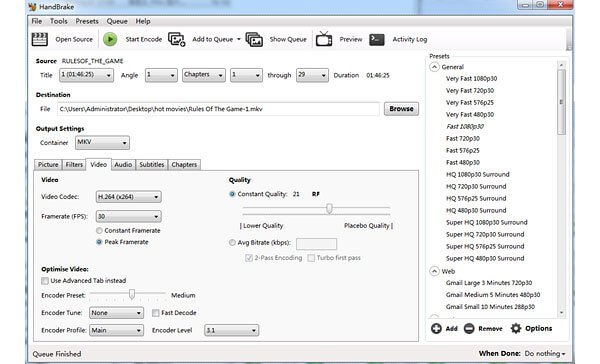
2. HandBrake - Encoding Control
As an open-source software, HandBrake also impresses people with its quality. Unlike ordinary free DVD extractors, HandBrake offers a wide range of customizable options. You can definitely make the output file conform to your requirements. However, this involves some complex professional knowledge. Therefore, this tool might not be very suitable for beginners.
- Pros
- Totally free and open-source.
- Detailed presets to select from.
- Set the parameters precisely.
- Cons
- Steep learning curve for beginners.
- Complex interface and parameters.
- No preview is provided before exporting.
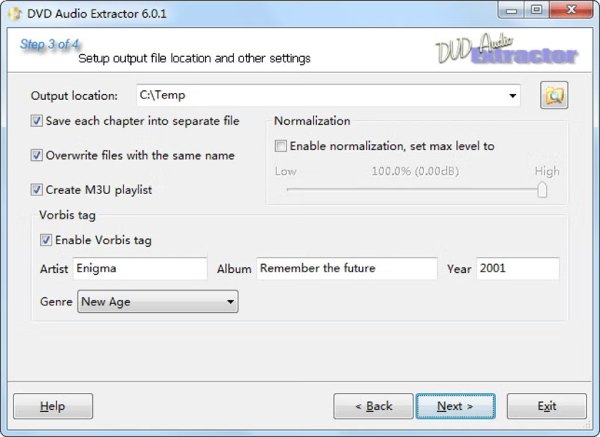
3. DVD Audio Extractor - Simple Tasks
As its name suggests, DVD Audio Extractor is dedicated solely to helping you extract music from DVDs. What impressed us the most was its interface. It is simple and intuitive, with no unnecessary displays or settings. Anyone can complete the task quickly without any obstacles. However, this tool hasn't been updated for a long time. This means that it might not be suitable for some relatively new types of discs.
- Pros
- Simple interface and operation method.
- It occupies very few system resources.
- There is additional support for the FLAC format.
- Cons
- The interface might be somewhat outdated.
- Does not support processing Blu-ray discs.
- It is updated only once every two or three years.
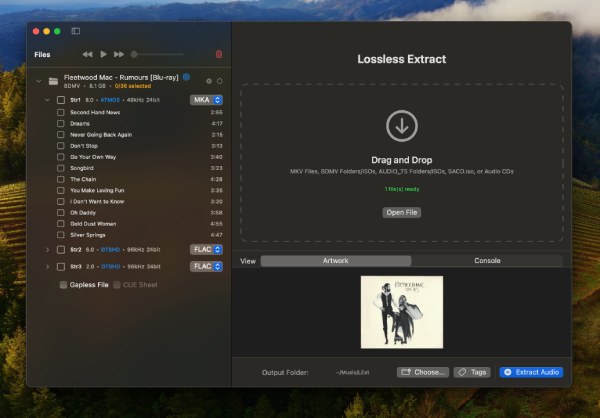
4. LosslessExtract - Mac Solution
For Mac users, LosslessExtract is also highly reliable. This DVD audio ripper is specifically developed for Mac. Its interface and workflow are fully compatible with macOS. You might even think that it is a default software. Its classification is very clear, which can help you quickly organize the output audio files.
- Pros
- The simple operation of drag and drop.
- Very intuitive and clear classification.
- Add tags to the output audio files.
- Cons
- Applicable only to macOS.
- The supported audio formats are limited.
- The DVD-to-audio process may get stuck.
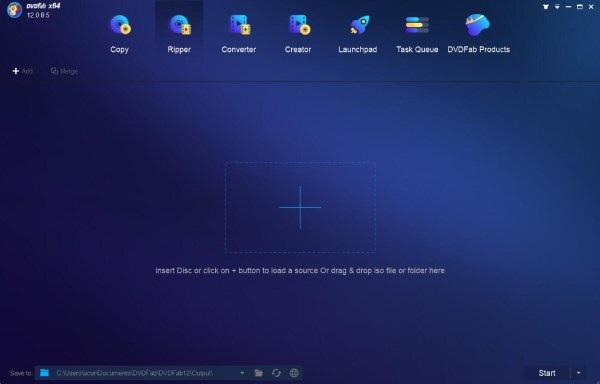
5. DVDFab DVD Ripper - Extra Features
For many users, knowing how to extract audio from a DVD is just the first step. Many people may have post-production needs. DVDFab DVD Ripper is particularly suitable for scenarios like this. It offers a wide range of editing functions for your audio output. You can easily export the edited files for content production.
- Pros
- Rich editing features as a Blu-ray audio ripper.
- Suitable for various CD formats.
- Support batch extraction.
- Cons
- The interface contains too many other elements.
- The menu selection system is not very intuitive.
- It requires payment to start the extraction.
Conclusion
This post introduces six tools for extracting audio from DVDs. They have their own advantages and disadvantages. You can make a choice based on your needs after getting the information. For a simple yet professional choice, 4Easysoft DVD Ripper is the answer. It has the best versatility and can meet all your needs.
100% Secure
100% Secure
