
Recover deleted/lost data from PC/Mac, HDD, USB, SD card and more.

Why is My iPhone Getting Hot and How to Prevent This Issue

Posted by Paula Pailaga to iOS Cleaner, Solutions/Tips Dec 19, 2025
An iPhone getting hot can affect battery life, cause performance degradation, and even trigger automatic shutdowns to protect hardware. This issue occurs more frequently after system updates. For persistent abnormal heating, combine the methods outlined in this article to more effectively and quickly solve the "why does iPhone get hot" issue.
Guide List
What Causes an iPhone to Get Hot Use Professional Repair Tools to Fix a Hot iPhone Rapid but Short-lived Cooling to Avoid a Hot iPhone Optimize iPhone System Settings to Reduce a Hot iPhone Use Charging Accessories Correctly to Prevent OverheatingWhat Causes an iPhone to Get Hot
The external environment is the primary factor. The ideal operating temperature range for an iPhone is 0°C to 35°C. Placing the device in a car exposed to direct sunlight, using navigation, or taking photos outdoors in hot conditions for extended periods can quickly exceed this temperature threshold. Alternatively, a thick, poorly ventilated phone case can act like a blanket, hindering heat dissipation.
Internal usage load represents another major heat source. Running demanding games, editing videos, or utilizing augmented reality apps causes the processor and graphics processor to operate at full capacity, generating significant heat.
Simultaneously charging wirelessly while using the phone. A "charge-and-use" scenario - combines battery heat with processor heat, greatly increasing the risk of the iPhone getting hot.
System software issues also warrant attention. Outdated iOS versions may contain power-optimization bugs, while newer releases like iOS 26 and 27 beta temporarily increase resource consumption during initial updates due to background indexing and adaptive learning processes.
Use Professional Repair Tools to Fix a Hot iPhone
If your iPhone is consistently getting hot, a simple restart or settings adjustment may not suffice. You'll need a professional tool to fix underlying system issues. 4Easysoft iOS System Recovery is a comprehensive solution designed precisely for this purpose. It resolves over 50 types of iOS system-related problems, like iPhone getting hot or lagging, without damaging your existing iPhone data.

Offer "Standard" and "Advanced" modes to fix various levels of system issues.
Supports all iOS models and systems, including the latest iPhone 17 and iOS 26 and 27 beta.
Intuitive and simple operation requires no professional repair knowledge to use.
Reset your iOS devices easily without passwords/iTunes/iCloud.
100% Secure
100% Secure
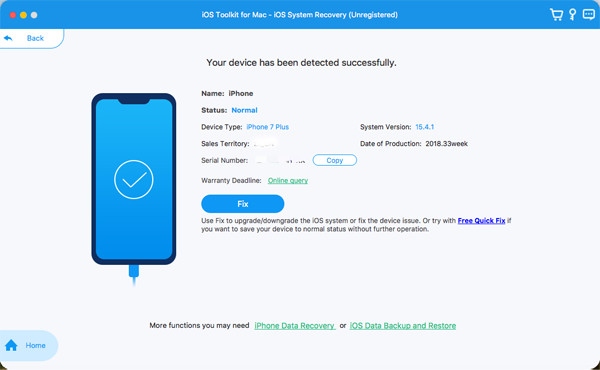
Step 1Launch this software, connect the hot iPhone to the computer via a USB cable. You can click "Fix" to try the quick repair.
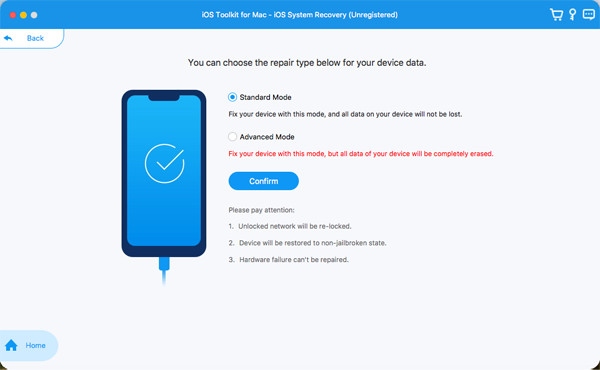
Step 2Click the "Repair" button, then choose between "Standard Mode" and "Advanced Mode".
Step 3Follow the prompts to select your iPhone model and download the matching iOS firmware package.
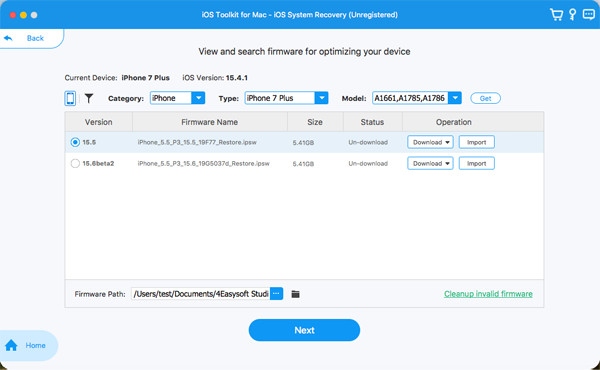
Step 4After clicking "Next", the software will automatically complete the repair process. Do not disconnect the device during this time.
Rapid but Short-lived Cooling to Avoid a Hot iPhone
If your iPhone gets too hot to handle, the most direct solution is to cool it down by stopping it from launching. Immediately reduce its temperature and workload by removing the protective case, pausing use, closing apps that consume significant background resources, and so on.
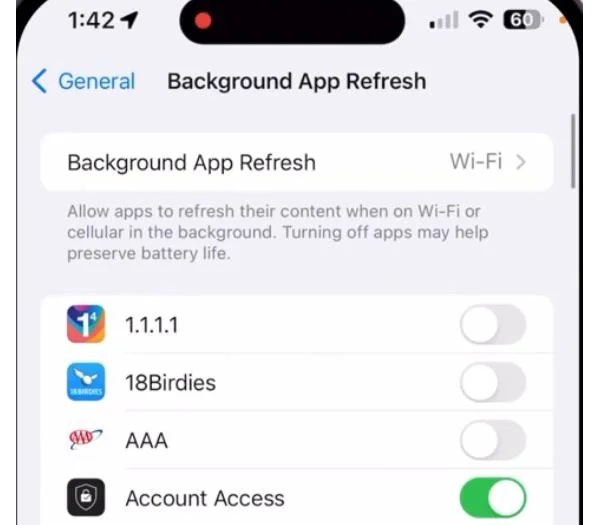
Step 1Go to "Settings", find "General", tap "Background App Refresh", and completely close or exit high-energy-consuming apps.
Step 2Swipe down from the top of the screen. For iPhone 8 and earlier models, swipe up from the bottom.
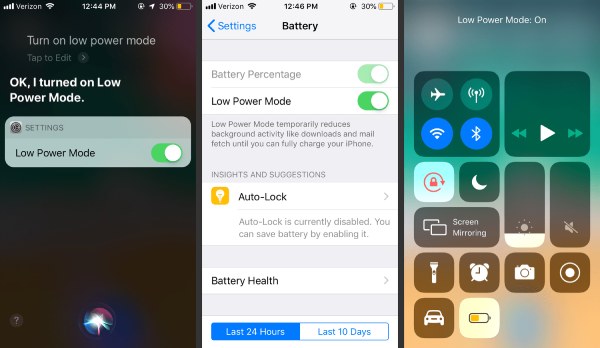
Step 3After opening Control Center, locate "Low Power Mode" and tap to turn it on. Or you can use Siri to help you open it.
Optimize iPhone System Settings to Reduce a Hot iPhone
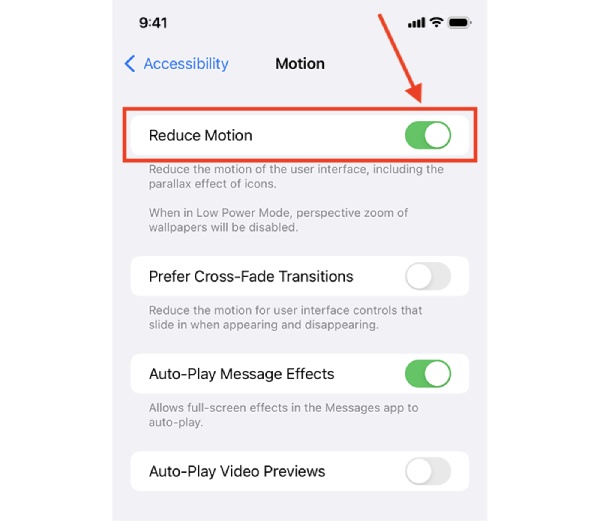
Many system-level effects and features, while convenient, can cause hidden heat buildup. Adjusting these settings can significantly reduce energy consumption during daily iPhone use, thereby minimizing the iPhone's getting hot. You can use the following three methods to reduce the issue of the iPhone getting hot caused by system settings.
Step 1Go to "Settings", find "General", tap "Background App Refresh", and completely close or exit high-energy-consuming apps.
Step 2Go to "Settings", find "Privacy & Security" and "Location Services". Review the app list and find rarely used apps.
Step 3Change permissions for apps that don't need location access to "While Using the App" or "Never".
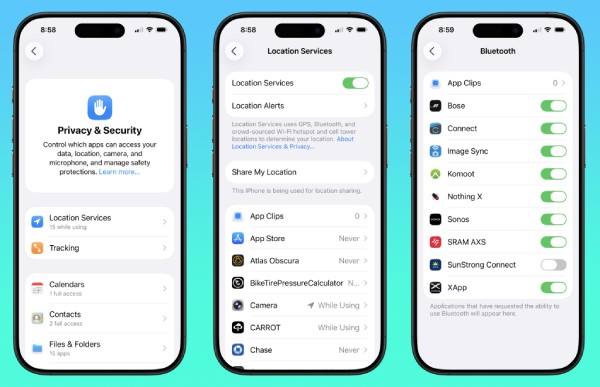
Step 4Go to "Settings", tap "Battery" and "Battery Health". Check if "Maximum Capacity" is below 85%, and consider replacing the battery to avoid the iPhone getting hot.
Use Charging Accessories Correctly to Prevent Overheating
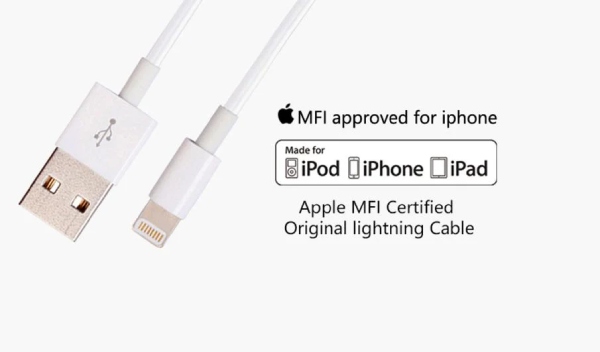
Improper charging methods and accessories pose a high risk of the iPhone getting hot, or even cause the iPhone to not charge in the summer. Therefore, always use Apple genuine or MFi-certified chargers and cables. Uncertified, low-cost accessories may deliver unstable voltage and current, making them highly prone to causing overheating during charging.
Second, avoid using your device while charging. The battery itself generates heat during charging. If you simultaneously play games or watch videos, the heat produced by the processor adds to the battery's heat.
Optimize your charging environment by avoiding charging on soft, insulating surfaces like beds or couches. It's best to charge on a hard, cool surface like a desk and ensure the area is well-ventilated.
Conclusion
iPhone getting hot is often caused by multiple factors. After initial cooling, you can use 4Easysoft iOS System Recovery for a deep scan and repair to prevent prolonged use in overheated conditions. It quickly fixes issues across all models. Download it to diagnose why your iPhone is getting hot now.
100% Secure
100% Secure
