
Reliable video converter, editor, and compressor for daily tasks.

Upgrade Your Footage: 6 Ways to Upscale Video Quality

Posted by Paula Pailaga to Edit Video/Audio Dec 10, 2025
One of the quickest ways to transform low-quality footage into sharper, clearer footage is to upscale video quality. It could be a family clip, phone recordings, or content for social media you will be upscaling; the right tool can make a massive difference in the entire process. Therefore, this guide gathers the 6 best tools to boost video resolution on both desktop and online platforms, giving you flexible options for upgrading your footage effortlessly. Upscale now!
Guide List
Upscale Any Video with Topaz Video AI How to Upscale Video Using Premiere Pro Plugins Upscale Video with Professional Editing Tools Kapwing Video Quality Enhancer - Fast Upscaling and Editing Media.io AI Video Enhancer - One-Click Upscaling and Noise Reduction VEED.IO Online Video Enhancer - All-in-One Upscaling with Smart FiltersUpscale Any Video with Topaz Video AI
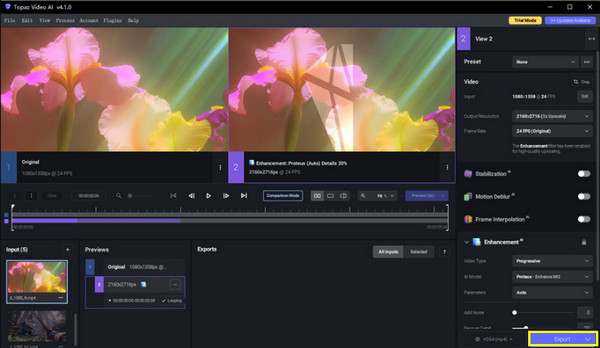
A desktop software that specializes in AI-powered video upscaling, Topaz Video AI turns low-resolution videos into high-quality 4K or even 8K footage. The program can enhance low-resolution videos by reducing noise, fixing blurry frames, and enhancing details automatically.
Step 1Launch the Topaz Video AI on your desktop, then click the "Browser" button to choose the video you wish to upscale.
Step 2Pick an AI model based on your enhancement goal, like Artemis or Gaia.
Step 3After that, choose the desired resolution and frame rate. Optionally, watch how it turns out in the preview window.
Step 4Click the "Start" or "Export" button to upscale video.
How to Upscale Video Using Premiere Pro Plugins
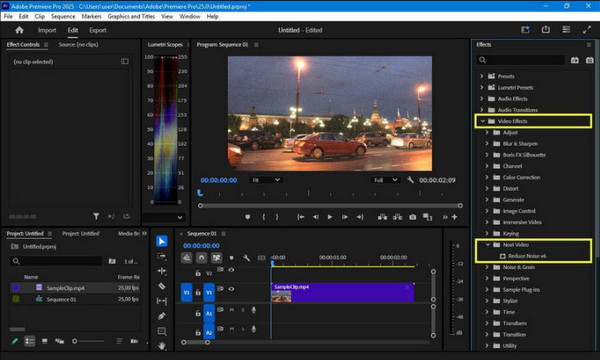
Next is Adobe Premiere Pro, a professional video editing software that can upscale video to 4K with the help of plugins. With plugins like Red Giant Instant 4K, you can upscale footage directly within your editing workflow, making it perfect for editors who wish to improve video resolution without leaving their timeline.
Step 1Get the Premiere Pro plugin of your choice installed. Launch the program and open the project containing the video you wish to upscale, and drag the plugin effect onto your clip.
Step 2Afterward, set the target resolution, scaling method, and enhancement options by the plugin. Then, check the preview to make sure your video upscaling result is achieved.
Step 3Later, export the project using your desired format and resolution.
Upscale Video with Professional Editing Tools
While some tools have basic video upscaling, the following editing software gives you more control over the process, letting you refine details, reduce noise, and enhance color as well as sharpness. 4Easysoft Total Video Converter is your all-in-one solution. You can upscale video, adjust brightness, reduce video noise, and stabilize video shakiness in clicks. You can turn your low-quality and old footage into high-quality and visually striking content without complicates steps.
Can upscale video resolution, adjust effects, reduce noise, and more.
Provides output formats like MP4, MOV, AVI, MKV, and more.
Hardware acceleration for faster editing and conversion with no quality loss.
Built-in editing tools like cropping, trimming, merging, effects, etc.
100% Secure
100% Secure
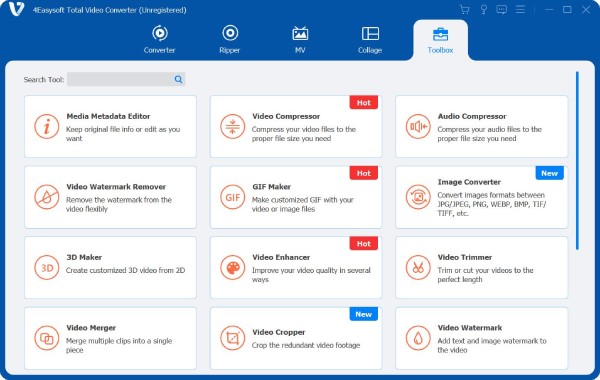
Step 1First, launch 4Easysoft Total Video Converter on your computer. Head to the "Toolbox", and there you'll find over 15 tools. Select the "Video Enhancer". Next, add the video you want to upscale.
Step 2After uploading, you'll see four enhancement options: Upscale Resolution, Optimize Brightness and Contrast, Remove Video Noise, and Reduce Video Shaking. Tick the "Upscale Resolution" box to upscale video; you can select others depending on what you want.
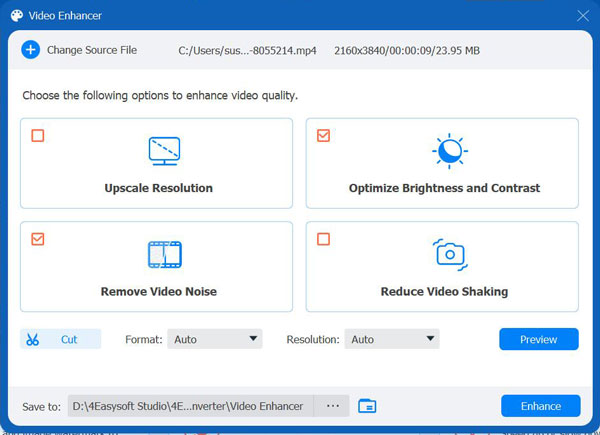
Step 3Before finalizing, click the "Preview" button on the side to see how your video looks after upscaling. You can also set your desired resolution, format, or make edits like trimming clips.
Step 4Once you're happy with everything, click the "Enhance" button to start the video upscaling process. In just a few moments, your clip will be upgraded to a higher resolution, ready to save or share.
100% Secure
100% Secure
Kapwing Video Quality Enhancer - Fast Upscaling and Editing
For those who seek quick and easy online video upscaler, the first one here is Kapwing. It is a browser-based upscaling that is perfect for improving clarity, brightness, and resolution for social media content, presentations, and personal projects in just a few clicks.
Step 1Click the "Upload" button to import your video to online Kapwing Video Quality Enhancer.
Step 2Start adjusting the video's resolution, brightness, or sharpness as needed.
Step 3Preview the upscaled video to make sure it meets your expectations before clicking the "Export" button.

Media.io AI Video Enhancer - One-Click Upscaling and Noise Reduction
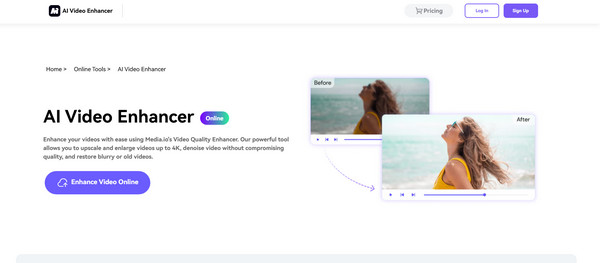
Media.io AI Video Enhancer, on the other hand, is another online AI video upscaler. Its AI engine works with each frame to enhance the resolution and clarity. It is easy to make your old video look like new.
Step 1Search for Media.io AI Video Enhancer in your chosen browser. Click the "Upload Video" button to import the clip you want to upscale.
Step 2Next, pick from the enhancement options, like Upscale Resolution and Noise Reduction.
Step 3Click the "Enhance" button to upscale video details.
VEED.IO Online Video Enhancer - All-in-One Upscaling with Smart Filters
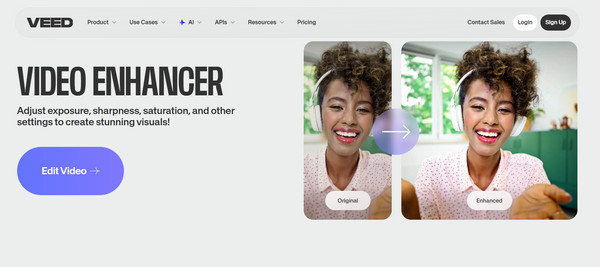
The last web-based video quality upscaler is VEED.IO. Its video enhancer tool combines with smart filters and editing features. It is a great place for creators who are looking for both quality enhancement and visual creativity, like filters, color correction, and sharpening.
Step 1Open VEED.IO Video Enhancer and upload your video.
Step 2Afterward, choose the "Upscale Resolution" option and apply optional filters or effects as you wish.
Step 3View the results, then click the "Export" button to save the upscaled video on your device.
Conclusion
With above video quality enhancers, it is made possible to transform low-quality footage into polished footage. Among them, if you want an all-in-one video upscaling solution, 4Easysoft Total Video Converter combines friendliness with powerful enhancement capabilities. It not only improves video quality efficiently but also covers a wide range of formats and exciting features, giving you professional, high-definition output with no hassle.
100% Secure
100% Secure
