
Convert Blu-ray to digital format for playback on DVD players.
Can a DVD Player Play Blu-ray Discs - Answers & Methods

Posted by Paula Pailaga to Rip Blu-ray Sep 18, 2026
Can a DVD player play Blu-ray? Many people may have similar questions. Don't worry, you can find the answer in this post. This post provides information on DVD players and Blu-ray discs. After reading this post, you will have a deep understanding of this issue. In addition, you can also learn how to play Blu-ray discs seamlessly on a DVD player.
Guide List
Can a DVD Player Play a Blu-ray Disc Successfully How Can You Play Blu-ray Content without a DVD Player A Professional Tool to Convert Blu-ray to a DVD Player [Bonus] A Compatible Way to Play Blu-ray ContentCan a DVD Player Play a Blu-ray Disc Successfully
No, a standard DVD player cannot play a Blu-ray disc. Suppose you want to know whether a DVD player can play Blu-ray. Many people might wonder why that is. Aren't they all optical discs? In fact, although both DVD and Blu-ray can store data on discs, they differ significantly. It is precisely these differences that prevent Blu-ray discs from being played on DVD players. You can read this section to gain a deeper understanding of the relevant information.
1. Laser Technology
The reading and storage technologies used by DVD players and Blu-ray discs are fundamentally different. The DVD player reads data from the old red laser-scanned media. And Blu-ray discs require a blue laser to be read. This results in Blu-ray discs not being properly read by DVD players.
2. Compression Method
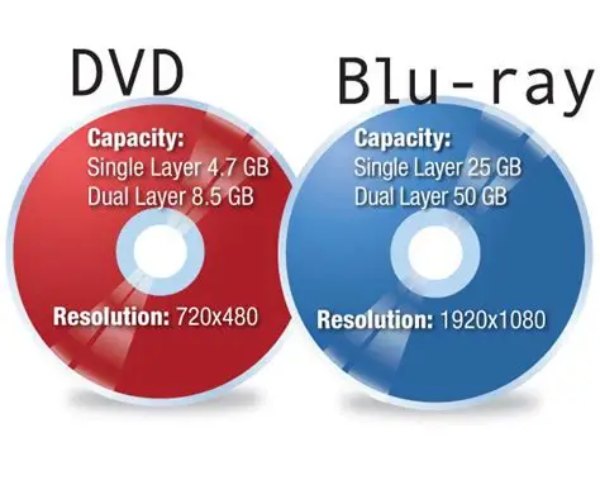
DVDs and Blu-rays are actually both types of storage containers. Each of them stores media data. As storage containers, their compression methods are different. This difference determines that they are actually different media. Therefore, special corresponding equipment is required to recognize them.
3. Generation Issue
When it came to Blu-ray players replacing DVD players, an important issue was generational. In simple terms, DVD is an older technology. While Blu-ray, as an advanced technology, has higher compression efficiency and quality. Therefore, you will find that it's OK to play DVDs on Blu-ray players, but the opposite is not possible.
How Can You Play Blu-ray Content without a DVD Player
Since you can't play Blu-ray discs in DVD players, what should you do with your Blu-ray collection? If you happen to have the devices below at hand, you might as well give them a try. This section recommends several devices that can help you play Blu-ray discs. You can choose and select the proper device according to your own needs.
1. Portable Blu-ray Player
A portable Blu-ray player is a good choice. A portable Blu-ray player can perform as well as a professional-grade one for smooth Blu-ray playback. Convenience is not the only reason why many people choose it. Compared to professional-grade Blu-ray equipment (which often costs from $200 to $500), portable Blu-ray players usually cost around $100. They usually come with a Blu-ray disc drive and a display screen as well. This means you can use this integrated Blu-ray device to enjoy Blu-ray content directly.
2. Game Console
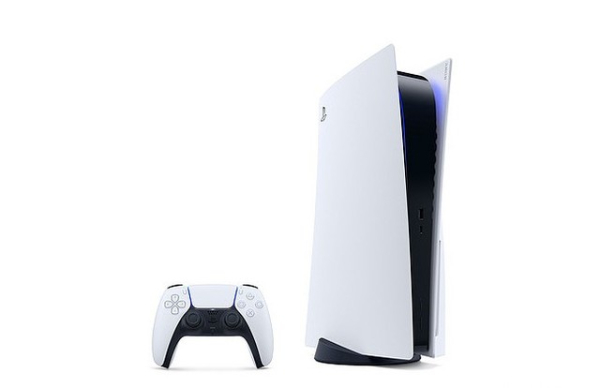
If you usually play games on a game console, you can also consider it as an option. Since some games require a disc to run, both the PS5 and Xbox One include disc drives for inserting game discs. And these disc drives can also read the content from Blu-ray discs. This means that you can enjoy the games while also using them as a Blu-ray player.
3. Computer
When your DVD player fails to play a Blu-ray disc, your computer or laptop can help. They can read Blu-ray content when connected to a Blu-ray disc. Even if your device is not equipped with a built-in disc drive, an external one works as well. Once you insert the disc, the device will load it smoothly. Next, all you need to do is select a proper 4K Blu-ray player to enjoy them.
A Professional Tool to Convert Blu-ray to a DVD Player
Although you can't directly play Blu-ray discs in DVD players, there is actually a way to do it. Many DVD players support USB devices. This means that you can convert Blu-ray video files to digital format. Once you convert the Blu-ray content, you can put it in a USB device and connect it to the DVD player. In this way, your DVD player can play the Blu-ray content smoothly. 4Easysoft DVD Ripper can easily help you complete this step.
Copy Blu-ray content for playback on DVD players.
Support many video customization settings.
Multi-core processors for a smooth Blu-ray ripping.
Modify the detail parameters of the ripped Blu-ray videos.
100% Secure
100% Secure
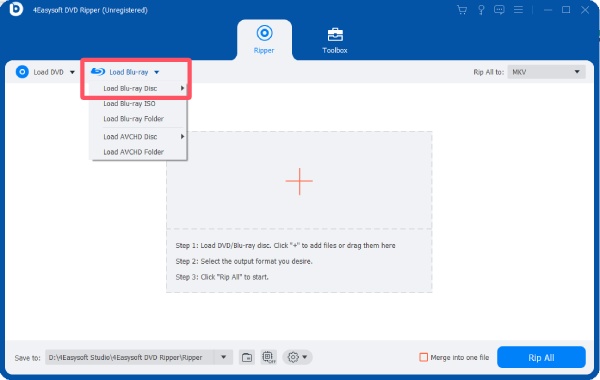
Step 1Insert the Blu-ray disc into the disc drive. Launch 4Easysoft DVD Ripper on your device. Click the "Load Blu-ray Disc" button.
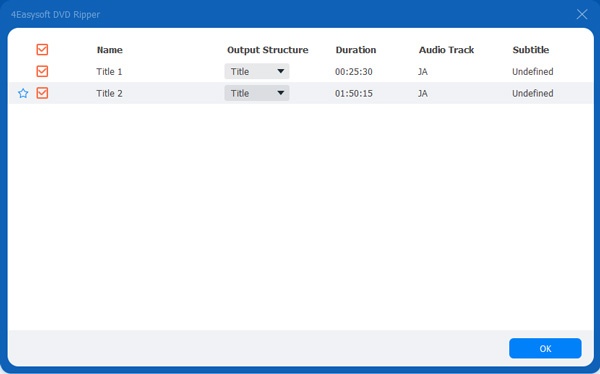
Step 2Then, click the "Full Title List" button. You can select the content you want to rip. Once finished, click the "OK" button.
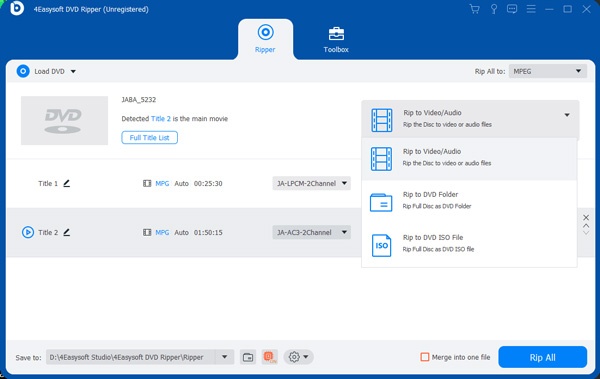
Step 3To select the output format, click the "Rip All to" button. You can decide the format that meets your requirements.
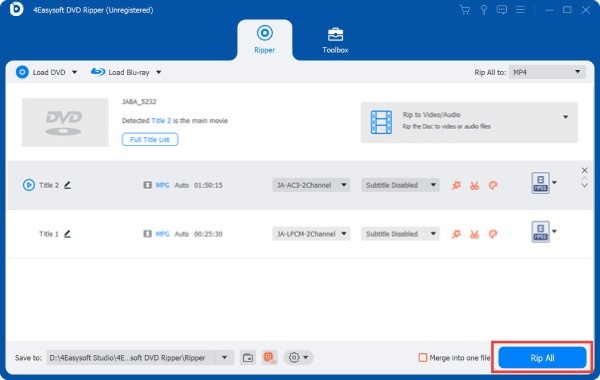
Step 4In the main interface, click the "Rip All" button. Now, you can play Blu-ray on DVD players or anywhere you want.
[Bonus] A Compatible Way to Play Blu-ray Content
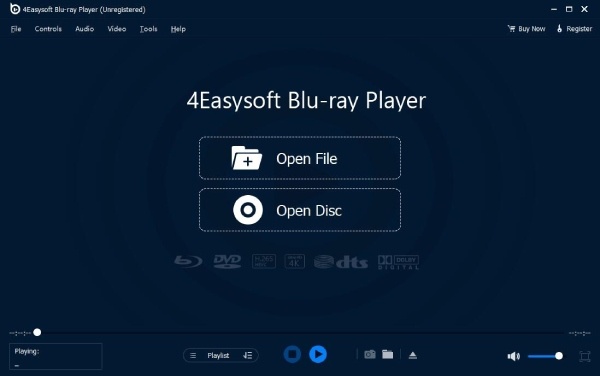
Many people may want to watch Blu-ray content directly on their computers. The default media player usually fails to play Blu-ray content successfully. Then you will need a professional Blu-ray player. 4Easysoft Blu-ray Player is a perfectly suitable choice. It enables you to enjoy the original quality of Blu-ray content. During this process, you also have full control over how you view.
Conclusion
Although you can play DVDs on Blu-ray players, the opposite operation won't work. This post offers you multiple solutions to help you quickly access Blu-ray content. If you want to enjoy them freely on your DVD players, 4Easysoft DVD Ripper can assist you. Just through a quick conversion, you can easily enjoy Blu-ray content in the future.
100% Secure
100% Secure
