
Reliable video converter, editor, and compressor for daily tasks.

7 Apps Like CapCut for Desktop/Online/Mobile Video Editing

Posted by Aira Lesly Escoto to Edit Video/Audio Mar 05, 2026
For years, CapCut has been the champion of the quick-edit world. However, you may crave more precision on a larger screen, which is why you need apps like CapCut that actually deliver. You need tools that handle 4K footage, AI that removes background with accuracy, and workflows that do not limit you to a smartphone. So, this guide brings you the 7 best CapCut alternatives for desktop and online use. Upgrade your creative flow today!
Guide List
iMovie: Seamless 4K Editing and Cinematic Storyboarding InShot: Creative Social Media Layouts VN Video Editor: Multi-Track Editing Timeline VEED.IO: Online Smart AI Subtitling Kapwing: Web-Based Collaborative Editing Clipchamp: Official Windows Editor with 4K Stocks The Best Alternative to CapCut on Windows/Mac to Edit VideosiMovie: Seamless 4K Editing and Cinematic Storyboarding

For iPhone and Mac lovers, iMovie is the standard for creative high-definition films without cost. This video editing app like CapCut, includes Magic Movies, which automatically adds your best clips to a polished video with transitions and titles in just seconds. You can also easily manage tasks such as green-screen effects, picture-in-picture, and split-screen layouts.
- Edit and export videos in professional-grade cinema quality.
- Sync video projects between iOS and macOS.
- Enjoy all features and high-resolution exports without a subscription.
InShot: Creative Social Media Layouts

For a more versatile mobile creator, here's InShot. This CapCut similar app, stands out as a social media-first editor as it excels at producing content for Instagram and TikTok. Plus, it has keyframe animation that adds custom motion to text, stickers, and overlays. The apps also feature a massive library of filters, glitch effects, and trending transitions.
- Can create smooth slow-mo and dynamic velocity curves.
- AI tool suite with auto captions, background removal, and smart object tracking.
- Save your video on social media in high definition.
VN Video Editor: Multi-Track Editing Timeline
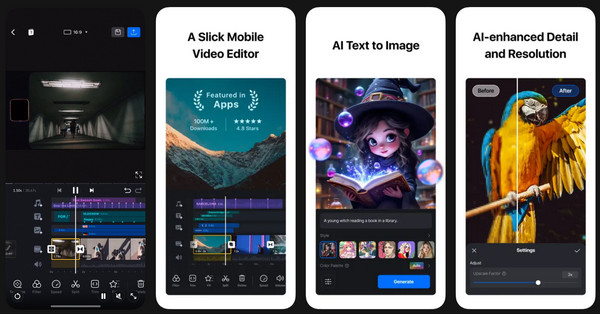
If you're looking for a more technical precision on your smartphone, VN Video Editor is the app to replace CapCut you've been looking for! It has an intuitive multi-track timeline as well as complete control over video timing. Unlike other free editors, this app offers a clean, watermark-free experience while supporting 4K exports and Dolby Vision HDR, making it a favorite among YouTubers who need a portable editor that handles complex layers and high-fidelity footage.
- Desktop-style editing timeline for frame-accurate editing.
- Can import and apply professional cinematic color filters.
- Protection mode for your project drafts.
VEED.IO: Online Smart AI Subtitling
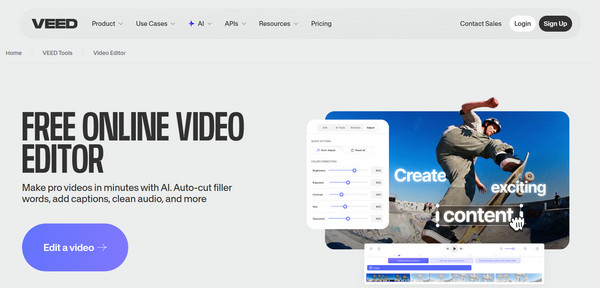
Moving to VEED.IO, a browser-based app similar to CapCut, which is perfect for educators and creators who want a polished video without expensive installations. This editor features a Magic Cut tool that removes filler words from your audio. It also has an accurate auto-subtitle generator that translates your content into more than 50 languages. Or you can add a subtitle to your video from all sources.
- AI-powered adjustments for professional delivery.
- Real-time editing and cloud collaboration.
- Generate and translate captions in more than 125 languages.
Kapwing: Web-Based Collaborative Editing

Another powerful force in online CapCut free alternative is Kapwing. With its Trim with Transcript feature, you can edit video by deleting text from a transcript, making the process as simple as editing a document. It has a collaborative workspace that makes it easy for teams to save brand kits, ensuring that logos, colors, and fonts are consistent across all exported media.
- AI Clip Maker that turns lengthy footage into short-form clips.
- Adds relevant stock footage to your video project.
- Trim video by editing the text transcript.
Clipchamp: Official Windows Editor with 4K Stocks
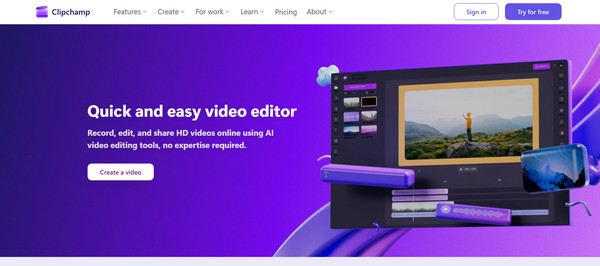
For those working on PC, Microsoft Clipcamp offers a smooth hybrid experience as a web app like CapCut and a native Windows tool. It features a library with over a million royalty-free stock images, videos, and audio tracks. This CapCut video editing alternative has a sophisticated Auto Compose mode that utilizes AI to arrange your clips into a highlight reel based on your selected theme. Since it is part of the Microsoft ecosystem, you can have secure backups to OneDrive and easy sharing with platforms like Teams.
- Export high-resolution videos for presentations.
- Millions of royalty-free assets can be accessed directly.
- Advanced text-to-speech in 70 languages and several tones.
The Best Alternative to CapCut on Windows/Mac to Edit Videos
When your project needs to extend beyond simple editing, 4Easysoft Total Video Converter can be your ultimate desktop companion! This all-in-one solution handles more than a thousand formats, ensuring you can import and edit any files! It has a dedicated video editor that lets you merge, crop, rotate, trim, add watermarks, apply filters, adjust effects, and more with a few clicks. It also utilizes advanced hardware acceleration to deliver speeds that are faster than any software, saving you hours of work on large batch projects. So, whether you're preparing a video for a mobile app or for a larger screen, this CapCut alternative for Windows and Mac, offers the speed and reliability that mobile editors lack.
Edit everything from 4K UHD to 3D and 360-degree videos.
Can upscale resolution, stabilize shaky videos, and remove noise with AI.
Blazing fast processing speed without affecting visuals and clarity.
Get the results you want by customizing the quality, format, frame rate, etc.
100% Secure
100% Secure
Conclusion
Each of these paid and free apps like CapCut, offers unique magic that elevates your workflow, from iMovie to Kapwing. While there is no doubt that CapCut and other mobile and online apps are great for quick social clips, it is important that the tool you choose ensures your content remains high-quality and fits your creative workflow. Out of them, 4Easysoft Total Video Converter is the premier choice for Windows and Mac users. Its built-in editing suite, super-fast processing speed, and AI-driven enhancer, you can guarantee a professional finish before you even start your edit.
100% Secure
100% Secure
