
Compress videos from GB to MB and keep its original quality with the AI technology
Convert WebM to GIF: 5 Best Ways to Get GIF Animations

Posted by Paula Pailaga to Solutions/Tips Jan 23, 2026
One of the easiest ways to share short moments across social media is GIFs. While WebM is an efficient video format, it is not always supported, so converting WebM to GIF makes it a flexible option for quick sharing and playback. The challenge here is choosing a method that keeps the process smooth and the visuals clear. Thus, this guide outlines five ways to turn WebM to GIF, from desktop to online tools, letting you pick the one that best fits your needs.
Guide List
How to Convert WebM to GIF with High Quality Convert WebM to GIF by Ezgif Use VLC to Convert WebM to GIF Online Converting WebM to GIF with Convertio Use Zamzar to Convert WebM to GIFHow to Convert WebM to GIF with High Quality
You will find plenty of tools available for an effective way to convert .webm to .gif. However, when you want flexibility and output quality, 4Easysoft Total Video Converter clearly stands out. This powerful software works beyond just a simple format conversion by covering several video and audio formats, including WebM, AVI, MP4, MKV, MP3, OGG, and more. In addition, it lets you fine-tune GIF settings such as resolution, frame rate, and output size, meaning you get complete control over how your GIF will look and play after the conversion.
Maintains high visual quality for WebM to GIF animation.
Trim, crop, rotate, merge, and edit WebM files before exporting to GIF.
Customizable settings include frame rate, resolution, size, and more.
Batch convert WebM files to GIF and other formats.
100% Secure
100% Secure
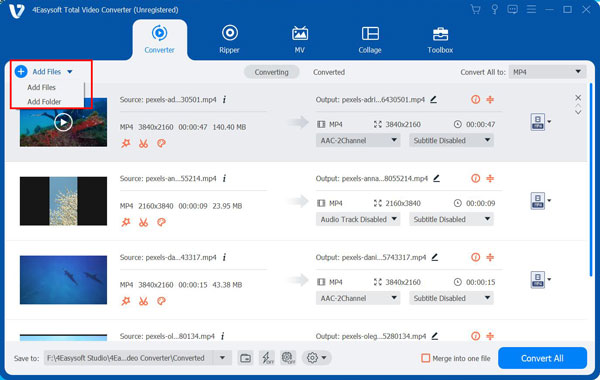
Step 1Launch 4Easysoft Total Video Converter on your Windows or Mac computer. Now, click the "Add Files" button or simply drag and drop your WebM videos into the program to import them.
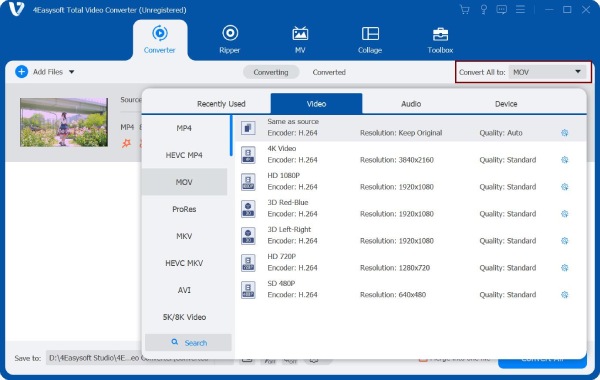
Step 2Go to the "Format" dropdown menu to view all the list of supported formats. Under the "Video" category, find and select "GIF" as the output format for your WebM to GIF animation.
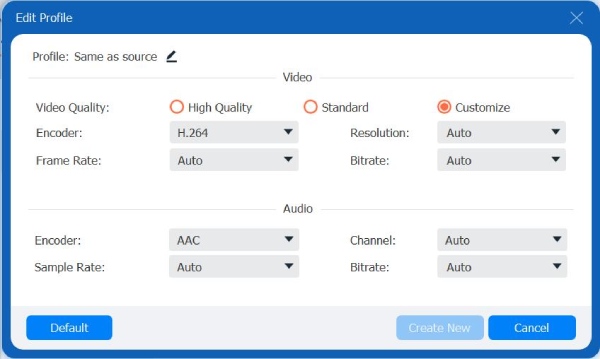
If you would like more control, click the "Custom Profile" button to adjust settings like resolution, frame rate, and other parameters to match your preferences better.
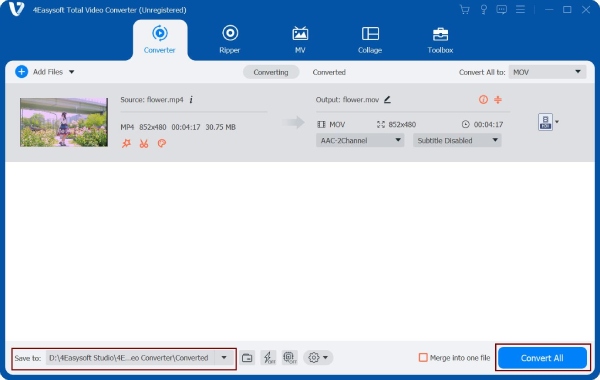
Step 3Once everything is set, pick a save location and rename your GIF output file. Click the "Convert All" button to begin converting your WebM videos into high-quality GIFs.
100% Secure
100% Secure
Convert WebM to GIF by Ezgif
Moving to a browser-based tool named Ezgif, which is a popular choice for quick WebM to GIF conversions. It needs no installation and works very well directly in your browser. It is ideal for all your short clips and casual projects. You can crop videos with Ezgif, as well as trimming and resizing.
Step 1From the Ezgif Video to GIF converter window, click on "Choose File" to upload your WebM video file. Or paste the URL of the video, then click "Upload Video" to proceed.
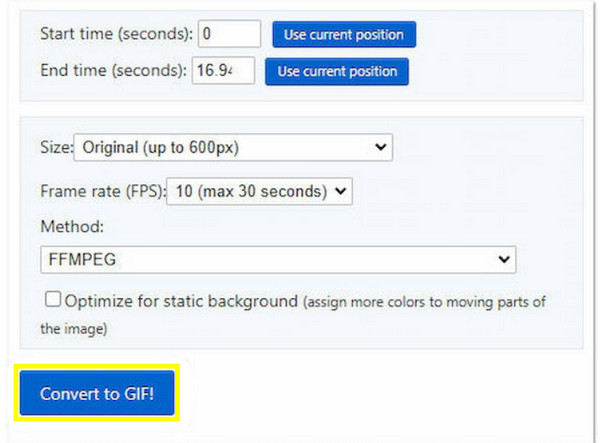
Step 2Next, adjust the time or size if needed, and after all that, click the "Convert to GIF" button to start the processing.
Step 3Download the finished GIF to your computer.
Use VLC to Convert WebM to GIF
For anyone who wants a free desktop solution to change WebM to GIF, VLC Media Player offers a workaround. Although VLC does not directly export GIFs using a simple button, it can still help you achieve the task with a few extra steps. Just take note that this approach only has limited output customization compared to other dedicated converters.
Step 1Run VLC Media Player on your computer.
Step 2Click on "Media" then select "Convert/Save" and import your WebM video file, then click "Convert/Save" again to move on.
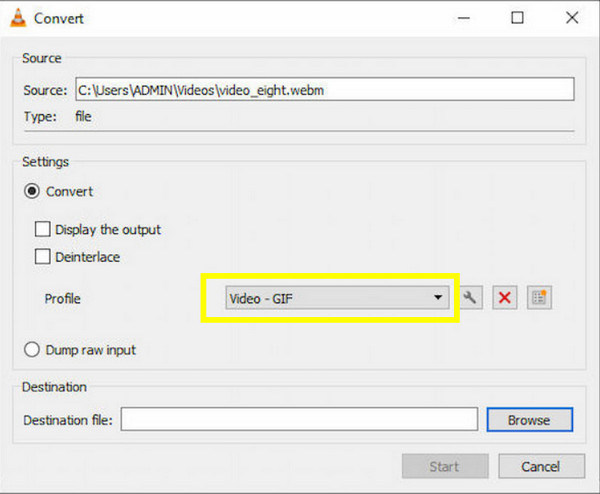
Step 3Afterward, choose a video format under "Profile", pick "Video - GIF".
Step 4Select a file destination and make sure to save it with a .gif extension.
Step 5Click the "Start" button to finalize.
Online Converting WebM to GIF with Convertio
Convertio can convert WebM to GIF with transparency. This online GIF converter covers the conversion process directly in the browser and can be accessed across different devices. However, you may encounter file size limits, but if you do not mind, see the steps for quick WebM to GIF conversions. Later, you can slow down or speed up GIF to make it funny.
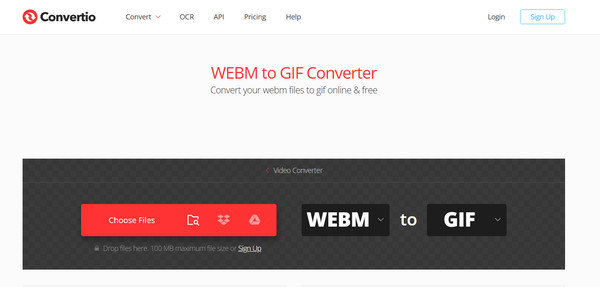
Step 1Inside the Convertio WebM to GIF official page, upload your WebM file from your computer or cloud storage.
Step 2Next, make sure "GIF" is picked as the output format.
Step 3Click the "Convert" button and wait for the conversion process to finish.
Use Zamzar to Convert WebM to GIF
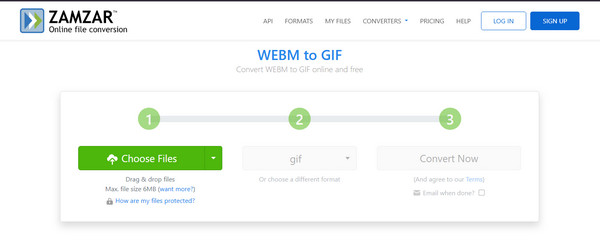
At last, Zamzar offers an effortless and beginner-friendly way to change WebM to GIF online. The process works simply without any complicated settings to adjust. While it has no advanced editing tools, it handles format conversion reliably, so here's how it works:
Step 1Visit the Zamzar WebM to GIF official page. There, upload your WebM video file in the first step.
Step 2At this stage, ensure "GIF" is selected as the output format.
Step 3Click the "Convert Now" button to start the process. Download it once completed.
Conclusion
When you use the right tools, you can turn WebM to GIF in an instant! Whether you want a desktop software or a convenient online converter, each way here offers a practical solution to convert short videos into quick shareable animations. Out of them, for the most dependable performance, use 4Easysoft Total Video Converter. With its high-quality GIF output, customizable settings, editing tools, and fast speed, it is an ideal all-in-one solution for converting WebM to GIF efficiently.
100% Secure
100% Secure
