
Burn Xbox game disc to digital files to save the video/audio files.

4 Best Free DVD to MKV Converters: Pros, Cons & Alternative

Posted by Ethan Brooke to Rip DVD Sep 11, 2026
Turning a DVD into an MKV file is easier than most people think. It won't cost you anything if you use the right tools. The catch is that not every free DVD converter handles copy protection or preserves the original quality. This guide covers four solid free options, then breaks down exactly how to rip protected DVDs to MKV losslessly. Therefore, your movie collection stays sharp on any device.
Guide List
Can You Convert a DVD to MKV for Free Top 4 Free DVD to MKV Converters How to Rip Protected DVDs to MKV LosslesslyCan You Convert a DVD to MKV for Free
Yes. You can convert a DVD to MKV for free with several tools. MakeMKV is one of the simplest choices. Its official site states that opening DVD discs is free and will remain free. It can keep the original video, audio tracks, chapters, and other information in the MKV file. HandBrake is another free and open-source option. It can create MKV files from supported DVD sources. But it cannot handle copy-protected DVDs on its own. If you need more output formats, editing tools, or control over the conversion, 4Easysoft DVD Ripper is a more feature-rich alternative.
Top 4 Free DVD to MKV Converters
Not every free DVD to MKV converter works the same way. Some focus on speed and quality, others on shrinking file size, and a couple are better suited to people who don't mind fiddling with settings. See which one you need according to the following recommendations.
| Tool | Handles Copy-Protected DVDs | Output Quality | Re-encodes Video |
| MakeMKV | Yes | Lossless, exact copy | No |
| HandBrake | No (needs libdvdcss added separately) | Good, but compressed | Yes |
| VLC | Not reliably, even with libdvdcss | Inconsistent | Yes |
| FFmpeg | No, needs external decryption first | Depends on settings | Yes (configurable) |
1. MakeMKV
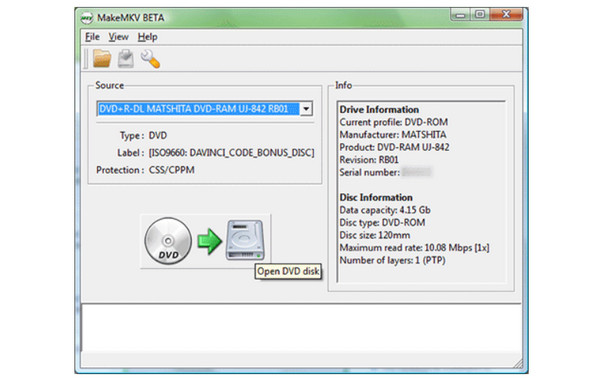
MakeMKV is the go-to DVD to MKV converter freeware for most people, and for good reason. It reads the DVD, decrypts it if needed, and copies everything, video, audio tracks, subtitles, and chapters, straight into an MKV file. The catch is that you'll need to renew a free beta key every so often to keep using it.
- Pros
- Built-in presets make it easier to choose the right quality settings.
- Re-encoding can make the final video much smaller than a direct remux.
- Cons
- Files stay large since there's no compression.
- The free MakeMKV beta key requires occasional manual renewal, which some users find annoying.
2. HandBrake
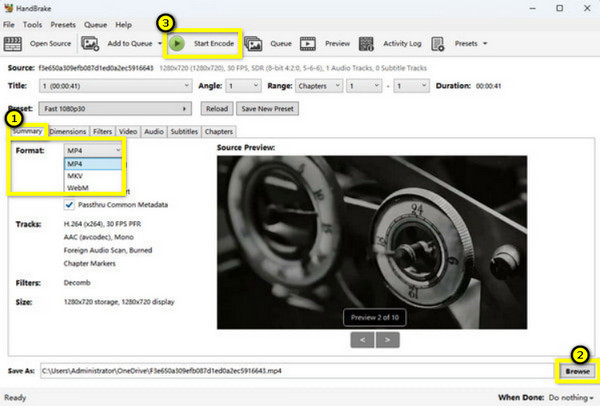
HandBrake is a good MakeMKV alternative when file size matters more than keeping the DVD video completely untouched. It is free and open source, and it can open DVD sources and create MKV files. Unlike MakeMKV, HandBrake re-encodes the video. Thus, you can adjust quality, resolution, frame rate, and other encoding settings. This makes it useful if you want an MKV that takes up less space.
- Pros
- Presets make quality settings much easier to handle.
- You can get smaller files compared with a direct remux.
- Cons
- Need a separate library for encrypted discs, which trips up new users.
- Some users report crashes on long or damaged discs when ripping DVDs with HandBrake.
3. VLC Media Player
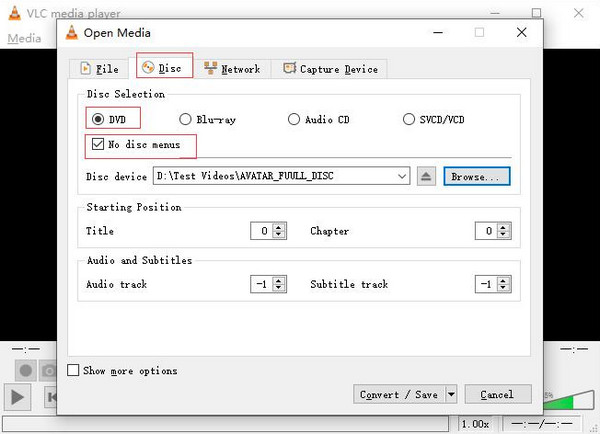
VLC is not just a video player, it can convert DVDs to MP4, MKV, and other formats for free, too. However, VLC is not a reliable choice for copy-protected DVDs. VLC relies on an external library called libdvdcss to decrypt discs, and even with it installed, it often fails on newer or more heavily protected commercial DVDs. For unprotected or homemade discs, it works fine, but for most store-bought movies, people report the rip either won't start or comes out broken.
- Pros
- Read DVD video and can output MKV files.
- Handle unprotected and personal DVDs without much trouble.
- Cons
- Copy-protected commercial DVDs can still be a problem, even after installing libdvdcss.
- Some users run into freezes while ripping full-length DVD movies.
4. FFmpeg
FFmpeg is free and powerful enough to convert DVD video into MKV. But it takes some technical know-how. Everything is done through commands. So, there isn't a simple interface to guide you. It also can't handle copy-protected DVDs by itself. Working out the right VOB and IFO files can be another headache, and a bad command can force you to redo the conversion.
- Pros
- Extremely flexible, handles almost any combination of formats.
- Great for batch jobs and scripting.
- Cons
- Protected DVDs need additional tools. Because there's no built-in decryption.
- It's easy to enter the wrong command and have to start over.
How to Rip Protected DVDs to MKV Losslessly
The above free DVD to MKV converters work well for unprotected and homemade discs. But ripping protected DVDs is another story. If MakeMKV feels too limited or you want something easier, 4Easysoft DVD Ripper is worth trying. It can detect and remove many common DVD copy protections automatically. You don't have to deal with manual key renewals. Moreover, you can get more controls over the output than many basic free DVD rippers.
Convert DVD to MKV, MP4, and other 600+ formats.
Handle the latest copy-protected commercial DVDs.
Preserve multiple audio tracks, subtitles, and chapters.
Get 30× faster DVD ripping speed.
100% Secure
100% Secure
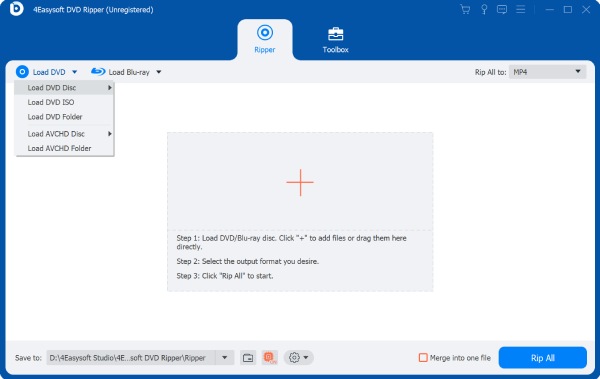
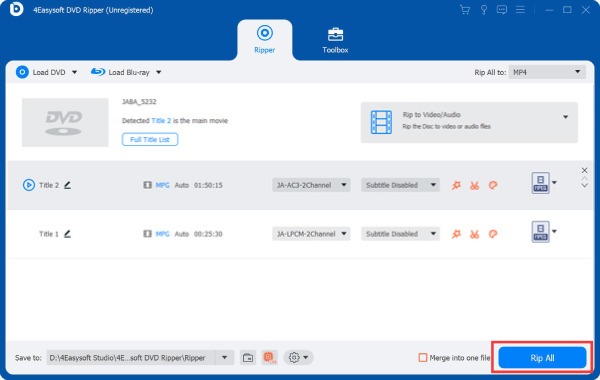
Step 1Insert your disc. Open 4Easysoft DVD Ripper. Click the "Load DVD" button and get the DVD content.
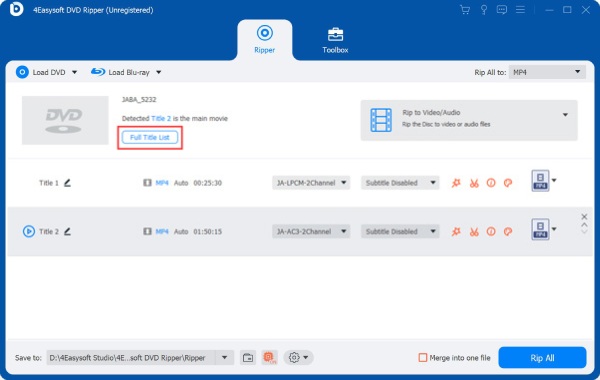
Step 2Click the "Full Title List" button to load all titles and chapters. You can click the "Edit" button to apply video editing if necessary.
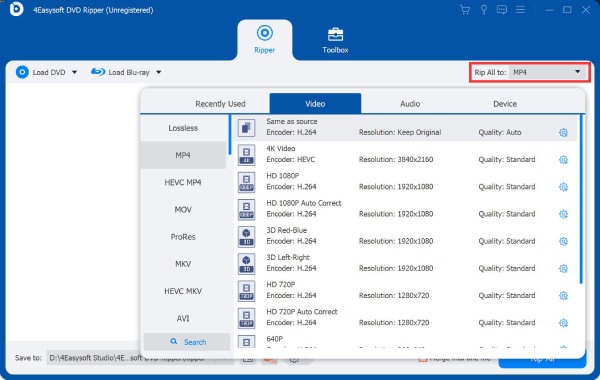
Step 3Unfold the "Rip All to" drop-down menu. Select MKV as the output video format.
Step 4Click the "Rip All" button to rip DVD to MKV format.
Conclusion
You can definitely convert DVDs to MKV for free with tools like MakeMKV and HandBrake. But free options can become frustrating when you run into copy protection or need more output choices. If you don't want to deal with keys or extra libraries, 4Easysoft DVD Ripper gives you a more guided way to get the job done.
100% Secure
100% Secure
