

How to Rip DVD Movies for Plex and Add Them Easily

Posted by Paula Pailaga to Rip DVD Oct 13, 2026
Plex makes it easy to keep a movie collection in one place. But if your movies are still on DVDs, you cannot simply put a disc into your computer and have Plex stream it. You need to rip the DVD and save the movie as a digital file first. Ripping DVDs for Plex is more than copying a movie from a disc. You need a video file that works well with your Plex setup and a folder structure that Plex can recognize. As for more details, you can continue reading to rip your DVD collection for Plex Media Server.
Guide List
What Format Is Best for Plex How to Rip a DVD for Plex How to Add the Ripped DVD to Plex FAQsWhat Format Is Best for Plex
There's no single format that plays perfectly on every device. Plex itself says direct playback depends on a mix of factors, including the container, video codec, audio codec, subtitles, resolution, and bitrate all of which play a part.
For a DVD collection, it usually comes down to a few main options:
| Format | Recommended Settings | Best For |
| MP4 | H.264 + AAC | Maximum compatibility |
| MKV | H.264 + AAC/AC-3 | Keeping multiple tracks |
| MP4 | H.265 + AAC | Smaller files on compatible devices |
| DVD folder | Original DVD structure | Preserving the disc |
For a DVD collection, MP4 with H.264 video and AAC audio is usually the safest starting point. It's about as close to a universal format as Plex gets.
How to Rip a DVD for Plex
4Easysoft DVD Ripper is a practical option for preparing DVDs for a Plex library. It can load DVD discs, folders, and ISO files, then export them to MP4, MKV, and other formats while adjusting the video and audio settings. You can choose the main movie, specific chapters, audio tracks, and subtitles. This helps you avoid filling your Plex library with trailers and bonus clips.
Convert DVDs, folders, and ISO files to 600+ formats.
Pick exact titles and chapters, skip the trailers.
Adjust the video codec, resolution, bitrate, and frame rate.
Choose specific audio tracks, including AC-3 or AAC.
100% Secure
100% Secure
100% Secure
100% Secure
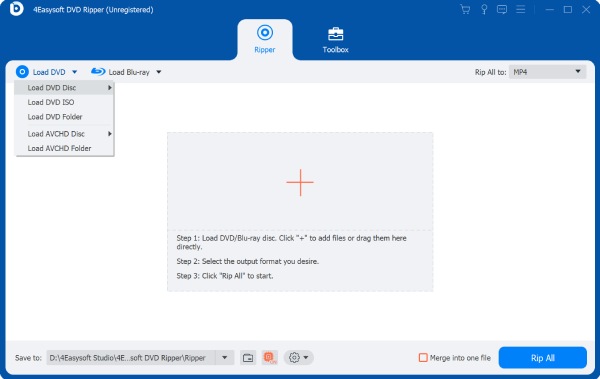
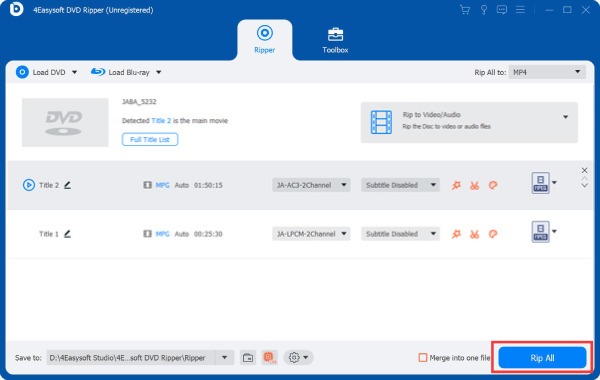
Step 1Open 4Easysoft DVD Ripper. Click the "Load DVD" button. Choose the disc from the available options and load the content.
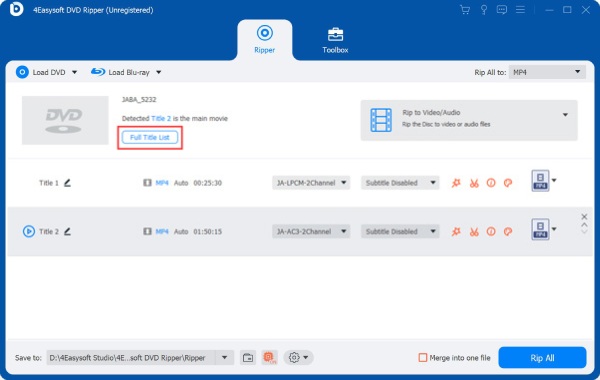
Step 2Click the "Full Title List" to show the main title and other chapters. You can decide whether you want to keep or remove from your Plex library.
Step 3Click the "Rip All to" button and select MP4 as the video format. If you want to keep multiple audio or subtitle tracks, you can choose the MKV format too.
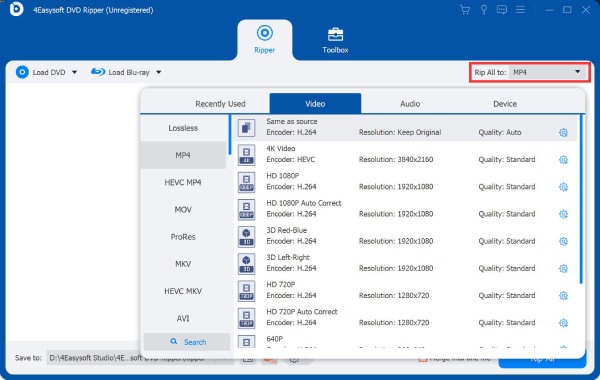
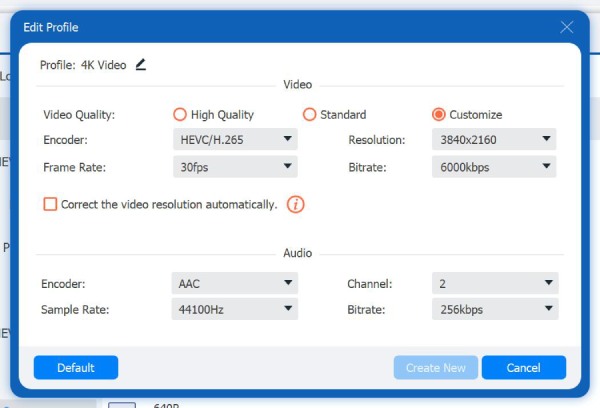
Step 4For maximum compatibility, H.264 is a safe starting point. If you want to make the file smaller, you can use H.265/HEVC.
Step 5Set a destination folder. Then click the "Rip All" button to rip DVDs to Plex-compatible formats.
How to Add the Ripped DVD to Plex
After ripping the DVD, you need to put the finished video in a folder that Plex scans. For a movie library, it is best to give each movie its own folder. Use the movie title and release year in both the folder and file name.
A simple structure looks like this:
Movies
Movie Name (2020)
Movie Name (2020).mp4
Another Movie (2019)
Another Movie (2019).mp4
By doing so, Plex can identify the correct movie. It can match the title with the specific artwork, description, cast, and other metadata.
To add the movie folder to Plex, you can open Plex Media Server and go to your movie library. If you have not created one yet, click the "Add Library" button and select "Movies" as the library type.
Enter the location of your Movies folder. Make sure the Plex Media Server has permission to access that drive or network folder.
For a large DVD collection, keeping the same structure for every movie makes future additions much easier. You can simply rip a disc, place it in its own correctly named folder, and let Plex handle the cataloging.
FAQs
-
Can Plex play DVD files directly?
Plex does not treat a physical DVD as a normal movie file in your library. You should convert or otherwise prepare the DVD content as digital media before adding it to Plex.
-
Is MKV good for Plex?
Yes. Plex supports MKV. However, its compatibility depends on the codecs, audio, subtitles, and playback device.
-
Can I keep subtitles when ripping a DVD for Plex?
Yes. You can select subtitle tracks during the DVD ripping process. Whether Plex can Direct Play the resulting file without transcoding depends on the subtitle format and playback device.
Conclusion
To rip a DVD for Plex, first decide whether you want the maximum compatibility or more flexibility. MP4 with H.264 video and AAC audio is a good starting point for a library that needs to work across different devices. MKV is also a good option when you want to keep multiple audio and subtitle tracks.
For the ripping itself, 4Easysoft DVD Ripper provides a straightforward way to load DVDs, select titles and chapters, and convert them to MP4, MKV, or other formats. You can also adjust the video and audio settings to balance quality, file size, and compatibility with Plex. In short, it is a practical choice for building a flexible Plex library.
100% Secure
100% Secure
