
Burn videos to DVD/ Blu-ray with templates and editors.

Reviews on 6 Best DVD Recorders to Backup Videos on DVDs

Posted by Paula Pailaga to Burn DVD/Blu-ray, Review Jun 11, 2026
You may need a DVD recorder to save TV shows in disc and then watch them at any time without the Internet. You can also use it to convert the video tapes to DVDs for viewing on TVs. Since there are many choices on the market, it’s difficult to find the best and cheapest DVD recorder for you. This article had tested 6 popular DVD recorders and provide you pros and cons from real experience. Dive into it and make the best decision.
Guide List
Top 1: Magnavox HDD and DVD Recorder Top 2: Toshiba DR430 DVD Recorder Top 3: Sony RDR-GX300 DVD Recorder Top 4: Panasonic DMR-EZ28K DVD Recorder Top 5: Funai Combination VCR and DVD Recorder Top 6: Sony VRD-MC6 Compact DVD Recorder 4Easysoft DVD Creator - Make DVDs on Windows/Mac What DVD Recorder to Actually Buy Detailed Steps to Use DVD Recorder| Recorder | Status | Real Price Range | Best For |
| Magnavox HDD and DVD Recorder | Discontinued – refurbished/used only | $150-$400 | TV recording, large HDD storage |
| Toshiba DR430 | Discontinued – refurbished/used only | $80-$180 | VHS-to-DVD transfer, basic TV recording |
| Sony RDR-GX300 | Discontinued – refurbished/used only | $100-$250 | Good picture quality, dual format |
| Panasonic DMR-EZ28K | Discontinued – refurbished/used only | $80-$200 | Over-the-air digital TV recording (ATSC) |
| Funai VCR/DVD Recorder | Discontinued – refurbished/used only | $150-$350 | VHS-to-DVD transfer |
| Sony VRD-MC6 | Discontinued – refurbished/used only | $100-$300 | Camcorder transfer, no PC needed |
Top 1: Magnavox HDD and DVD Recorder (MDR535H/F7 or MDR865H)
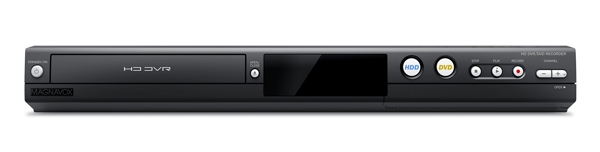
What it does: Records live TV to a 500GB internal hard drive. Later, it lets you burn highlights to DVD. Built-in digital tuner (ATSC) for over-the-air HD channels.Real price: $150-$400 refurbished depending on model and condition.
As one of the best DVD players with VHS recorder, Magnavox HDD and DVD Recorder offers over 500 hours of recorded footage up to 8 hours in HD and has the largest memory on the top list. 1080p up-conversion provides an excellent experience.
- Pros
- Integrate a large memory storage.
- Offer high-quality video output.
- Transfer content between different media.
- Include versatile connectivity options.
- Cons
- It is expensive compared to competitors.
- It is only compatible with NTSC video input.
Top 2: Toshiba DR430 DVD Recorder
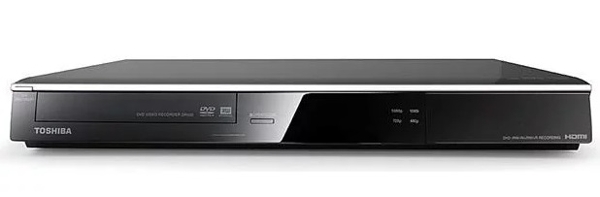
What it does: Records TV (via cable/satellite box passthrough) and VHS content directly to DVD. No internal hard drive. No built-in tuner. It requires an external cable or satellite box.Real price: $80-$180 refurbished.
Toshiba DR430 is a DVD recorder for TV. It lets you record DVDs from TV sets, and digital video cameras via HDMI. The 1080p upscaling feature enhances the video quality automatically. Moreover, it can play MP3 CDs and standard audio CDs.
- Pros
- Support video resolution up to 1080p.
- Feature WMA and MP3 music playback.
- Compatible with different optical discs.
- Easy to navigate with a one-touch recording function.
- Cons
- It cannot record VSH video tapes.
- It cannot record audio CDs.
Top 3: Sony RDR-GX300 DVD Recorder
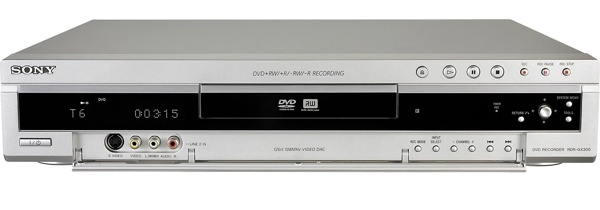
What it does: Universal DVD recorder that handles both DVD+RW/+R and DVD-RW/-R formats. Built-in TV tuner (NTSC), IR blaster for cable/satellite box control, chasing playback (rewind while still recording), and simultaneous record/playback in VR mode.Real price: $100-$250 refurbished.
This DVD recorder comes with six different recording modes so that users can adjust the video quality and expand the internal memory. It allows you to record up to 5 hours of videos. For beginners, there is an electronic program guide.
- Pros
- Record DVDs with remote control.
- Compatible with a wide range of disc types.
- Integrate Precision Cinema Progressive.
- Simplify timer recording through VCR Plus+.
- Cons
- It cannot record videos from DV or videotapes.
- It lacks a display.
Top 4: Panasonic DMR-EZ28K DVD Recorder
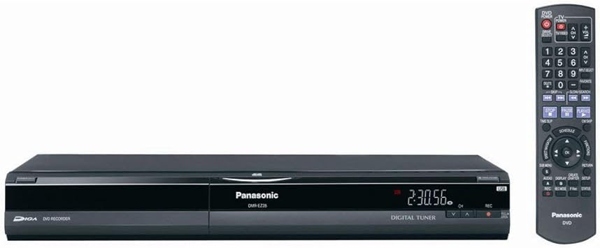
What it does: DVD recorder with a built-in hybrid ATSC/NTSC tuner (records both over-the-air digital and analog TV), 1080p upconversion via HDMI, SD card slot, USB port, and DVD-RAM support.Real price: $80-$200 refurbished.
Panasonic DMR-EZ28K DVD Recorder is a great entry-level DVD recorder for TV through an ATSC tuner, which allows the reception and recording of over-the-air digital TV signals. In addition, the device equips powerful features, like 1080p up-conversion, producing crisp tones with 384Kbps, and more.
- Pros
- Come with an SD card slot.
- Integrate ATSC tuner for DVD recording.
- Compatible with most DVDs.
- Upscale video resolution up to 1080p.
- Cons
- The price is a bit high.
- It only supports HDMI connectivity.
Top 5: Funai Combination VCR and DVD Recorder (ZV427FX4)
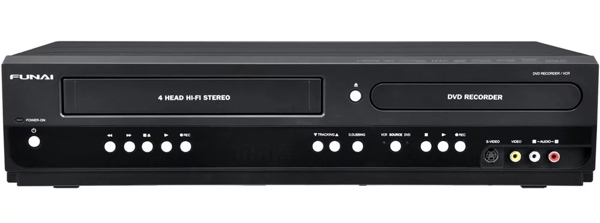
What it does: Records from VHS tapes to DVD (or vice versa) in one unit. Two-way dubbing is the headline feature. 1080p upconversion via HDMI. Dolby Digital passthrough. Real price: $150-$350 refurbished.
Funai Combination VCR and DVD Recorder is a premium VHS to DVD recorder. If you need a high-end DVD recorder, it is one of the best options. It includes many great functionalities, like 1080p up-conversion, Dolby Digital stream output, and more, which makes it fascinating to convert home videos to DVDs.
- Pros
- Transfer video files from VHS to DVD or vice versa.
- Equip analog audio-video ports on both front and back.
- Upscale video quality up to 1080p.
- Record from cable-satellite box.
- Cons
- The 1080p up-conversion is only available to HDMI output.
- It is expensive.
Top 6: Sony VRD-MC6 Compact DVD Recorder
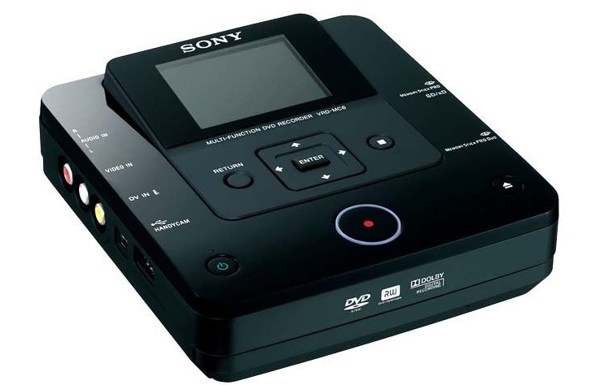
What it does: Compact, standalone recorder designed specifically for transferring camcorder footage and photos to DVD without a PC. Has a 2.7-inch color LCD screen, built-in memory card readers (Memory Stick, SD/SDHC, xD), and records from virtually any camcorder, VCR, or DVR via analog inputs. Supports 1080i AVCHD recording from Sony AVCHD camcorders. Real price: $100-$300 refurbished.
If you need a portable DVD recorder, Sony VRD-MC6 Compact DVD Recorder is a nice choice. It transfers home video recordings and digital pictures to DVD without quality loss. The inputs supported include camcorder, VCR, or DVR. Most types of DVDs are supported.
- Pros
- Equip a 2.7-inch color LCD screen.
- Support MP3, JPEG, and WMA file formats.
- Preview the DVD menu and chapters.
- Record up to 12 hours of video.
- Cons
- It does not support HDMI.
- It cannot control DVD recording with a remote.
4Easysoft DVD Creator - Make DVDs on Windows/Mac
If you only want to make videos to DVD disc on Windows/Mac, you can get a cheaper DVD recorder here. 4Easysoft DVD Creator is one of the best DVD recording and burning software, which provides everything you need for make DVD and Blu-ray disc.
Burn videos to DVD, Blu-ray, or ISO quickly.
Utilize AI to enhance the video quality to 1080P and even 4K.
Able to edit, crop, cut, and add effects to the input files before burning DVD.
Offer customized DVD menus for you to record and make DVD in different themes.
100% Secure
100% Secure
Here are the steps to record a DVD with videos on your computer:
Step 1Run 4Easysoft DVD Creator after installing it on your computer. Click "DVD Disc", and click the "Add Media File(s)" button to open the desired video files.
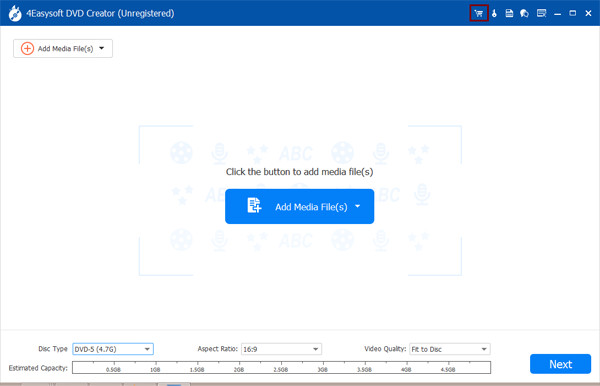
Step 2Click "Next" after the video loads. Then choose a proper menu template from the right side, and modify the background picture and music according to your preference.
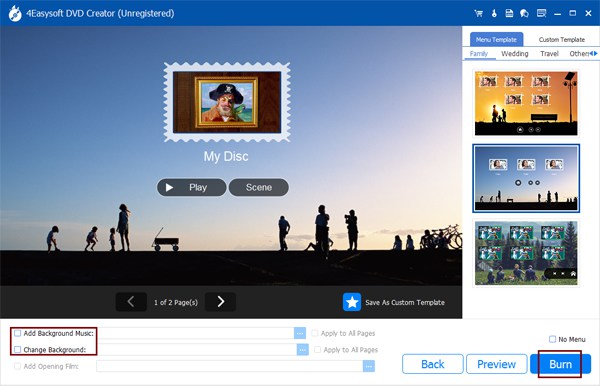
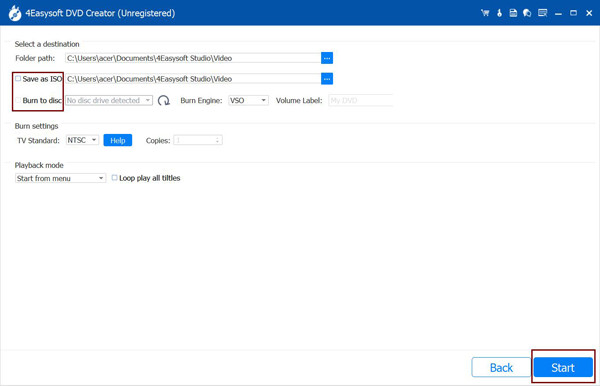
Step 3Next, hit the "Burn" button, customize the options accordingly, and click the "Start" button to begin burning the video DVD immediately.
What DVD Recorder to Actually Buy
All six recorders above are old hardware available only used or refurbished. Here's honest buying guidance.
If you want to record TV (over-the-air):Panasonic DMR-EZ28K or Magnavox HDD models. The ATSC tuner handles modern over-the-air digital channels. Buy from a seller with a return window.
If you want to transfer VHS tapes to DVD:Funai ZV427FX4, Toshiba DVR620 (same hardware, more expensive), or Magnavox ZV427MG9 (same hardware, slightly cheaper). For best results, pair with a decent quality VCR rather than relying solely on the built-in one.
If you want to transfer camcorder footage:Sony VRD-MC6 (easy, no PC needed) or connect via a PC with capture software (more flexible, free).
If you want an HDD buffer before burning:Magnavox HDD/DVD combo models. The 500GB drive is genuinely useful for recording before deciding what to keep.
Honest alternative to all of the above:A USB video capture device (Elgato Video Capture, ~$80 new) plus free software (OBS, Handbrake) lets you convert VHS or camcorder footage directly to digital files on your computer. No physical DVD required, and the output is more flexible. This is what most people doing VHS preservation use now.
Detailed Steps to Use DVD Recorder
To record VHS video tapes or TV shows on a DVD, you need a DVD recorder, a compatible TV, audio and video cables, and the batteries for your remote control. Some DVD recorders support both HDMI and RCA, while others only support one connection technology. You need to prepare the cable according to your device.
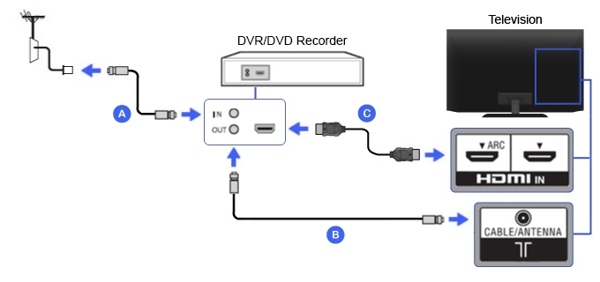
Step 1Insert the audio video cables into the ports on your DVD recorder, and connect the other end of the cable to your TV. If you intend to record a videotape on a DVD, connect the VCR to your TV.
Step 2Power on all devices and turn your TV to the proper channel. Make sure to set your TV as the correct input.
Step 3Insert a blank DVD into your DVD recorder.
Step 4Use the remote to adjust the record mode to the highest quality and set other options according to your situation.
Step 5Once you are ready, press the Record button on your DVD recorder remote to begin recording the TV show or video tape on the disc.
FAQs of DVD Recorder
-
What is the difference between a DVD Burner and a DVD recorder?
A DVD recorder is an external device that records footage from another video device, like a TV, camcorder, etc. A DVD Burner is used to create DVDs and burn content on blank discs.
-
Can you record from a DVR to a DVD recorder?
Yes, you can connect the DVR, TV set, and DVD recorder with a set of AV cables and record the video on a DVD. Or take the DVR to a professional studio to record it on a DVD.
-
How long can you record on a DVD?
A recordable single-layer DVD holds 2 hours of video at the standard rate. If you have a long video, you can use a dual-layer DVD or a Blu-ray disc.
Conclusion
This guide has told you the top 6 best DVD recorders on the market. You can pick an appropriate one based on our review and your situation. Plus, we also shared the basic procedure of recording a DVD. 4Easysoft DVD Creator is the best option to create video DVDs on a computer. If you have other recommendations, please feel free to leave your message below this post.
100% Secure
100% Secure
