
Reliable video converter, editor, and compressor for daily tasks.

Top 4 Video Converters for iPad You Should Try

Posted by Paula Pailaga to Video Converter Jan 13, 2023
Sometimes you download videos from social media platforms, and you may find that your iPad does not support playing videos. The most reliable way is to use a video converter for the iPad to convert videos to media formats supported by the iPad so that you can enjoy them on the iPad. But if you want to convert high-quality videos for playback on iPad, here are 4 video converters for iPad for you to choose from.
Guide List
Part 1: 3 Video Converter Apps for iPad Part 2: Best Alternative to the Video Converter for iPad [Safe & Easy] Part 3: Supported Video/Audio Formats for iPad Part 4: FAQs about Video Converter for iPadPart 1: 3 Video Converter Apps for iPad
1. The Video Converter
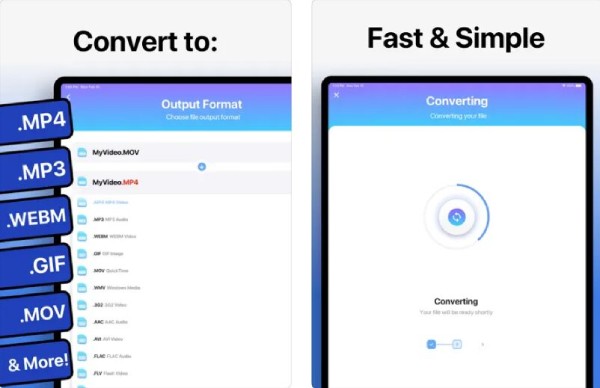
The Video Converter is a very useful and best video converter app available for the iPad. This video converter for the iPad can support dozens of file formats, including MP4, MP3, WEBM, GIF, MOV, WMV, 3G2, AAC, AVI, etc. After the successful conversion, you can directly open the video and watch it on your iPad. Moreover, this video converter for iPad adds support for local transformations for many popular transformation types that do not require a server.
- Pros
- Support various popular file formats to convert videos to iPad.
- After conversion, you can directly open the file for playback.
- Cons
- There will be problems when uploading multiple videos.
- Slow conversion speed and limit the period of the free trial.
2. iConv
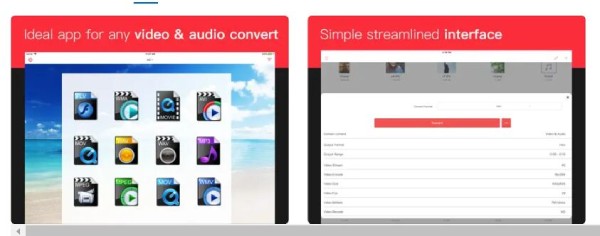
iConv is also a video converter app for iPad. It supports the conversion of various files, such as video and audio conversion, document processing, decompressing files, image conversion, PDF conversion, etc. Moreover, this video converter for iPad provides batch conversion to convert several video files at the same time.
- Pros
- Provide batch conversion and file compression.
- Support previewing and trimming the video.
- Cons
- There will be problems converting files after upgrading.
- No customized settings to adjust the parameters of the video.
3. Video Converter and Compressor
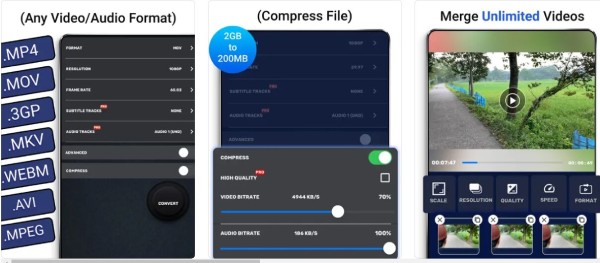
If you want a video converter app for iPad with more functions, you can try the Video Converter and Compressor. This video converter for the iPad can not only combine audio and video but also set codec and resolution. As its name suggests, you can also compress the video file to a specified size.
- Pros
- Provide batch conversion to convert multiple files simultaneously.
- Support customized settings to adjust the parameters of the video.
- Cons
- The software does not support background running.
- Adjust the audio bitrate but do not change.
Part 2: Best Alternative to the Video Converter for iPad [Safe & Easy]
Although the application of video conversion on iPad is very convenient, there are some shortcomings. Unable to convert in batch and supported few formats, these defects can not make you have a better experience of video conversion. Don’t worry. You can try the 4Easysoft Total Video Converter on Windows/Mac, which is an all-in-one video converter for iPad. It can convert video files to 600+ formats and devices. And it offers customized settings that can adjust the resolution to 1280x720 for iPad. Moreover, this excellent video converter for iPad also provides powerful editing features, including trimming, cropping, and watermarking.
Customized settings to adjust the suitable resolution of the iPad.
Support batch conversion to convert multiple videos to iPad simultaneously.
Provide the preset to convert video to iPad directly.
Powerful editing features to add subtitles to the video.
100% Secure
100% Secure
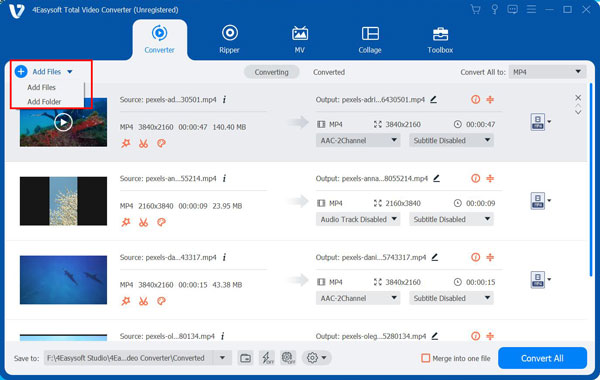
Step 1Launch this video converter for iPad after downloading the 4Easysoft Total Video Converter. Click the Add Files button to load your videos. You can also click the Plus button or drag the video file directly to the square to import the file.
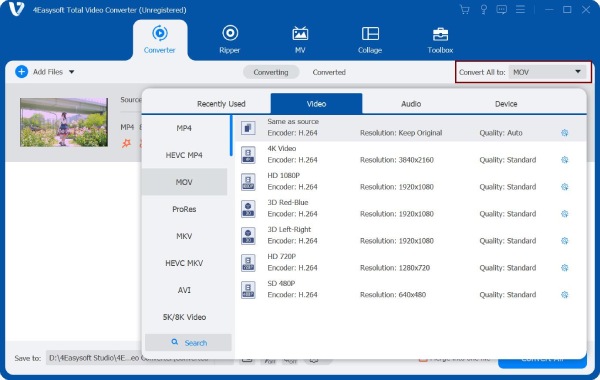
Step 2Click the Format button to open a new window. You can click the Device button to choose the iPad as the output format. You can also click the MP4 as the output format from the list.
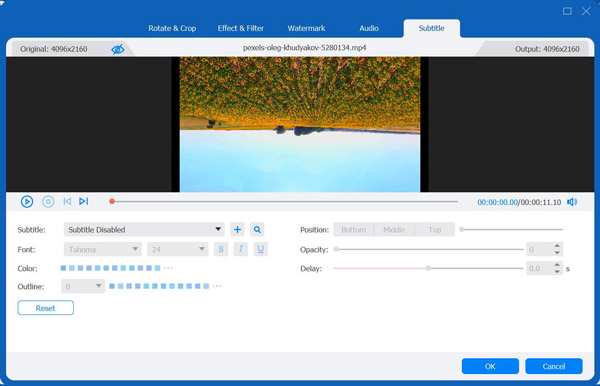
Step 3Customize the settings by clicking the Gear button. You can adjust the resolution to 1280x720 and the frame rate to 30fps. If you want to add subtitles to your video, click the Edit button to choose the Subtitle option. Then click the Plus button to import the subtitle file. And you can also adjust the position, font, color, outline, and opacity of the subtitle.
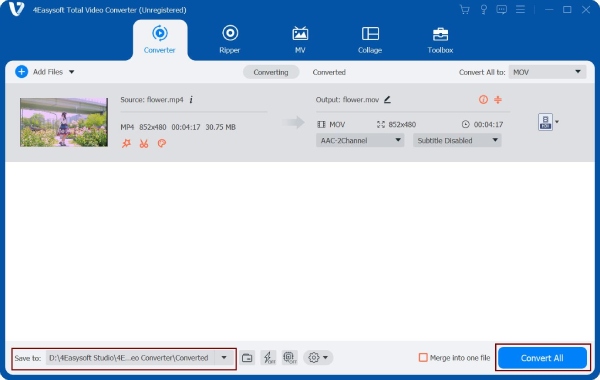
Step 4Choose the output path by clicking the Save to button, and click the Convert All button to start converting videos to iPad. You can use this video converter for iPad to merge multiple video files into one file by choosing the Merge into one file option.
Part 3: Supported Video/Audio Formats for iPad
| Video Formats | H.264 video, 720p resolution, 30 frame rate, Main Profile level 3.1 with AAC-LC audio up to 160 Kbps, 48kHz, stereo audio in .m4v, .mp4, and .mov file formats; | MPEG-4 video, 640×480 resolution, 30 frame rate, Simple Profile with AAC-LC audio up to 160 Kbps per channel, 48kHz, stereo audio in .m4v, .mp4, and .mov file formats; | Motion JPEG (M-JPEG), 1280×720 resolution, 30 frame rate, audio in ulaw, PCM stereo audio in .avi file format. |
| Audio Formats | HE-AAC (V1 and V2)AAC (8 to 320 Kbps)Protected AAC (from iTunes Store)MP3 (8 to 320 Kbps)MP3 VBR, Audible (formats 2, 3, and 4, Audible Enhanced Audio, AAX, and AAX+)Apple LosslessAIFFWAV | ||
Part 4: FAQs about Video Converter for iPad
-
How to get a high-quality video for playback on an iPad?
You should use a video converter for the iPad with customized settings. Then you need to adjust the resolution to 1280x720 and the frame rate to 30fps.
-
Which is the best conversion format for iPad?
H.264 MP4 is the most recommended format. MP4 is the popular format that has a small file size and high quality. Moreover, it can be compatible with almost any platform.
-
How to convert videos to the iPad with Handbrake?
Click the Source button and choose the Video File option to import your video files. You should click the Format button to select the MP4 as the output format. Then click the Browse button to choose the output folder and click the Start button to start converting the video to iPad. You can also use the Handbrake to convert MOV to MP4.
Conclusion
That’s all. These are the four recommended video converters for iPad, you can choose one to try according to your needs and preferences. If you don’t want to convert videos with your computer, you can try the easy video converters apps. But if you want a video converter for iPad with high quality and more features, 4Easysoft Total Video Converter is the best all-in-one tool for you.
100% Secure
100% Secure
