
Convert, edit, and compress videos/audios in 1000+ formats.

Noteworthy Free Flash Video Converter Tools on Windows and Mac For You

Posted by Paula Pailaga to Video Converter Jan 13, 2023
Have you ever downloaded a Flash Video on YouTube but could not open it with your media player? That is because Flash Videos can only play using Adobe Flash players that support FLV, SWF, and F4V formats. However, Adobe decided to deprecate this format and switch to modern formats such as MP4. The solution is already quite visible, right? Converting FLV to MP4 on Windows and Mac is all you need to solve it! Don't know how to do it? Don't worry; I got you covered! Please read this article to see the best tools with comprehensive ways to convert flash format.
Guide List
Part 1. The Best Flash Video Converter to Transfer SWF/FLV to MP4 Part 2. How to Convert Flash to Videos Online: 4 Free Tools for You Part 3. FAQs about Flash Video Converters on Windows/MacPart 1. The Best Flash Video Converter to Transfer SWF/FLV to MP4
4Easysoft Total Video Converter is a great tool to use as a flash video converter on Windows and Mac. This tool offers 600 plus formats, including SWF, FLV, F4V (file extension formats of a flash video), and other popular formats. Moreover, unlike other video converter tools, this tool supports 60X ultra-fast speed conversion process in all formats and doesn't limit you with your file inputs. Furthermore, this tool is free and compatible with Windows and macOS. This tool could offer you much more besides just providing the SWF or FLV to the MP4 conversion process you want. To support that, you can also add some redefining changes to your video, such as modifying the video's frame rate, which also benefits your video quality.
Convert flash videos with SWF, FLV, or F4V to other popular formats without losing the original quality.
Offers basic editing features such as trimming, cropping, rotating, etc.
Supports video enhancement, such as reducing video shakiness, removing video noise, and more.
Infused with video tweaking options to enhance the video’s resolution for better and more admirable quality.
100% Secure
100% Secure
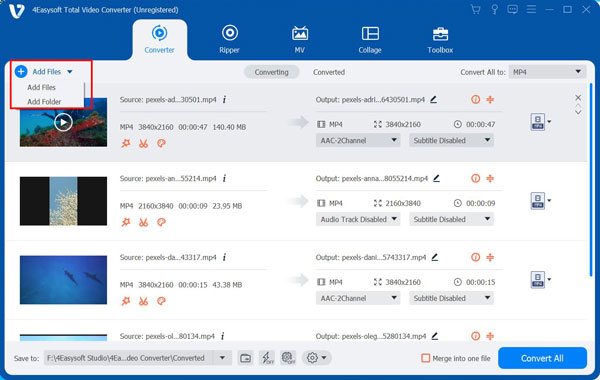
Step 1Visit the 4Easysoft Total Video Converter install and launch the app on your device. Suppose you want to convert an FLV file. Upload your flash video file by clicking the Add Files button. You can also Drag and Drop your file directly on the tool's interface.
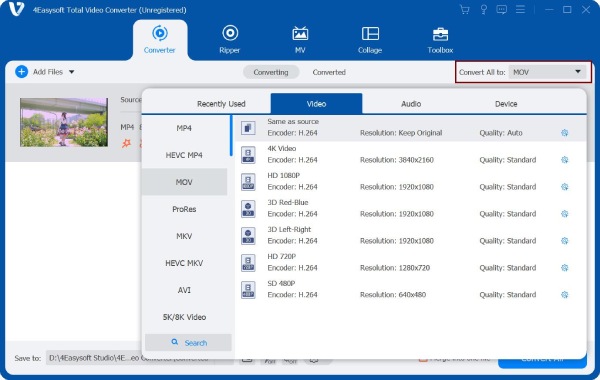
Step 2Click the Format button at the right corner of the tool. Tick the MP4 format. If you wish to add some changes to your flash video file before converting it to MP4, click the Custom Profile button and customize your file according to your preferences.
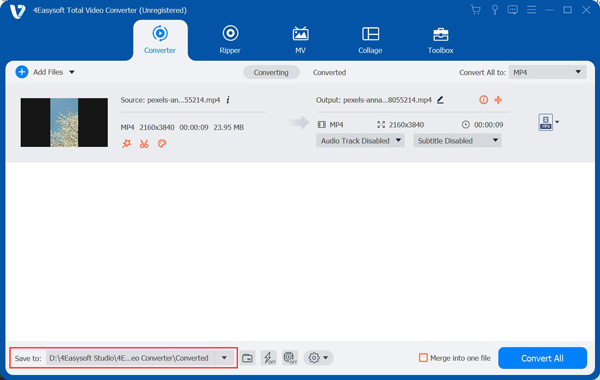
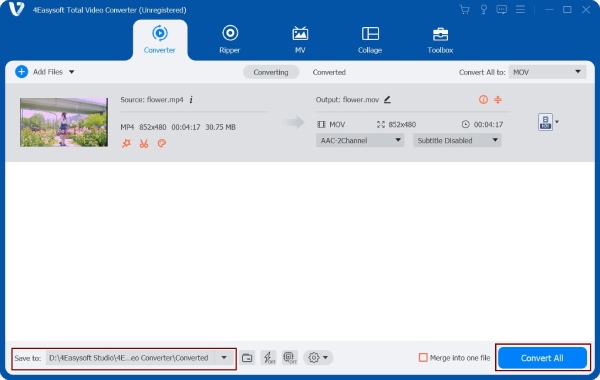
Step 3To save your file, tick the Save to dropdown list button at the lower left part of the tool's interface and choose your preferred output folder for the converted files.
Step 4To begin the conversion process of FLV to MP4, click the Convert All button at the lower right part of the tool's interface. Wait for the tool to finish the conversion which takes a couple of minutes.
Part 2. How to Convert Flash to Video Online: 4 Free Tools for You
1. 4Easysoft Free Video Converter
If you wish to convert your file online, you can use this free online flash video converter tool. This tool offered by 4Easysoft supports 300 plus video and audio formats and is usable under Windows and macOS platforms. Moreover, this tool also supports FLV, SWF, and F4V input formats, which are suitable for your FLV to MP4 conversion. Furthermore, using this tool will not limit you with your file size inputs and supports the batch conversion process.
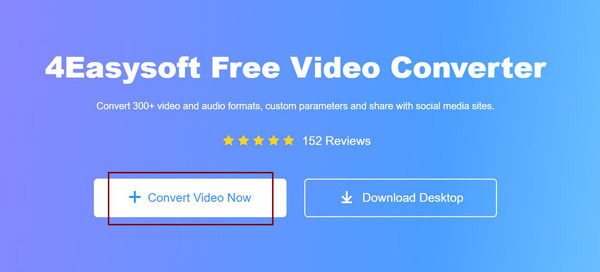
Step 1Visit the 4Easysoft Free Video Converter's website. Upload your flash video file by clicking the Convert Video Now button.
Step 2Look for the MP4 format at the bottom part of the tool and click. You can also add some adjustments to your output file by clicking the Settings button.

Step 3To convert FLV to MP4, click the Convert button at the lower-right part of the tool. A new file window will open; choose your preferred folder location where your file will be saved, then click the Select Folder button. Then, wait for the tool to finish the conversion.
2. Convertio
Convertio is also one of the best flash video converter tools you can use online. This tool supports 300 formats and is designed to provide you with an easy conversion from its interface up to its usage. Converting your flash videos will only take a few clicks to happen. However, this tool will only allow you to drop files a maximum of 100 MB; to upgrade it, you should sign in to your account.
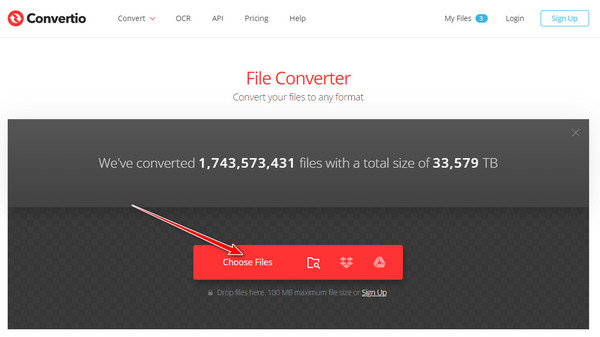
Step 1Search Convertio on your browser, and click the Choose Files button to import your file. You can also select other options to upload your file, whether Google Drive or Dropbox.
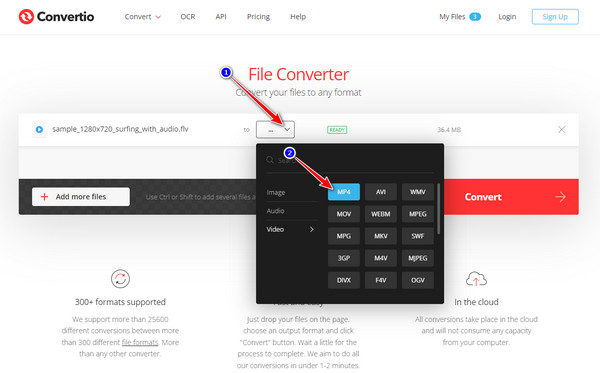
Step 2To pick MP4 as the output format, click the Dropdown button and navigate to MP4 under the Video category.
Step 3Start the conversion process if the file is ready by clicking the Convert button. Wait for the tool to finish the upload. Once it is finished, you can download the file to save on your computer.

3. Cloudconvert
Cloudconvert is another tool you can utilize to convert FLV to MP4 files. This tool is also infused with video tweaking options you can use to add some adjustments to your file before converting it. Moreover, this tool support 200 plus video file formats. Furthermore, this tool is very straightforward and comes with a hassle-free conversion from FLV to MP4.
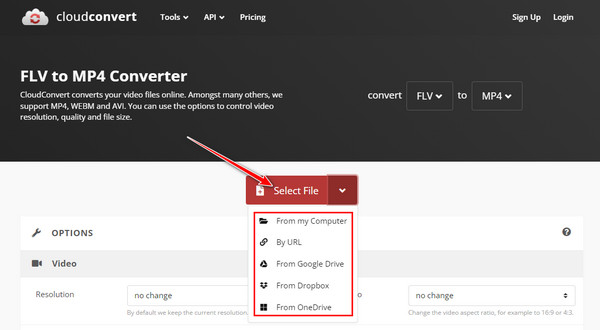
Step 1Go to Cloudeconvert's website. Import your flash video file by clicking the Select File button. You can also add your file through URL, Google Drive, From Dropbox, or OneDrive.
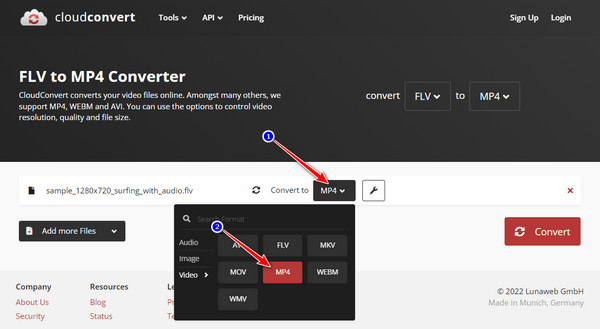
Step 2Click the Convert to dropdown button and tick the MP4 format.
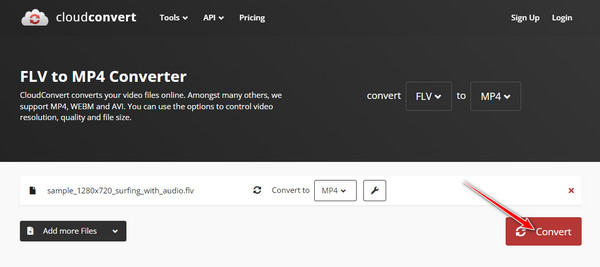
Step 3To convert your file, tick the Convert button. Wait for the tool to process and finish the uploading which will take a couple of minutes. Once it is finished, you can download the converted file to your device.
4. FreeConvert
It is another free online tool you can use on the Windows and Mac market. You don't need to spend much time learning how to use this tool, for it is designed to be user-friendly and infused with straightforward video and audio tweaking features. Lastly, this tool allows you to convert FLV to MP4 with a maximum size of 1GB.
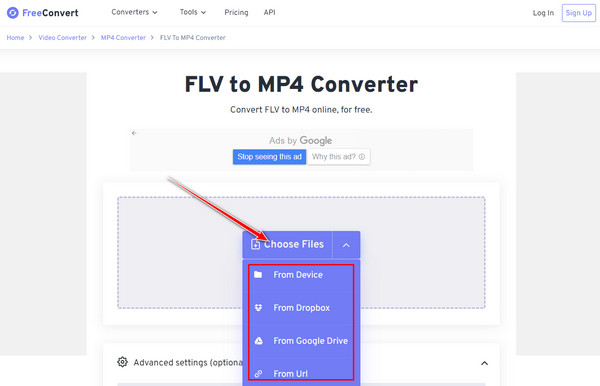
Step 1Search for FreeConvert's official website. In the tool's interface, click the Choose Files button to upload your file. You are given a variety of other ways to import your file.
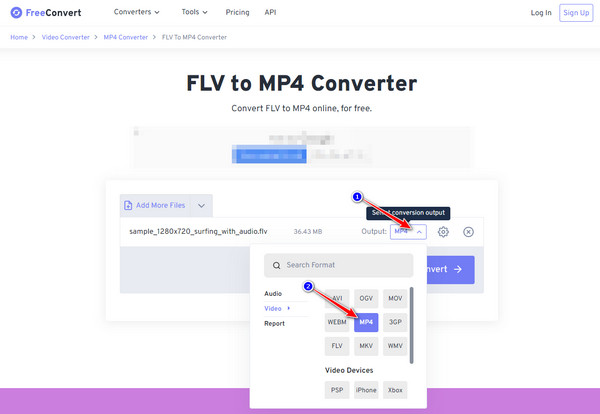
Step 2Click the Output dropdown button, look for the MP4 format under the Video category, and then tick it
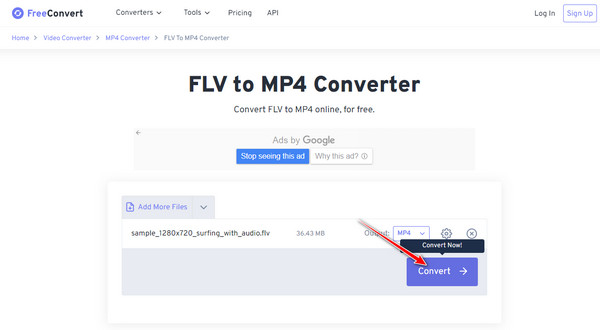
Step 3To start converting your FLV to MP4 format, tick the Convert button. Depending on your file size, the uploading and conversion process will take a couple of times. After that, you can download the file to save on your PC.
Part 3. FAQs about Flash Video Converters on Windows/Mac
-
Do Mac supports FLV?
You can download an FLV file on your Mac. However, QuickTime player doesn't support this type of file format, and you cannot play flash videos using this software. So you have to convert FLV with other file formats to make it compatible to play with Mac, particularly with QuickTime player.
-
Does MP4 contains the best video quality than FLV?
Yes, but it depends on some particular category. MP4 is considered to be the preeminent all-rounder format. It is also an ideal format that deals with file size, compression, compatibility, and quality. On the other hand, when we talk about applications used for digital video distribution or sharing over the internet, FLV would be the best format to use.
-
Do flash video converter online tools are safe to use?
Using online converters is indeed much more convenient, especially if you have fast and stable internet and if you convert only small size of files. Anyhow, not all of them are safe for you to use. Suppose you decide to use an online flash video converter tool. In that case, you must consider some crucial points, such as the tool should offer deletion after your file is converted, the URL being secured, and it doesn't have too much unnecessary and suspicious Ads.
Conclusion
Now, it's time for you to store many Flash Video files and watch them without worrying about how you can play and keep them. Always remember that most flash video converters online limit you with file size inputs, requires you to add an account, and the uploading process takes a lot of time to finish. It will be a great choice to use the 4Easysoft Total Video Converter on Windows and Mac to transform your FLV to MP4 format. Feel free to download it and obtain all its unique features.
100% Secure
100% Secure
