

How to Rip Blu-ray to iPad with High Quality on Windows/Mac

Posted by Paula Pailaga to Rip Blu-ray Jun 19, 2023
Blu-ray is a medium for watching movies in high definition, and it is evident that if you want to watch Blu-ray movies, you will need a Blu-ray player. And it is a hassle if you have a long journey and want to watch a Blu-ray movie on your iPad. You can get away with this by ripping Blu-ray to iPad! Thankfully, there are lots of Blu-ray rippers that can help. In this post, there are shared complete ways to rip Blu-ray to iPad and watch movies conveniently. Dive now into the following parts!
Guide List
Part 1: The Ultimate Way to Rip Blu-ray to iPad with High Quality Part 2: How to Rip Blu-ray to iPad with VLC Media Player Part 3: FAQs about How to Rip Blu-ray to iPadPart 1: The Ultimate Way to Rip Blu-ray to iPad with High Quality
If you want a simple but powerful one, always look for a program that supports a wide range of formats and lets you rip Blu-ray to iPad quickly with high quality. And it describes best the 4Easysoft DVD Ripper. Aside from the formats it provides, this program allows you to customize movies, such as adding subtitles, applying effects, cropping, and more basic editing you can do. Furthermore, it allows you to easily watch on your iPad or iPhone with its multiple settings that enable you to compress the video size while still maintaining the original quality. In this way, you are free to enjoy Blu-ray and DVD movies on whatever devices whenever you like.
A multimedia converter that provides more than 600 formats for video and audio.
Provide multiple settings that can be adjusted to compress video size, letting you watch on your iPad with no quality compromised.
Equipped with a GPU Acceleration, you can get your ripped Blu-ray at a 60x faster ripping speed.
Let you customize your movies by adding subtitles, effects, watermarks, and so on.
100% Secure
100% Secure
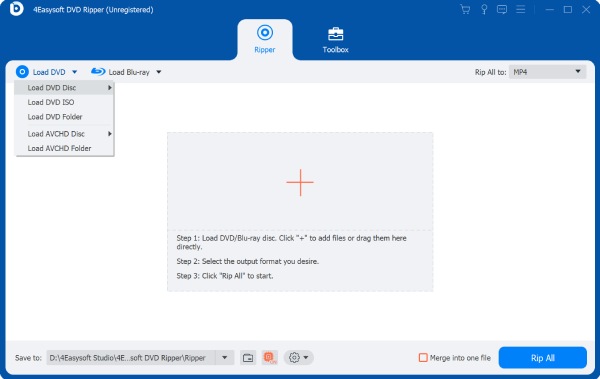
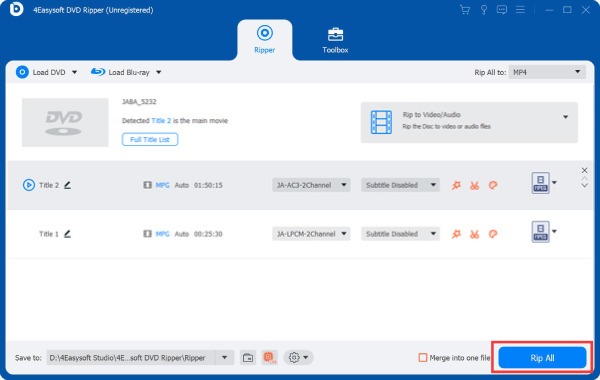
Step 1Once you have launched the program, 4Easysoft DVD Ripper, hit the Load DVD button, then select Load DVD Disc. Note that you have to insert the disc into your Blu-ray drive on your PC to rip Blu-ray to iPad.
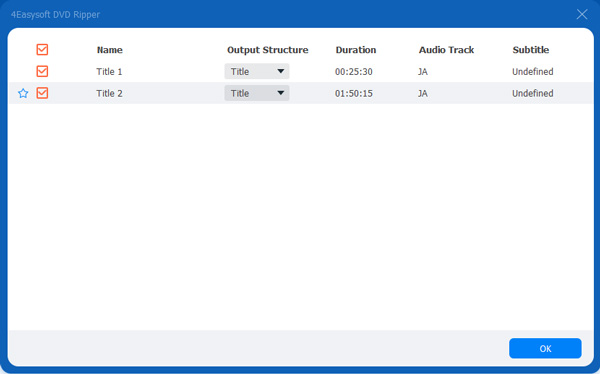
Step 2After it detects your disc, it will load all main titles. Then click the Full Title List to load all and tick the checkbox for each one you want to select. Click the OK button if you are done choosing.
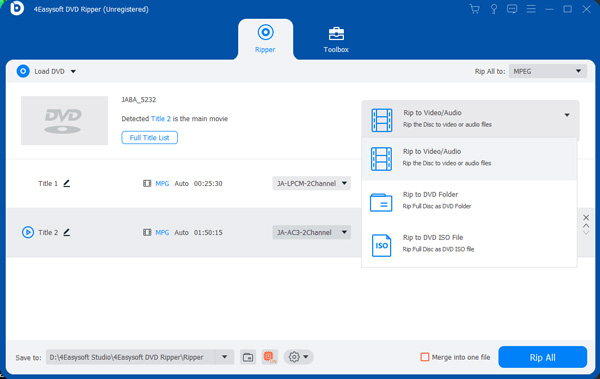
Step 3Navigate to the menu above, then click the Rip to Video/Audio among the three options. Go to the Rip All to menu, and choose the format you want for easy playback, like MOV, MP4, WMV, etc on your iPad.
Step 4If satisfied with how your Blu-ray movies turn out, click the Rip All button at the bottom right corner. And that’s how you rip Blu-ray to iPad with the program!
Part 2: How to Rip Blu-ray to iPad with VLC Media Player
VLC Media Player is known to many as a famous player supporting many media files. But, aside from this, you can do things such as a simple ripping process with it. Before you start, the first thing you have to consider is to make sure your Blu-ray disc can be played with VLC. If it is not, you may have to do additional operations to rip Blu-ray to iPad with VLC Media Player. If you’ve ensured the Blu-ray disc can be played without a problem, follow the guide below to rip Blu-ray to iPad.
Step 1Install and run the VLC’s latest version on your computer. Insert your Blu-ray disc into your computer’s drive.
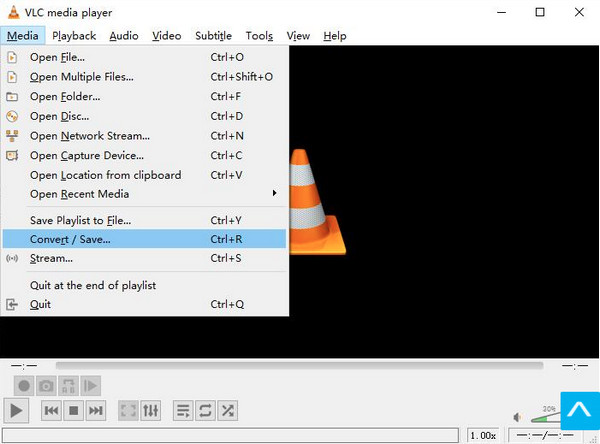
Step 2Afterward, click the Media from the above menu, then hit Convert/Save on the drop-down list to access the Open Media dialogue window.
Step 3In the Open Media box, go to the Disc tab. Under the Disc Selection, hit the radio button of Blu-ray, then browse to open your blu-ray movie to VLC.
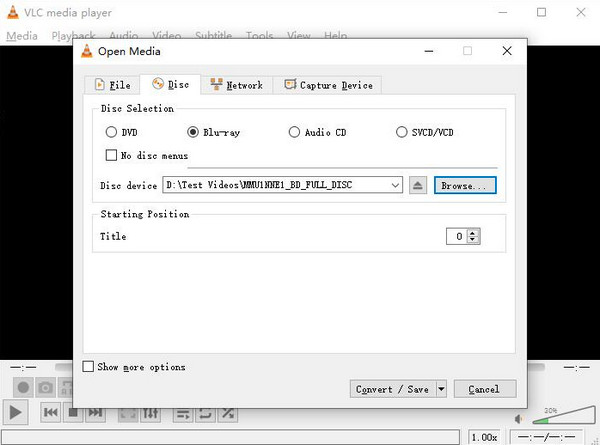
Step 4After that, set a title and chapter you want to rip. If you’re unsure, you can play the Blu-ray with VLC first. Click the Convert/Save button if done.
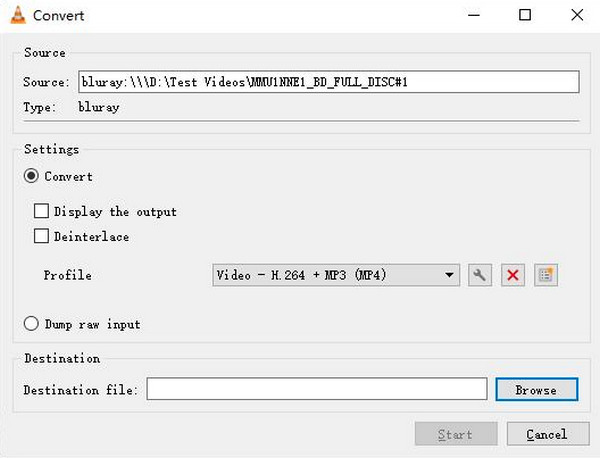
Step 5The Convert pop-up window will then open. Navigate to Settings, then set the profile as MP4. Depending on you, you can make some adjustments in Settings with a Gear icon. Then, select the file destination for your ripped Blu-ray, and finally, hit the Start button.
Bonus Tip: Transferring Blu-ray to iPad
When you have completed ripping Blu-ray to iPad with VLC, you have to transfer it to your iPad. And there’s a powerful tool that can assist, and that is the 4Easysoft iPhone Transfer. With this program, you can transfer files between iOS and a computer. It guarantees a safe and fast process of transferring movies from your PC to your iPad. Besides transferring, you are allowed to manage iOS data on your computer, like editing, deleting, creating, and converting according to what you need. There are only simple steps to get it all done; get to know more about this program now!
Support transferring between iOS devices, iOS and computer, and iOS and iTunes.
Capable of managing everything from your iOS devices directly on computers.
Support almost all models and versions of iPad, iPhone, and iPod devices and iOS version.
Allow you to easily sync all videos on your iPad and computer with the help of iTunes library.
100% Secure
100% Secure
Part 3: FAQs about How to Rip Blu-ray to iPad
-
Does Handbrake handle ripping Blu-ray to iPad?
Handbrake is a program that works on Windows and Mac that lets users convert and rip DVDs. However, it can’t handle copy-protected ones, meaning you can’t use it as a Blu-ray disc ripper.
-
What happens if VLC can’t play Blu-ray movies?
If VLC can’t play your Blu-ray movies, you can’t do much ripping Blu-ray to iPad. One solution for this problem is to update the AACS key and the version of VLC you’re using if you encounter playback errors on your Blu-ray movie.
-
Does Apple give support for Blu-ray movies?
Apple never builts drives into Macs, so you can’t play Blu-ray movies on it. However, you can use an external USB drive or Blu-ray player app on your Mac to watch a movie.
Conclusion
Now that you’ve reached this part, you surely know how to rip Blu-ray to iPad with the given complete guide above. Indeed, there are many programs out there, like VLC Media Player, that lets you rip Blu-ray to iPad. But, if you don’t want to be held back by poor ripping features, always go for a tool like 4Easysoft DVD Ripper. This program is made mainly for ripping, but it offers much more than what you expect that a ripper does. It has a 60x faster ripping speed, lets you customize movies, preserves the original quality, etc. If you want to know more, try it now!
100% Secure
100% Secure
